Introduction: Why Hybrid Identity Matters
Modern enterprises operate across hybrid environments: on-premises data centers running Active Directory, cloud services in Azure, and increasingly, workloads distributed across multi-cloud platforms. The challenge is to maintain a unified, secure identity fabric that spans all these environments while preserving the investment in existing on-premises infrastructure.
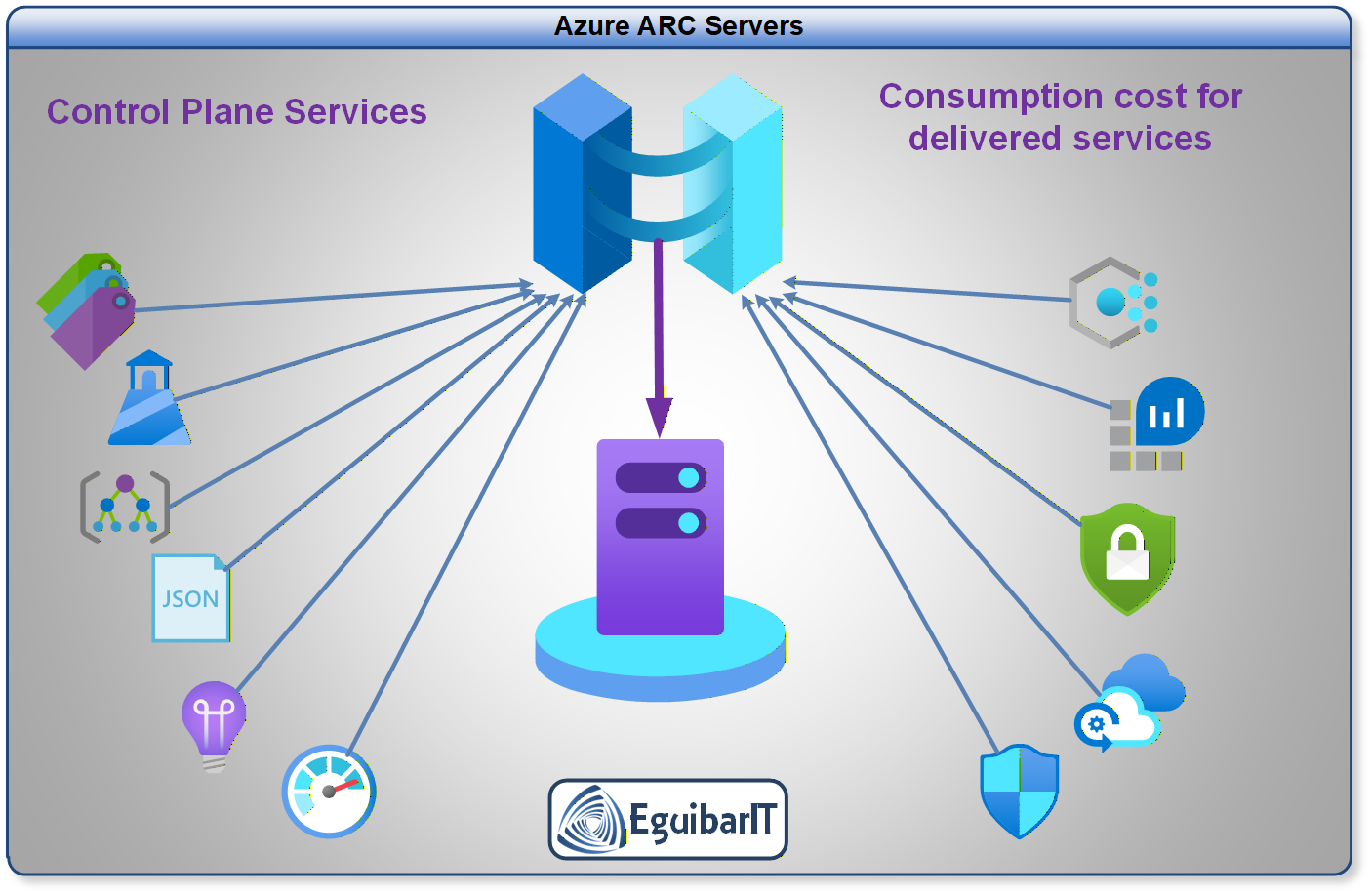
Azure ARC-enabled servers combined with On-Premises Active Directory creates a seamless hybrid identity model. You can manage Tier 0, Tier 1, and Tier 2 systems consistently across cloud and on-premises using the same group policies, role-based access controls, and delegation models you've already built. This guide covers the complete architecture, implementation, and operational considerations.
Beyond mere connectivity, Azure ARC + AD integration enables advanced scenarios: automated service principal provisioning, conditional access policies that bridge on-prem and cloud, centralized audit logging across hybrid infrastructure, and zero-trust principles applied uniformly regardless of workload location.
War Story: The Identity Silos Nightmare
The Situation: A Global 2000 company had Azure ARC agents on all their Arc-enabled servers, but no integration with on-premises AD. Result: separate identity management for cloud vs. on-prem, conflicting GPO configurations, duplicate user accounts, and security teams maintaining multiple privileged access models.
The Impact: Compliance audits failed (inconsistent controls), DevOps teams had to maintain parallel approval processes, and a breach in one silo could not be rapidly contained across the other.
The Lesson: A unified hybrid identity model eliminates silos and enables consistent policy enforcement, delegation, and audit trails from day one.
Hybrid Identity Architecture Overview
Azure ARC + On-Premises AD enables a single identity control plane across hybrid environments. The architecture rests on these pillars:
Core Architecture Principles
- Single Source of Truth (On-Premises AD): Your on-premises Active Directory forest remains the primary identity store for domain identities and group memberships on joined servers. Azure ARC provides Azure control-plane management identity for hybrid resource governance.
- Azure ARC as Management Layer: ARC agents register hybrid servers in Azure Resource Manager (ARM), allowing centralized policy enforcement, Azure governance, and unified monitoring without compromising on-premises control.
- Entra ID as Cloud Identity Bridge: Where cloud-only applications require identity, Entra ID (Azure AD) provides cloud-native identity with optional sync from on-premises AD.
- Conditional Access & Zero Trust: Layer conditional access policies across hybrid resources, enforcing consistent authentication requirements regardless of workload location.
Architecture Tip: Think of Azure ARC as extending Azure's management plane to on-premises servers while preserving on-premises AD as the identity authority. This is NOT the same as pure Azure AD Domain Services (AADDS), which replaces on-prem AD. With ARC + on-prem AD, you keep your existing infrastructure investment.
Planning & Design Considerations
Hybrid Identity Model Decision Matrix
| Architecture Decision | On-Prem AD + ARC (Recommended) | Azure AD DS (AADDS) | Cloud-Only Entra ID |
|---|---|---|---|
| Identity Authority | On-premises AD forest | Managed AD in Azure (replica) | Entra ID cloud-native |
| On-Prem Server Control | Native AD, full control | Sync'd from on-prem via Azure | Hybrid AD Connect agent |
| Azure Management | ARC agent + ARM policies | Limited ARC integration | Azure AD join, Intune |
| Best For | Enterprises with mature on-prem AD, hybrid infrastructure at scale | Organizations migrating away from on-prem AD | Cloud-native born organizations |
| Tier Model Alignment | ✅ Full support (Tier 0/1/2 in both clouds) | ⚠️ Partial (AADDS has limitations) | ✅ Cloud-only tiers |
Design Decision Checklist
- Scope: Will all on-prem servers be Arc-enrolled? (Recommendation: Yes, for unified management)
- Network Connectivity: How will Arc agents reach Azure? (Direct, proxy, or private endpoint)
- Authentication: Service Principal, Managed Identity, or Interactive user authentication for Arc enrollment?
- Tier Model Mapping: How do your on-prem Tiers (0/1/2) map to Azure resource groups and RBAC?
- Conditional Access: Will you enforce Conditional Access policies on hybrid servers? (Requires Entra integration)
- Compliance & Audit: How will you unify audit logs from on-prem AD and Azure ARC?
Prerequisites & Requirements
Infrastructure Requirements
- On-Premises Active Directory: Windows Server 2016 or later (2022+ recommended for security features)
- Azure Subscription: Active Azure subscription with appropriate permissions (Owner or Contributor)
- Network Connectivity: Hybrid servers must reach Azure endpoints (proxy or direct internet access; not recommended direct access for Tier0 devices.)
- Operating System: Windows Server 2019, 2022, 2025 or supported Linux distributions (RHEL, CentOS, Ubuntu)
- PowerShell: Version 5.1 or later on Windows servers. Better if PowerShell 7.5 or higher.
Security & Permissions
- Azure Permissions: Owner or Contributor on Azure subscription and resource group where servers will be registered
- On-Prem AD Permissions: Arc onboarding does not require Domain Admin; use least-privilege local/server permissions and delegated rights only where needed
- Firewall Rules: Outbound HTTPS (443) to Azure management endpoints
Software & Tools
- Azure CLI: Latest version for scripting Arc enrollment
- Azure PowerShell: Az.ConnectedMachine module
- EguibarIT Modules: Delegation module (optional but recommended for tier model automation)
Azure ARC Enrollment in Hybrid AD Environments
The key to hybrid identity is preserving on-premises AD authority for server identities while onboarding Arc management securely through Azure. This section covers the complete enrollment workflow.
Step 1: Prepare Azure for ARC Enrollment
Before enrolling servers, create an Azure resource group and service principal for ARC agent authentication:
Step 2: Enroll Hybrid Servers
On each hybrid server, install the Azure Connected Machine agent and connect it to your Azure subscription:
Security Warning: Service Principal Credentials
Critical: Never hardcode service principal credentials in scripts. Use Azure Key Vault or managed identities where possible. For ARC enrollment, consider using a temporary service principal that is rotated after initial enrollment.
Entra ID Integration for Conditional Access
Once servers are enrolled in ARC, optionally integrate with Entra ID to enable cloud-based conditional access and identity-driven policies.
Hybrid Identity Scenario: AD + Entra ID
For advanced scenarios, synchronize identities from on-premises AD to Entra ID using Azure AD Connect and/or Microsoft Entra Cloud Sync. This allows:
- Cloud Application Access: Users in on-prem AD can authenticate to SaaS apps via Entra ID
- Conditional Access: Enforce MFA, device compliance, and location policies for hybrid users
- Passwordless Authentication: Enable Windows Hello for Business or phone sign-in
Note: Entra ID integration is optional if your use case is purely on-premises server management. However, for cloud-native applications and modern authentication, it's highly recommended.
Applying Tier Model to Hybrid Infrastructure
The Enterprise Access Model and Tier Model extend seamlessly to hybrid environments. Here's how to structure Tier 0, Tier 1, and Tier 2 across on-premises and Azure.
Tier 0: Hybrid Tier 0 Resources
- On-Premises Tier 0: Domain Controllers, key AD infrastructure
- Azure Tier 0 (Arc): Management servers (e.g., SCCM, Update Servers registered as ARC servers)
- Delegation: Same Delegated Groups and permissions apply across environments
Tier 1 & Tier 2: Hybrid Workloads
Application servers and general workloads registered as ARC servers inherit the same RBAC and group policies as their on-premises counterparts.
Implementation: Delegated Groups in Hybrid Model
Define delegated groups that span both environments:
PowerShell Automation for Hybrid Enrollment
Automate the enrollment of hybrid servers at scale using centralized scripts.
ARC Server Tools & Add-ons
Once a server is Arc-enabled, Azure lights up a rich set of management tools that work for on-premises and multi-cloud assets the same way they do for native Azure VMs. The sections below summarize the most impactful capabilities and when to use them.
Update & Patch Management
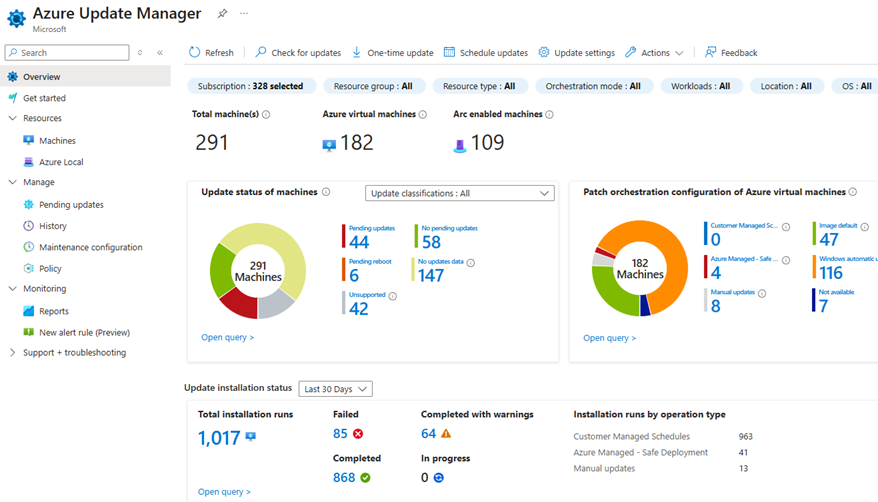
- Azure Update Manager: Unified patching for Windows and Linux with maintenance windows, scheduling, and compliance reporting. Product docs.
Monitoring & Insights
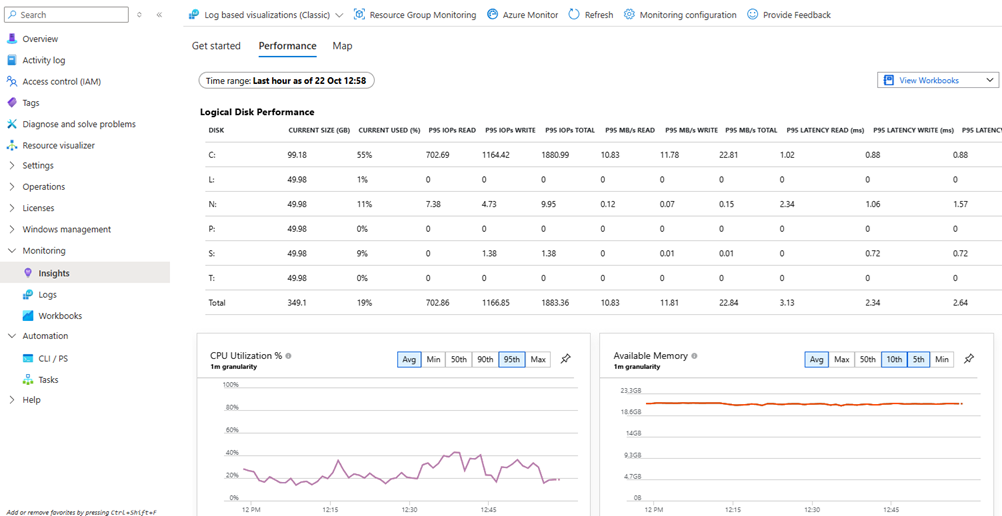
- Insights - Performance: CPU, memory, disk, and network baselines with trending and alerts. Product docs.
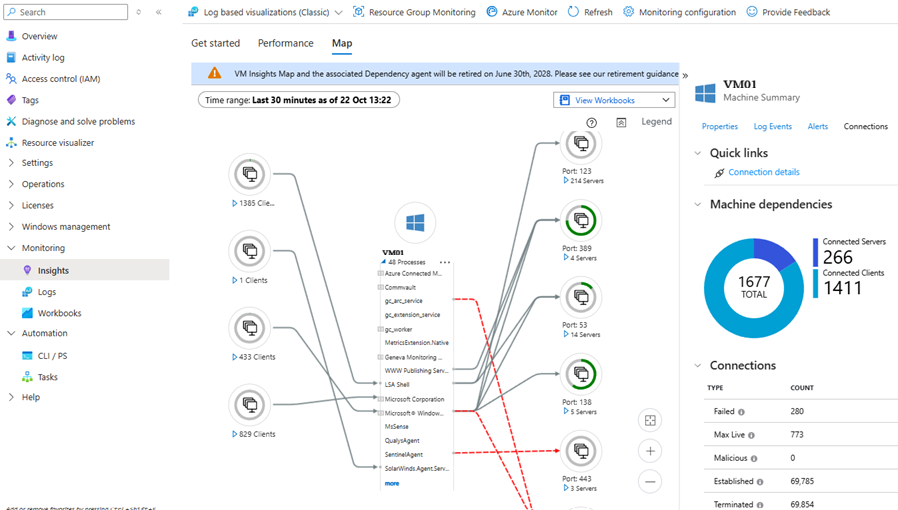
- Insights - Map: Dependency mapping that visualizes server-to-server and server-to-service connections (this one is awesome; having the information from which client, using certain service and communicating to X destination is invaluable. Troubleshooting with this information is much easier). Product docs.
Security & Compliance
- Defender for Cloud Recommendations: Security posture guidance, vulnerability insights, and hardening actions. Product docs.
- Azure Policy (Guest Configuration): Enforce baseline configuration and compliance checks across hybrid servers. Product docs.
Inventory & Change Tracking
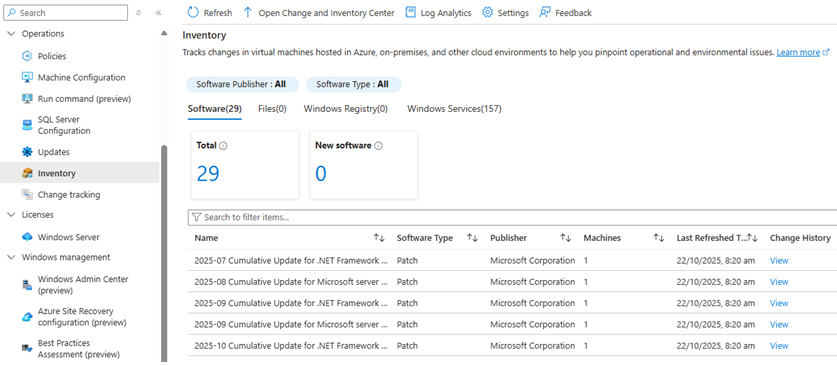
- Inventory: Central visibility of installed software and extensions across Arc-enabled servers. Product docs.
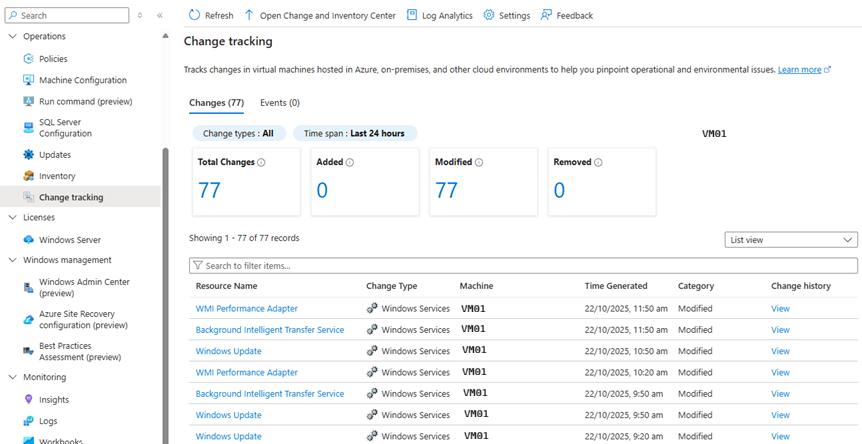
- Change Tracking: Track changes to services, registry keys, and files for drift detection and audit trails. Product docs.
Remote Administration
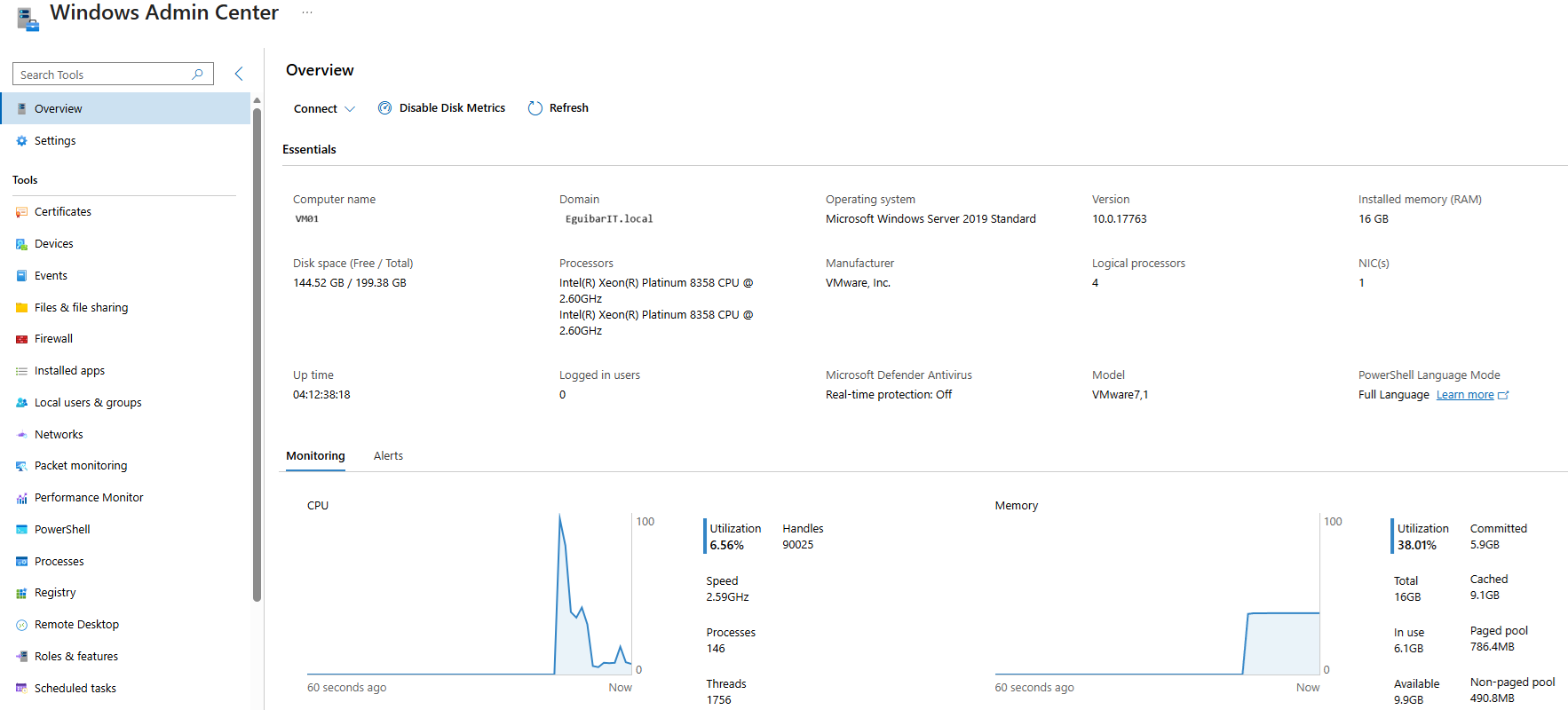
- Windows Admin Center: Browser-based management for Arc servers without opening inbound management ports. Product docs.
Resiliency & Recovery
- Azure Site Recovery: Configure DR replication and recovery plans for critical hybrid servers. Product docs.
Operational Assessments
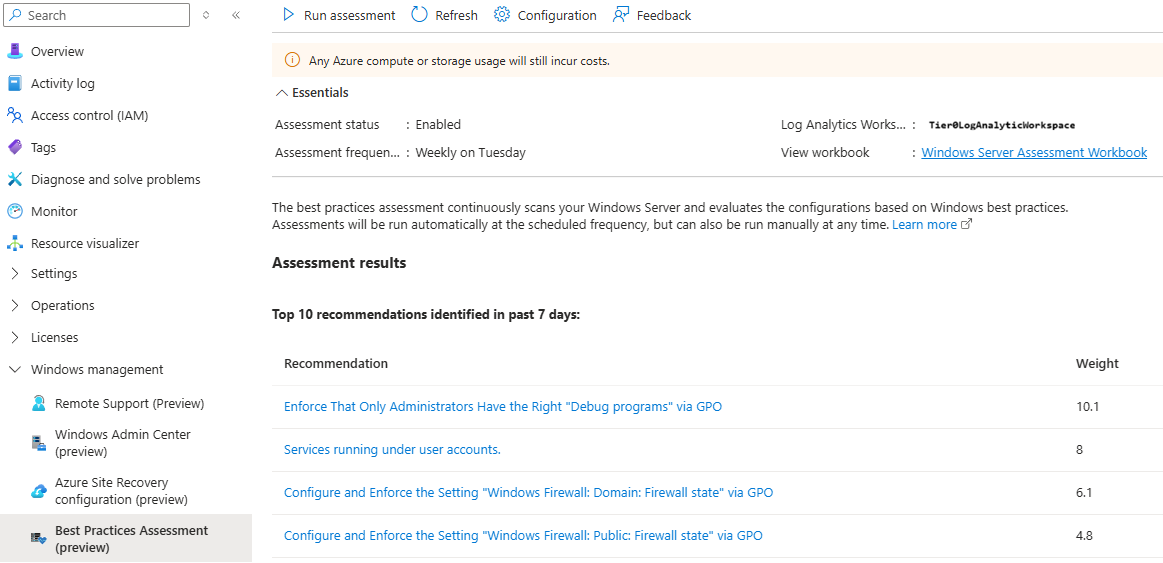
- Best Practices Assessment: Health and configuration reviews to surface risky settings and optimization opportunities. Product docs.
Dependency note
Most insights and inventory features require the Azure Monitor Agent (AMA) and Data Collection Rules. Plan AMA onboarding early to avoid gaps in telemetry.
Operations & Monitoring
Daily Tasks
| # | Task | Description | Task | Impact Definition | Automated |
|---|---|---|---|---|---|
| 1 | Monitor ARC Agent Status | Verify all enrolled servers report healthy status in Azure Portal | Query Azure Portal or use: Get-AzConnectedMachine -ResourceGroupName "rg-hybrid-servers" | Early detection of agent failures prevents service disruption and aids troubleshooting | Yes (automated alerting) |
| 2 | Review Enrollment Failures | Check Azure Activity Log for enrollment errors or network connectivity issues | Review Azure Activity Log filtered by ARC enrollment operations; identify failed connections | Quick response to enrollment issues prevents servers from drifting out of management | Partial (alerting automated, investigation manual) |
Weekly Tasks
| # | Task | Description | Task | Impact Definition | Automated |
|---|---|---|---|---|---|
| 1 | Sync AD Changes to Azure | Verify AD user/group changes have sync'd to Entra ID (if using hybrid identity) | Check Azure AD Connect sync status; review sync logs for errors or delayed replication | Ensures cloud identity matches on-premises source of truth; prevents access control drift | Partial (sync automated, monitoring automated) |
| 2 | Review RBAC Assignments | Audit Azure RBAC assignments for Arc servers match on-prem tier model | Query Azure RBAC: Get-AzRoleAssignment -Scope "/subscriptions/[subid]/resourcegroups/rg-hybrid-servers"; compare against tier documentation | Prevents privilege creep; ensures cloud RBAC aligns with delegation model | Partial (reporting automated, approval manual) |
| 3 | Patch & Update Compliance | Check Azure Update Manager for patch deployment status across hybrid servers | Review Azure Update Manager deployment schedules; verify patches deployed to all Arc servers | Ensures timely patching across hybrid infrastructure; reduces vulnerability window | Yes (Update Manager orchestrates) |
Monthly Tasks
| # | Task | Description | Task | Impact Definition | Automated |
|---|---|---|---|---|---|
| 1 | Access Review: Delegated Groups | Review membership of hybrid delegated groups matches least-privilege principles | Query AD groups: Get-ADGroupMember "DL-Tier0-Admins-Hybrid"; verify members are current employees with active roles | Prevents stale access and privilege creep; meets compliance requirements (SOC 2, PCI-DSS) | Partial (member query automated, approval manual) |
| 2 | Audit Hybrid Authentication | Review sign-in logs for AD and Entra ID to detect suspicious patterns or failed auth attempts | Query Azure AD Sign-in Logs for admin accounts; identify failed MFA, impossible travel, or location anomalies | Early detection of compromised credentials or attack attempts; enables rapid incident response | Partial (log aggregation automated, analysis manual) |
| 3 | Conditional Access Review | Validate conditional access policies are enforced across hybrid workloads | Review CA policies in Entra ID; test MFA requirement, device compliance, and location-based rules | Ensures consistent authentication security posture; detects policy bypasses or configuration drift | Partial (policy testing manual, reporting automated) |
Resources & References
Microsoft Documentation
- Azure ARC Overview
- Azure ARC Agent for Connected Machines
- Azure AD Connect: Hybrid Identity Design
- What is Hybrid Identity?
Related EguibarIT Articles
- Enterprise Access Model (EAM): Beyond the Traditional Tier Model
- Tier 0 Overview
- Onboard Servers to Azure ARC
- Azure Update Manager
- PowerShell Delegation Module
- Active Directory Housekeeping Tasks — ARC Maintenance — Dedicated Azure ARC monitoring checks (enrollment health, extension status, compliance drift detection) integrated into the 316-point site-wide maintenance schedule