Tier0 Overview
The Delegation Model - Admin Area or Tier0 will host all objects required by the delegation model to operate as mentioned in this design. This is the container holding all the objects needed for domain administration, regardless of the Area/Tier where they belong to. This includes:
- Built-In Administrator
- the privileged groups (as Domain Admins or Enterprise Admins)
- all users/groups used to delegate rights and administrative tasks
- all service accounts, etc.
All the objects within this area will be managed and maintained by the infrastructure owners. This area must be as restrictive as possible while maintaining the operational level. The root OU of this area will not inherit the default security of the domain. Instead it will be copied and remove Account Operators &Print Operators from the Access Control Lists. Then all the required sub-OU will be created, now having enabled inheritance from the custom OU just mentioned. Auditing must be enabled and implemented for every object within this area. Only Infra Admins have the right to create and delete OUs within the domain.
This area, meaning OU sub-tree, is effectively Tier0.
All the domain administration and delegation, while having a well-defined and organized structure, will live in this area, managed and maintained by the infrastructure owners. We will achieve this by sub-dividing the objects into functional containers. This area should be as restrictive as possible while maintaining the operational level.
Purpose
The purpose of this area is to consolidate and secure all privileged identities while delegating tasks and rights to each of the objects of the domain. This includes the built-in Administrator, the privileged groups (as Domain Admins or Enterprise Admins), all users/groups used to delegate rights and administrative tasks, all service accounts, etc.
Design
This OU (Delegation Model - Admin Area or Tier0) consolidates and secures all
privileged identities while delegating tasks and rights to each of the objects
of the domain.
As a good start, the 1st level OU (called in this document Admin OU, being the
equivalent of Tier0) has to be secure. We do this by modifying the SACL's
(Security Access Control List) of the OU. Modifying the default inheritance is a
must, and the legacy compatibility groups removed. Additionally, the standard
operational groups must be removed as well. We need to create other groups for
the specific and secured operation of this area.
Once we create and secure the “root”, we must define additional sub-containers for the proper management of the environment. These containers should include Users, Groups, Service Accounts, Management Computers and the redirected User and Computer containers. When deciding the number of sub-containers, we have to keep it as simple as possible, while committing our goals. If our goal is fulfill with a single OU, then adding additional containers will barely help, but will make our operational costs higher and will jeopardize our security.
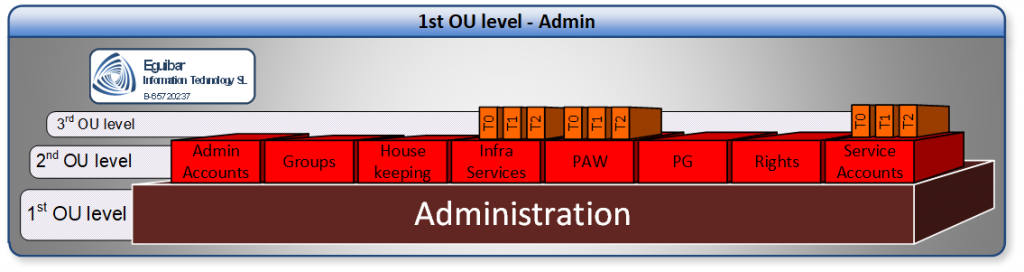
Once the root OU exists and secured, we can create all the required sub-OUs. Having enabled inheritance from the custom OU mentioned. Auditing must be enable and implemented for every object within this area. Only Infra Admins have the right to create and delete OUs within the domain.
After the creation of the Sub-OUs, we must create extra groups within is corresponding container. Some of these groups will have the delegated ability to manage objects in this area.
When deciding the number of sub-containers, we have to keep it as simple as possible, while committing our goals. If our goal can be fulfilled with a single OU, then adding additional container will barely help, but will make our operational costs higher and will jeopardize our security.
The root OU of this area will not inherit the default security of the domain. Instead it will be copied and remove Account Operators &Print Operators from the Access Control Lists. Then all the required sub-OU will be created, now having enabled inheritance from the custom OU just mentioned. Auditing must be enabled and implemented for every object within this area. Only Infra Admins have the right to create and delete OUs within the domain.
After the creation of the Sub-OUs, additional groups must be created within is corresponding container. Some of these groups will have the delegated ability to manage objects in this area.
Global Groups of the Delegation Model
Global Groups are used to organize users who share similar roles or functions within the organization. In the context of the Delegation Model, Global Groups are used to assign users to specific administrative roles and delegate tasks based on their responsibilities. These groups help in implementing the principle of least privilege by ensuring that users have only the permissions necessary to perform their roles. Here are some examples of Global Groups that might be used in the Delegation Model:
| Security Principal | Description |
|---|---|
| SG_InfraAdmins | Full rights on all Active Directory infrastructure |
| SG_ADAdmins | Partial rights on all Active Directory infrastructure |
| SG_T0SA | Service Account for Tier 0 / Admin Area |
| SG_T1SA | Service Account for Tier 1 / Servers Area |
| SG_T2SA | Service Account for Tier 2 / Sites Area |
| SG_Tier0Admins | Administrators group for Tier 0 / Admin Area |
| SG_Tier1Admins | Administrators group for Tier 1 / Servers Area |
| SG_Tier2Admins | Administrators group for Tier 2 / Sites Area |
| SG_DfsAdmin | Full Rights to administer DFS |
| SG_GpoAdmin | Full Rights to administer GPO |
| SG_PkiAdmin | Full Rights to administer CA |
| SG_PkiTemplateAdmin | Full Rights to administer CA Templates |
| SG_AllGalAdmins | Delegated Limited general rights on all sites |
| SG_AllSiteAdmins | Limited general rights on all sites |
| SG_Operation | Limited rights on all Servers |
| SG_ServiceDesk | Password rights and AllGALAdmin rights on all sites |
| SG_ServerAdmin | Full administrative rights on servers |
| SG_GlobalGroupAdmin | Full Group administrative rights on all sites |
| SG_GlobalUserAdmin | Full user administrative rights on all sites |
| SG_GlobalPcAdmin | Full computer administrative rights on all sites |
Domain Local Groups of the Delegation Model
Domain Local Groups are used to assign permissions to resources within a single domain. They can contain members from any domain within the same forest or trusted forests. In the context of the Delegation Model, Domain Local Groups are used to manage access to resources and delegate administrative tasks within the domain. These groups help in implementing the principle of least privilege by ensuring that users and groups have only the permissions necessary to perform their roles. Here are some examples of Domain Local Groups that might be used in the Delegation Model:
| Security Principal | Description |
|---|---|
| SL_InfraRights | Delegated full rights to all AD infrastructure |
| SL_AdRights | Delegated partial rights to all AD infrastructure |
| SL_PUM | Rights for Privileged User management |
| SL_PGM | Right for Privileged Group management |
| SL_PISM | Right for Privileged Infrastructure management |
| SL_PAWM | Right for Privileged Access Workstation management |
| SL_DirReplRights | Right for Privileged Directory Replication Rights |
| SL_PkiRights | Right for Privileged Public Key Infrastructure management |
| SL_PkiTemplateRights | Right for Privileged Public Key Infrastructure Template management |
| SL_DfsRights | Right for Privileged DFS management |
| SL_GpoAdminRights | Right for Privileged GPO management |
| SL_UM | Rights for User Management |
| SL_GM | Rights for Group Management |
| SL_PSAM | Rights for Service Account Management |
| SL_InfrastructureServers | >Rights for ALL Infrastructure Servers |
| SL_PAWs | Rights for ALL PAWs |
| SL_SvrAdmRight | Rights for server management |
| SL_SvrOpsRight | Rights for server operation management |
| SL_GlobalAppAccUserRight | Rights for Global Aplication Access Users |
| SL_GlobalGroupRight | Rights for Global Group Management |