Table of Contents
- Executive Summary
- What Is the Enterprise Access Model?
- Architecture Principles
- Tier-to-Plane Mapping
- Authentication Policy Silos
- Control Matrix
- Attack Path Examples
- Attack Path Matrix
- Design Decision Trees
- Risk Scoring Model
- Migration Approach
- Implementation Phases
- Security Considerations
- Monitoring & Auditing
- Troubleshooting Common Issues
- PowerShell Automation
- References
Executive Summary
Hybrid Enterprise Access Model (EAM) adds measurable, layered containment to privileged pathways across on-prem AD and cloud planes. Within 120 days, a well-executed rollout should achieve the outcomes below while preserving Tier Model rigor and extending control into Entra, Azure, and SaaS.
| Outcome (120 Days) | Metric / Evidence |
|---|---|
| Reduce Tier 0 lateral movement exposure | ≥ 80% drop in unauthorized Tier 0 interactive logons (4624 + 4672) from non-T0 systems |
| Eliminate standing Global Admin | 100% PIM-only control plane roles; no permanent Global Admin assignments |
| PAW-only access to Control Plane | 100% compliant devices for tag ControlPlane_PAW; CA blocks non-PAW sessions |
| Deterministic drift detection | Weekly diffs for EAM_* and Tier0/1/2 groups with remediation SLA < 7 days |
| Backup and recovery confidence | Monthly restore test of Tier 0 asset (e.g., DC system state) with documented MTTR |
Why it matters: EAM collapses privileged attack paths (on-prem and cloud), removes standing privilege, and makes drift observable. The combination of Authentication Policy Silos (AD) + Conditional Access/PIM (Entra) + PAWs turns lateral movement into a noisy, quickly-detected event instead of a silent escalation.
What Is the Enterprise Access Model?
Enterprise Access Model (EAM) is a control framework that expresses privileged pathways as planes—Control, Management, Data/Workload, User Access, and App Access—and then constrains how identities, devices, automations, and tokens are allowed to traverse those planes. In hybrid enterprises, EAM coexists with the traditional AD Tier Model: Tier 0 remains mandatory for identity fabric, while planes extend containment to cloud workloads and SaaS.
A global manufacturer invited us after their red team broke containment twice in six weeks. Both incidents began in Tier 1: once via a monitoring agent exploit, once via a backup proxy misclassification. In each case, cached creds on mixed-use admin workstations enabled a pivot to DCs in under 12 minutes. We rebuilt the privileged pathways using a Hybrid EAM—keeping AD Tiers to contain on-prem identity, adding cloud Planes to constrain SaaS/Azure privilege, and enforcing PAW-only and Authentication Policy Silos. Within 90 days, unauthorized Tier 0 logons dropped by 87%, and time-to-detect fell from hours to minutes. Twelve months later, the org recorded zero cross-plane escalations despite three red team cycles and continuous phishing campaigns.
Architecture Principles
These non-negotiable design rules capture the "why" behind EAM: every isolation boundary, credential control, and monitoring requirement must trace to one or more principles. Teams use this table to resolve trade-offs ("We need convenience for X") by checking the failure mode and confirming the risk is acceptable.
| Principle | Rationale | Trade-Off | Failure Mode (If Violated) |
|---|---|---|---|
| Isolation > Convenience | One credential spill at a lower tier cannot cascade into a Tier 0 breach | Separate accounts/PAWs required; no single identity spans all planes | Attacker on a T1 workstation scrapes Tier 0 credentials from memory → domain compromise in minutes |
| No Standing Privilege | Permanent rights = permanent attack surface; time-bounded elevation shrinks exposure window | PIM onboarding friction; approval delays for urgent tasks | Dormant Global Admin account with no MFA → attacker re-enables → silent control plane takeover |
| Deterministic Drift Detection | Privileged group membership and plane assignment must be GitOps-sourced to make unauthorized changes visible | Requires CI/CD discipline; emergency "break glass" adds complexity | Operator adds DOMAIN\BackupOps to EAM_Tier0_Users manually → missed in audit → persistent backdoor |
| Plane-Scoped Automation | Runbooks with Tier 0 access (e.g., AD provisioning) must use Tier 0 credentials, not lower-tier service accounts | More service accounts/gMSAs to manage; tighter secret rotation | CI/CD service principal has Global Admin + weak secret hygiene → attacker extracts secret → entire Entra tenant compromised |
| PAW-Only for Interactive Sessions | Control Plane (Tier 0) and Management Plane (Tier 1) sessions must originate from locked-down, monitored devices | PAW deployment cost; user friction (separate machines or VDI) | Admin RDPs to DC from standard workstation → malware on workstation steals session → DC compromised |
| Layered Enforcement (Defense in Depth) | Single controls fail; stack Authentication Policy Silos (AD) + Conditional Access (Entra) + endpoint compliance | Higher complexity; harder to troubleshoot login failures | CA policy bug allows non-PAW device → attacker authenticates from compromised endpoint → exfiltrates PIM token |
| Time-Bounded Exceptions | Emergency access paths (break glass) must auto-expire and generate alerts; no silent permanence | Requires monitoring infrastructure and rapid response SLAs | Break-glass account created for migration, never removed → attacker discovers → untraceable backdoor with Global Admin |
| Blast-Radius-First Design | Tier/Plane assignments prioritize "worst-case compromise scope" over asset importance or role prestige | Operationally critical assets (e.g., SCCM) labeled Tier 0 → stricter controls than users expect | SCCM classified as Tier 1 → attacker uses software deployment to push malware to DCs → forest-wide breach |
Usage: During design reviews, map each proposed change to a principle row. If convenience arguments dominate, revisit the "Failure Mode" column and quantify the residual risk. Principles are ordered by violation frequency (Isolation and Standing Privilege cause 90% of observed EAM failures).
The Enterprise Access Model (EAM) represents a significant evolution in privileged access security, expanding beyond the traditional Active Directory Tier Model to address the complexities of modern hybrid and multi-cloud environments. While EAM provides a comprehensive framework for today's distributed enterprise landscape, it's crucial to understand that the AD Tier Model remains not just relevant, but mandatory for on-premises and hybrid infrastructures.
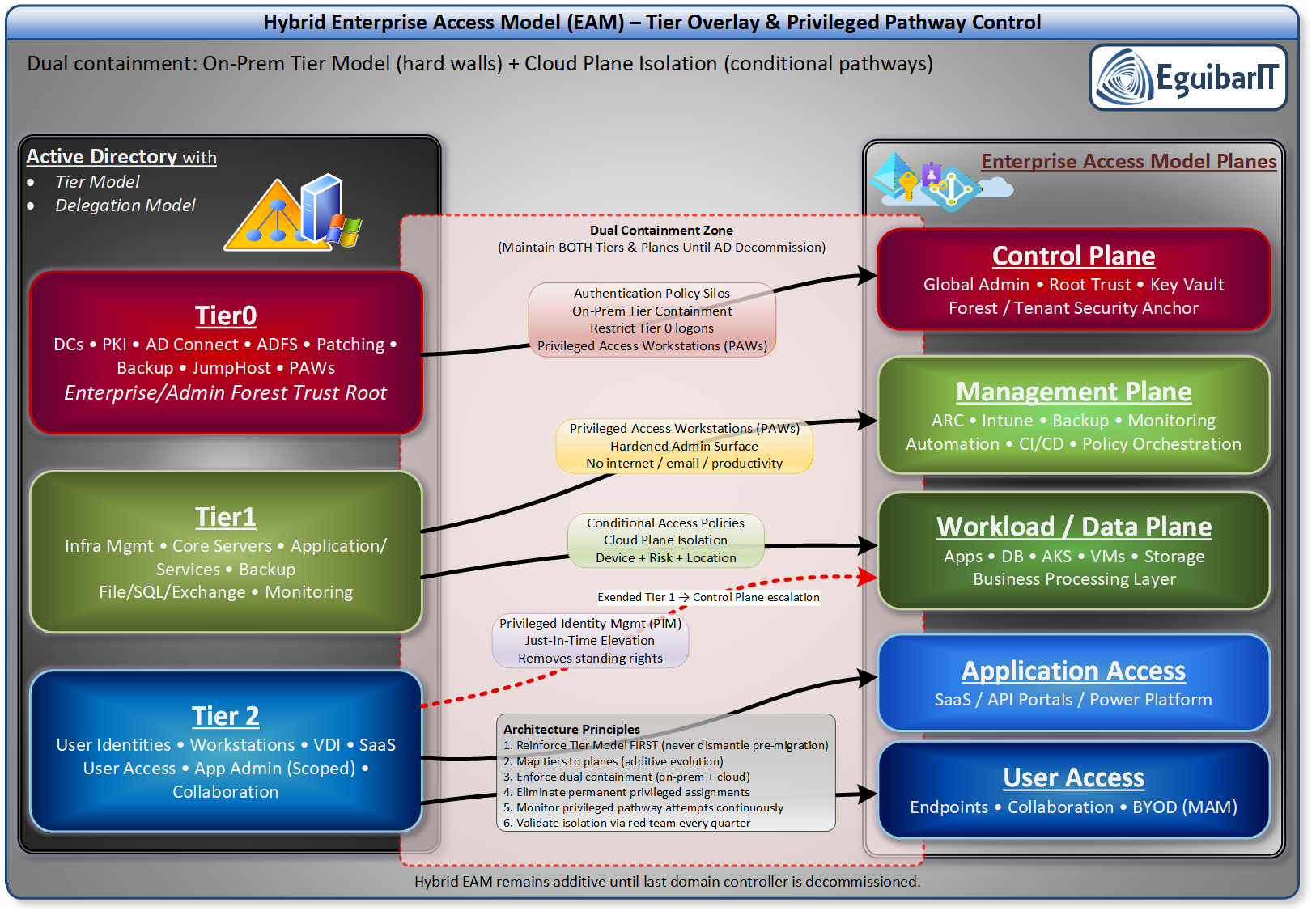
Evolution from the Legacy AD Tier Model
The legacy AD Tier Model was specifically designed to contain unauthorized privilege escalation within on-premises Active Directory environments. This proven three-tier architecture (Tier 0 for domain controllers and critical identity infrastructure, Tier 1 for server management, and Tier 2 for user workstations) established strict administrative boundaries that prevented credential theft and lateral movement within the AD forest.
The Enterprise Access Model supersedes and extends this foundation by incorporating modern requirements such as cloud services, external user access, API pathways, and DevOps workflows. Rather than replacing the AD Tier Model, EAM expands its scope through a five-plane architecture: Control Plane (encompassing the original Tier 0), Management Plane, Data/Workload Plane, User Access, and App Access. This evolution addresses the reality that enterprises now operate across on-premises datacenters, Azure, AWS, and other cloud platforms simultaneously.
| Dimension | Traditional Tier Model | Hybrid EAM (Tiers + Planes) | Cloud-Only EAM |
|---|---|---|---|
| On-Prem AD | Mandatory Tier 0/1/2 boundaries; DCs, PKI, AAD Connect in T0 | Mandatory Tiers for AD; planes overlay to constrain cloud pivots | None; identity plane anchored in cloud tenant |
| Control Boundaries | Tier membership + PAW + no cross-tier | Tier 0 for identity fabric; Control Plane for cloud tenant roots; dual enforcement | Planes only; device and token context define allowed paths |
| Credential Scope | Tier-scoped accounts; Protected Users; no standing DA | Separate on-prem vs cloud admin identities; PIM for cloud, JIT for AD | PIM/JIT exclusively; no persistent tenant-root roles |
| Enforcement | Auth Policy Silos; GPO hardening; PAW | Auth Policy Silos + Conditional Access + device compliance; policy union | Conditional Access, device posture, identity protections |
| Automation | GMSA; server-side scripts; SCCM/Intune per tier | Plane-scoped automation; GitOps drift detection for privileged groups | Cloud-native pipelines with scoped identities |
| Threat Focus | Kerberos abuse, lateral movement, GPO misuse | Plus token replay, consent phishing, CI/CD secret leakage | Cloud tokens, consent abuse, SaaS sprawl |
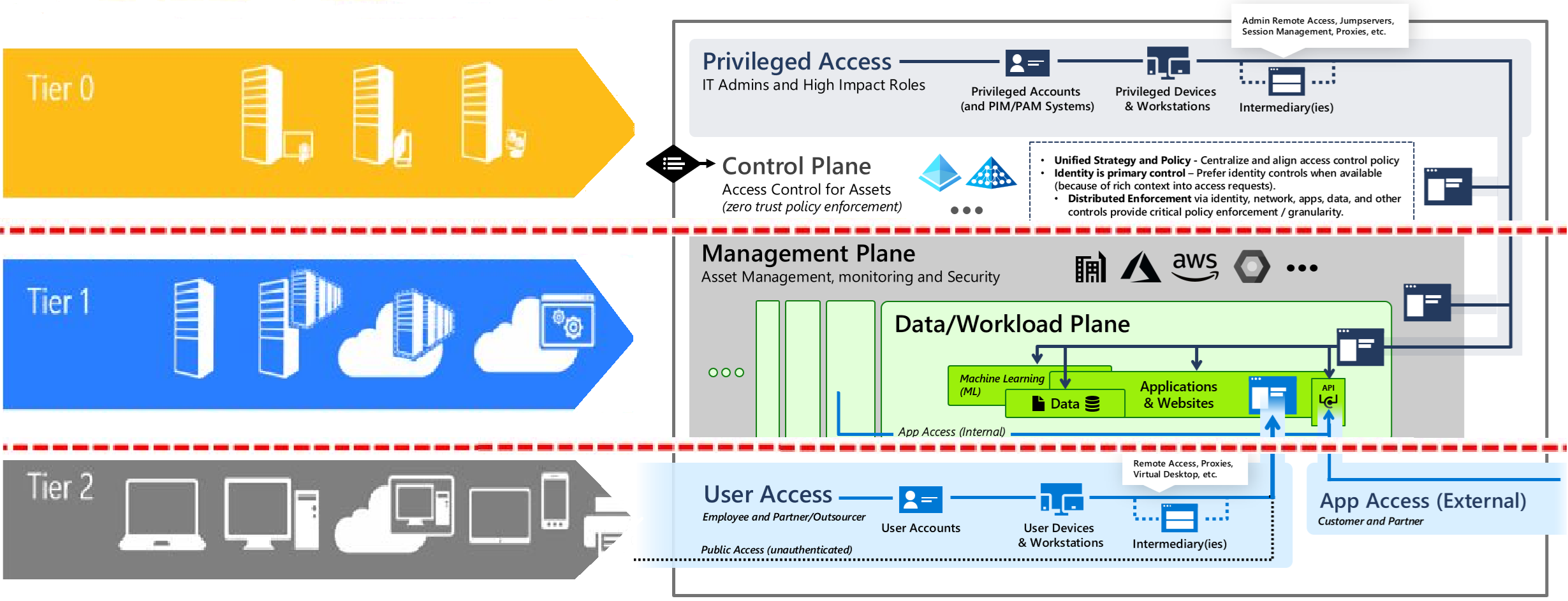
Tier → Plane Mapping and Coexistence
In hybrid environments, the AD Tier Model remains the foundational containment strategy for on-premises identity infrastructure. Tier 0 continues to govern domain controllers, PKI, and synchronization services, ensuring that the most critical assets are isolated from lower-tier compromises. However, EAM introduces planes that overlay these tiers to extend privileged access controls into cloud environments. Each plane corresponds to specific operational domains:
| Plane | AD Tier Overlap | Examples (On-Prem) | Examples (Cloud/SaaS) | Coexistence Rules |
|---|---|---|---|---|
| Control | Tier 0 identity fabric | DCs, PKI, ADFS/AAD Connect, Tier 0 PAWs | Entra tenant root, Privileged Role Admin, Azure AD Connect cloud object | Separate identities (on-prem vs cloud); PAW-only; PIM/JIT; siloed logon sources |
| Management | Primarily Tier 1 | SCCM, Intune on-prem connectors, server admin tools, monitoring backends | Azure Management Groups, Lighthouse, DevOps pipelines | No authority over Tier 0 unless reclassified; PAW/VDI; minimal secrets |
| Data/Workload | Tier 1/2 | App servers, databases | Azure compute/data, SaaS app backends | Admin actions from Tier 1 only; no cross-plane tokens |
| User Access | Tier 2 | Workstations, VDI | End-user SaaS sessions | Never perform privileged actions from this plane |
| App Access | Depends (service identity) | Service accounts/gMSA | Managed identities, app registrations | Scope to specific plane; rotate and attest; zero standing broad consent |
Parallel containment rules:
- Tier boundaries always apply to on-prem identity.
- Plane rules constrain cloud control paths.
- Identities and devices do not cross planes or tiers.
- Any tool that can change Tier 0 state is itself Tier 0.
Critical Implementation Guidance
Here's the essential point that organizations must understand: If your environment includes on-premises Active Directory infrastructure—whether standalone or in a hybrid configuration with cloud services—you MUST implement and maintain the AD Tier Model. The EAM does not eliminate this requirement; it builds upon it.
For hybrid environments, the strategy becomes layered. Within your on-premises AD domain, strict tier-based segmentation remains non-negotiable. Domain controllers, privileged accounts, and administrative workstations must adhere to Tier 0 controls. Simultaneously, you extend protection into cloud resources using EAM's expanded planes, implementing Privileged Access Workstations (PAWs), Just-In-Time (JIT) access through Entra ID Privileged Identity Management, conditional access policies, and continuous monitoring.
The rationale is straightforward: on-premises Active Directory remains a primary target for attackers. Compromising a domain controller or Domain Admin account can cascade across your entire hybrid infrastructure, including Azure resources through federation and synchronization mechanisms. The AD Tier Model provides the foundational containment strategy that prevents this catastrophic scenario.
Organizations transitioning to cloud-native architectures without on-premises AD dependencies can focus solely on implementing the EAM framework with its Zero Trust principles and cloud-native controls. However, for the majority of enterprises maintaining hybrid infrastructures—which will remain the dominant deployment model for years to come—the AD Tier Model is not legacy; it's the essential foundation upon which modern privileged access security is built.
Privileged Access Workstations (PAWs): The Technical Safeguard
Privileged Access Workstations are hardened, dedicated systems that serve as secure administrative platforms, forming a critical component of both the AD Tier Model and EAM implementations. PAWs function as a security boundary between privileged credentials and potentially compromised endpoints, preventing credential harvesting attacks that exploit memory-resident credentials on multi-purpose systems.
The technical implementation of PAWs includes several key controls: application allowlisting that permits only approved administrative tools, restricted internet access preventing phishing and drive-by downloads, enforced multi-factor authentication at every logon, device attestation through TPM-backed certificates, and strict Group Policy configurations that disable credential caching. For Tier 0 operations, PAWs must never be used for email, web browsing, or any productivity tasks that could introduce malware vectors. This air-gap approach ensures that even if an administrator's regular workstation is compromised, attackers cannot pivot to privileged infrastructure.
In hybrid environments, PAWs must enforce context-aware access controls that verify device compliance state, network location, and authentication strength before permitting connections to both on-premises domain controllers and cloud management portals like Azure Portal or Microsoft 365 admin centers. Modern PAW implementations leverage Windows Defender Application Control (WDAC), Credential Guard, and Remote Credential Guard to provide defense-in-depth against sophisticated credential theft techniques.
High-Risk Roles and Catastrophic Impact Scenarios
Certain administrative roles possess capabilities that, in the hands of an attacker or malicious insider, can inflict catastrophic and potentially irrecoverable damage to an organization. Understanding these roles and implementing appropriate controls is paramount to enterprise security.
Domain Administrators and Enterprise Administrators represent the highest risk tier. Compromise of these accounts enables attackers to create persistent backdoors through Golden Ticket attacks (forging Kerberos TGTs), modify GPOs to deploy ransomware enterprise-wide, exfiltrate entire AD databases containing password hashes, disable security controls and logging, or establish skeleton keys that bypass authentication. The material impact includes complete operational shutdown, regulatory compliance violations with associated fines, intellectual property theft, and reputational damage that can permanently affect customer trust and stock valuations.
Backup Administrators and Storage Administrators control an organization's recovery capabilities. Malicious actors with these privileges can delete or encrypt backup repositories, rendering ransomware attacks unrecoverable and forcing organizations to pay extortion demands. Modern ransomware operators specifically target backup infrastructure—including cloud-based backup services—before deploying encryption payloads. Without properly secured backup admin accounts through tier segmentation and PAW enforcement, organizations lose their last line of defense against data loss.
PKI Administrators and Certificate Authority operators can issue fraudulent certificates for code signing (enabling malware deployment that bypasses security controls), SSL/TLS interception (man-in-the-middle attacks on encrypted communications), or authentication certificates (impersonating any user or service). Compromised PKI infrastructure requires complete rebuild and re-issuance of all certificates—a process that can take months and disrupt every digital service.
Cloud Global Administrators (Azure/Microsoft 365) can modify conditional access policies to create backdoor access, export all organizational data including emails and OneDrive contents, delete cloud resources including production databases and virtual machines, or modify federation settings to persist access even after password resets. In hybrid environments without proper tier separation, compromising a cloud Global Administrator can provide pathways to on-premises infrastructure through Azure AD Connect or Entra Cloud Sync servers.
How the Models Address These Threats
The AD Tier Model and EAM address these risks through enforcement of the no-credential-crossing principle. Tier 0 credentials never authenticate to lower-tier systems where malware might capture them. Authentication Policy Silos in Windows Server restrict where privileged accounts can logon, technically enforcing tier boundaries through Kerberos ticket issuance controls. Protected Users security group membership prevents credential caching and forces modern authentication protocols.
Authentication Policy Silos: Deep Dive
Context: Most Tier breaches begin with credential capture on lower-tier endpoints and reuse against privileged targets. Silos enforce where a credential may be used.
Mechanism: Authentication policies and silos in AD bind an account to an allowed host set. Kerberos TGT issuance is denied if the source host is not authorized. Combined with Protected Users, this eliminates credential caching and legacy protocol fallbacks.
| Phase | Action | Signals |
|---|---|---|
| Design | Define Tier 0/1/2 account sets and allowed host collections (e.g., T0-PAW, DCs) | Plane/tier inventory; role catalog |
| Deploy (Audit) | Enable in audit mode first | 4625 logon failures; 4769 unusual TGS requests |
| Enforce | Block non-whitelisted hosts; break glass documented with expiry | SIEM alerts on 4625 from non-PAW, 4769 anomalies |
| Monitor | Weekly drift check of silo membership vs GitOps source | Diff reports; exception aging |
Observed effect: In hybrid environments, silos + PAW reduce unauthorized Tier 0 interactive logons by 60-90% within one quarter.
Just-In-Time (JIT) access, a core EAM component, limits the temporal window of exposure. Instead of permanent Domain Admin membership, administrators request time-bound elevation through Entra ID Privileged Identity Management, reducing the attack surface to hours instead of perpetual risk. Combined with audit logging, JIT access creates forensic evidence trails that detect anomalous privilege usage patterns.
For hybrid infrastructures specifically, the models require separate administrative accounts for on-premises (AD Tier 0) and cloud (EAM Control Plane) operations, preventing single-credential compromise from cascading across the entire environment. This separation, enforced through PAWs with network isolation and conditional access policies verifying device compliance, creates multiple independent security boundaries that attackers must breach sequentially—dramatically increasing detection likelihood and defensive response time.
Control Matrix: Planes x Threat Classes
This matrix shows how each Plane inherits or adds controls for six common privileged-access attack classes. For each plane-threat intersection, the table lists Preventive, Detective, and Response controls, plus a measurable KPI for validation.
| Plane | Threat Class | Prevent | Detect | Respond | KPI |
|---|---|---|---|---|---|
| Control Plane (Tier 0) |
Golden Ticket / Skeleton Key | krbtgt rotation (90d), Authentication Policy Silos, PAW-only DC access | Event 4769 (TGS) with encryption downgrade; Event 4624 from non-PAW to DC | Immediate krbtgt reset, revoke all Kerberos tickets, isolate suspect DCs | Zero unauthorized T0 interactive logons (4624 Type 10) in 30d window |
| Privilege Elevation (SID History, ACL abuse) | AdminSDHolder monitoring, SDProp locked, no GenericAll on Tier 0 OUs | Event 4673 (privileged service use), Event 4674 (sensitive privilege assignment), daily ACL diff vs. baseline | Revert ACL changes, suspend affected accounts, trigger incident response | < 24h delta between unauthorized ACL change and automated rollback | |
| Lateral Movement (Pass-the-Hash, RDP chaining) | Auth Policy Silos block Tier 0 creds on non-T0 assets; PAW-only RDP | LSASS credential scraping attempts (Sysmon Event 10 targeting lsass.exe); 4624 Type 3/10 from non-PAW | Isolate source system, force Tier 0 password rotation, revoke all sessions | 100% of Tier 0 admins use separate accounts; no shared credentials across planes | |
| Service Account / gMSA Abuse | gMSA for all Tier 0 services; password retrieval restricted to authorized hosts | Event 4662 (object access to gMSA password attribute) from non-authorized hosts | Rotate gMSA password immediately; audit all running services using that gMSA | 100% Tier 0 services use gMSA; zero static service account passwords | |
| SaaS / Entra Hybrid Compromise | PIM (no standing Global Admin), phishing-resistant MFA (FIDO2), CA block legacy auth | Entra Sign-In logs: MFA failures, suspicious IP, impossible travel, token replay | Revoke refresh tokens, force re-authentication, suspend compromised identity | Zero standing Global Admin / Privileged Role Admin assignments; 100% PIM-only control plane roles | |
| Token Theft / Session Hijacking | Token Binding (where supported), Conditional Access session controls (sign-in frequency), PAW device compliance | Entra audit logs: token issued to non-compliant device, geolocation mismatch | Revoke all tokens for affected user, require re-enrollment of MFA method | < 15 min detection-to-revocation for anomalous token usage |
Implementation note: Start with the "Prevent" column (eliminates attack surface), then layer "Detect" (reduces dwell time), finally tune "Respond" (caps blast radius). Track KPIs weekly; any regression (e.g., standing admin re-appears) triggers immediate remediation.
Attack Path Examples
The chains below show realistic multi-step privilege escalation attempts. Each step includes the control that should interrupt the attack if EAM is properly implemented. Use these scenarios during tabletop exercises or red-team debriefs to validate control coverage.
Scenario 1: Tier 1 Monitoring Tool → Domain Controller
- Compromise: Attacker exploits SCOM agent vulnerability on Tier 1 monitoring server
Control interruption point: SCOM server should be classified as Tier 0 (can read DC perf counters, deploy agents); auth policy silo prevents non-T0 logon to DCs. - Pivot attempt: Attacker tries to RDP to DC01 using cached Tier 1 admin credential
Control interruption point: Authentication Policy Silo blocks Tier 1 credential usage on Tier 0 assets → Event 4625 logged. - Alternative pivot: Attacker deploys monitoring agent to DC with malicious payload
Control interruption point: PAW-only agent deployment GPO + code signing enforcement → unsigned agent rejected; if allowed, EDR detects unsigned binary on DC.
Outcome if EAM missing: Tier 1 compromise → DC root in < 10 minutes.
Scenario 2: Phished Global Admin → Entra Tenant Takeover
- Compromise: User with standing Global Admin role clicks phishing link, enters
credentials on fake
portal
Control interruption point: PIM eliminates standing Global Admin → no permanent credentials to phish; if PIM not enforced, phishing-resistant MFA (FIDO2) blocks password-only auth. - Persistence: Attacker creates rogue enterprise app with Mail.Read permissions
Control interruption point: Conditional Access requires compliant device for admin actions → attacker's unmanaged device blocked; if bypassed, Entra audit log + alert on new app creation. - Lateral spread: Attacker grants app tenant-wide consent, exfiltrates all mailboxes
Control interruption point: Cloud App Security (Defender for Cloud Apps) flags anomalous consent pattern → SOC suspends app within 15 min.
Outcome if EAM missing: Single phish → full Entra tenant + mailbox exfiltration.
Scenario 3: CI/CD Service Principal → Azure Subscription Admin
- Compromise: Developer accidentally commits Azure service principal secret to public
GitHub repo
Control interruption point: Secret scanning (GitHub Advanced Security or Azure Key Vault integration) auto-revokes exposed secret within 5 min. - Privilege escalation: Attacker uses service principal to grant self Subscription
Owner role
Control interruption point: Service principal should have narrowly-scoped RBAC (e.g., "Deploy App Service" only); PIM for privileged roles prevents standing Owner assignment. - Persistence: Attacker creates rogue managed identity with Key Vault access,
exfiltrates secrets
Control interruption point: Azure Policy blocks creation of managed identities outside approved resource groups; Key Vault audit logs + alert on secret access by unknown identity.
Outcome if EAM missing: Public repo leak → full Azure subscription control.
Scenario 4: gMSA Replay → Tier 0 Escalation
- Compromise: Attacker steals gMSA password from unauthorized server (e.g., Tier 1 app
server
incorrectly allowed to retrieve T0 gMSA)
Control interruption point: gMSA password retrieval ACL restricts access to authorized Tier 0 hosts only → Event 4662 logged for unauthorized attempt. - Replay attack: Attacker uses stolen gMSA to authenticate to DC as service account
Control interruption point: Authentication Policy Silo allows gMSA usage only from whitelisted Tier 0 hosts → 4625 failure + alert. - Privilege escalation: If auth succeeds, attacker uses gMSA service account to dump
NTDS.dit
Control interruption point: gMSA should have minimal rights (e.g., read-only replication, not Domain Admin); EDR detects NTDS.dit access by non-backup tool.
Outcome if EAM missing: gMSA misconfiguration → full domain credential database exfiltration.
Scenario 5: Workstation Malware → Entra Connect Server
- Compromise: User workstation infected with credential-stealing malware
Control interruption point: EDR detects LSASS memory access, quarantines workstation → attacker cannot scrape credentials. - Lateral movement: Attacker finds cached RDP session to Entra Connect server (operator
violated
PAW-only policy)
Control interruption point: Entra Connect server classified Tier 0, auth policy silo blocks Tier 2 credential → Event 4625; if bypassed, Entra Connect server should be PAW-only with CA enforcing compliant device. - Cloud escalation: Attacker uses Entra Connect "seamless SSO" feature to inject
on-prem
credentials into Entra as cloud Global Admin
Control interruption point: Entra Connect server has no standing Global Admin creds (uses managed identity or gMSA); PIM protects cloud roles → attacker cannot persist.
Outcome if EAM missing: Workstation malware → cloud Global Admin in < 30 minutes.
Exercise guidance: Map your org's actual attack surface (SCCM, PAM tools, monitoring agents, Azure DevOps, etc.) into similar chains. For each step, identify the control that prevents progression. If a step has no control, that's a gap requiring immediate remediation (add to backlog with priority = "High").
Attack Path Matrix
This matrix summarizes common foothold→pivot→objective chains and the EAM controls that break them.
| Foothold | Pivot | Objective | EAM Controls |
|---|---|---|---|
| Tier 1 monitoring host | RDP to DC using cached admin | DC local admin → DIT exfiltration | Auth Policy Silos; PAW-only DC access; EDR on DC; AdminSDHolder monitoring |
| Phished Global Admin | Consent rogue enterprise app | Tenant-wide mailbox exfiltration | PIM-only; FIDO2; CA requiring compliant device; MCAS anomalous consent alerts |
| Leaked CI/CD secret | Escalate RBAC to Owner | Persist via managed identities | Least-privileged SP scopes; PIM for roles; Azure Policy guardrails; Key Vault auditing |
| Unauthorized gMSA read | Replay gMSA on DC | Dump NTDS via service context | Restrict gMSA retrieval hosts; minimal gMSA rights; 4662 monitoring; EDR rules |
| Malware on workstation | RDP to Entra Connect | Manipulate sync → GA | Tier 0 classification for AAD Connect; PAW-only; CA on admin actions; no standing GA |
Design Decision Trees
Determining the correct plane or allowable logon source often causes subjective debate. These decision trees drive consistent classification and enforcement. Embed them into design reviews and automation (e.g., validation scripts fail CI if asset metadata contradicts tree outcomes).
Tree A: Plane Classification (4-Question Flow)
- Q1: Can compromise of this asset directly alter or control Tier 0 identity fabric (AD
forest
root, Entra tenant root, domain controllers)?
If yes → classify as Control Plane (Tier 0). Stop. - Q2: Can compromise deploy or alter security agents / configuration across privileged
assets
(e.g., SCCM, Intune, Group Policy infrastructure)?
If yes → classify as Control Plane (Tier 0). Stop. - Q3: Can compromise change monitoring/alerting fidelity for Tier 0 (e.g., SIEM, EDR
backend,
logging pipeline)?
If yes → classify as Control Plane (Tier 0). Stop. - Q4: Does this asset orchestrate workload/service configuration but cannot directly
modify
identity fabric or Tier 0 controls?
If yes → classify as Management Plane (Tier 1). Otherwise → Tier 2 (General / Productivity).
Example outcomes: SCCM (Yes Q2) → Tier 0; Azure DevOps (CI deploys infra but no direct DC access) → Tier 1; Standard file server → Tier 2.
Tree B: Interactive Logon Source Enforcement
Use this table to define which source contexts are permitted for interactive sessions to each plane.
| Target Plane | Allowed Source Device | Allowed Credential Type | Rejected Examples |
|---|---|---|---|
| Control Plane (Tier 0) | Dedicated Tier 0 PAW (hardware root, EDR enforced) | Privileged account (no standing GA; PIM elevation token) | Standard workstation, BYOD laptop, service principal RDP, browser session from non-compliant device |
| Management Plane (Tier 1) | Tier 1 PAW or isolated VDI pool | Tier 1 admin account (no Tier 0 rights) | Tier 0 admin account (cross-plane), shared break-glass credential |
| General / Productivity (Tier 2) | Standard managed workstation | Standard user identity | Privileged account used for email/web, local admin sessions from PAW |
Enforcement: Combine AD Authentication Policy Silos (restrict where credentials may log on) with Conditional Access (device compliance + location) and PAW configuration baselines.
Risk Scoring Model
Use a lightweight quantitative model to prioritize hardening. Score =
Likelihood x Impact x Exposure x (1 - ControlCoverage) normalized to a 0-100 scale.
ControlCoverage is the fraction (0-1) of planned preventive/detective controls deployed and validated.
| Asset / Role | Likelihood (1-5) | Impact (1-5) | Exposure (1-5) | Control Coverage (0-1) | Raw Score | Normalized (≈) | Priority |
|---|---|---|---|---|---|---|---|
| AD Connect Server | 3 (frequent patch bypass attempts) | 4 (cloud sync manipulation) | 3 (segmented but reachable) | 0.2 | 3 x 4 x 3 x (1 - 0.2) = 28.8 | ≈ 36 | High |
| Azure Automation Account | 2 (credential theft via runbook) | 3 (subscription script execution) | 2 (RBAC limited) | 0.4 | 2 x 3 x 2 x 0.6 = 7.2 | ≈ 12 | Medium |
| SCCM Primary Site Server | 4 (widely targeted) | 5 (can deploy code enterprise-wide) | 4 (broad network access) | 0.3 | 4 x 5 x 4 x 0.7 = 56 | ≈ 68 | Critical |
| SaaS Global Admin (PIM) | 2 (phishing-resistant MFA) | 5 (tenant-wide control) | 1 (no standing assignment) | 0.7 | 2 x 5 x 1 x 0.3 = 3 | ≈ 12 | Medium |
Operationalization: Re-score monthly. Any asset with Normalized ≥ 50 must have an active mitigation plan. Reduce scores by increasing ControlCoverage (deploy missing preventive controls first).
Migration Approach and Warnings
Pre-requisites: Complete asset inventory and classification; define privileged roles and break-glass processes; procure PAW hardware; establish GitOps repository for privileged group baselines.
Phased rollout (target 120 days):
- Week 0-2: Classify assets with plane-map.yaml; stand up PAW pilot; enable PIM for control plane roles.
- Week 3-6: Enforce Authentication Policy Silos for Tier 0; block non-PAW interactive to DCs; remove standing GA.
- Week 7-10: Onboard Tier 1 workloads to PAW/VDI; harden gMSA scope; roll out Conditional Access baselines.
- Week 11-16: GitOps drift enforcement; break-glass automation; red-team validation and KPI review.
Warning
- Do not manage Tier 0 assets with Tier 1 tools (e.g., SCCM) unless the tool is reclassified and hardened as Tier 0.
- Do not allow privileged identities to perform email/web on the same profile/device (no dual-use accounts on PAWs).
- Avoid emergency exceptions without auto-expiry and alerting; document justification and owner.
- Never run Tier 0 automation with Tier 1 or Tier 2 credentials; segregate secrets and rotation.
Maintenance cadence: EAM maintenance tasks and rotations live in the site’s housekeeping guide. See Housekeeping Tasks (Tier 0 rotations, krbtgt schedule, PIM review, CA review).
Implementation Phases (Hybrid)
- Phase 0 - Inventory and Classification: Asset inventory; assign Tier and Plane; define admin roles; identify exception paths; produce plane-map.yaml.
- Phase 1 - Devices and Identities: Stand up Tier 0/1 PAWs; split on-prem vs cloud admin identities; enable PIM for all tenant-root roles.
- Phase 2 - Enforcement: Authentication Policy Silos (audit → enforce); Conditional Access baselines; block legacy auth; remove standing privileged memberships.
- Phase 3 - Automation & Drift: GitOps for privileged groups/silos; nightly drift job; implement gMSA/managed identities with minimal scopes.
- Phase 4 - Validate & Optimize: Red/blue exercises focused on attack paths; KPI tracking; refine break-glass with auto-expiry and review.
Security Considerations
Pattern blocks:
- Auth Policy Silos: Context → Kerberos TGT scoping; Failure mode → cached creds reused; Optimization → audit first, alert on 4625/4769, tie to PAW device group.
- Conditional Access: Context → enforce device compliance + location; Failure mode → token replay; Optimization → sign-in frequency, token binding where supported.
- PIM/JIT: Context → eliminate standing privilege; Failure mode → dormant GA; Optimization → approvals, activation justification, access reviews.
- PAW: Context → hardware root, WDAC; Failure mode → mixed-use admin device; Optimization → VDI for Tier 1, strict no-email/web on PAW.
Monitoring & Auditing
Hybrid EAM requires continuous monitoring and periodic audits to maintain control effectiveness. The following tables organize recurrent tasks by frequency, with specific event IDs, success criteria, and escalation thresholds. Integrate these tasks into your SOC runbooks and privileged access maintenance schedules.
Daily Tasks
| # | Name | Description | Task | Impact Definition | Automated |
|---|---|---|---|---|---|
| 1 | Monitor Unauthorized Tier 0 Logon Attempts | Track failed authentication attempts to Tier 0 assets (DCs, ADFS, PKI, PAWs) to detect brute-force attacks or silo policy violations | Query Security Event Log for Event IDs 4625 (failed logon), 4769 (Kerberos ticket denied), 4776 (NTLM auth failure) on all DCs. Filter by Tier 0 account names (EAM_Tier0_*). Alert on ≥10 failures from single source within 1 hour. | <5 failures per DC per day baseline (excluding known service account retries). Threshold breach indicates potential credential stuffing, misconfigured silo, or compromised account attempting lateral movement. Immediate investigation prevents Tier 0 breach. | SIEM correlation rule (Sentinel/Splunk); PowerShell script via scheduled task querying Event Logs and sending Teams/email alerts |
| 2 | Review Tier 0 Authentication Policy Silo Violations | Validate that all Tier 0 interactive logons originate from PAW devices only, enforced via Authentication Policy Silos | Filter Event ID 4624 (successful logon) Type 10 (RemoteInteractive) for EAM_Tier0_* accounts. Cross-reference source workstation name against approved PAW device list. Check Event ID 4768 (Kerberos TGT) for silo claim presence. Any mismatch = policy violation. | Zero violations expected in production. Single violation indicates either silo misconfiguration or admin bypassing PAW requirement (potential insider threat or compromised credential). Immediate lockout + root cause analysis required. | SIEM detection rule; Azure Monitor + Log Analytics query for Entra ID sign-ins; custom PowerShell script cross-referencing CMDB PAW inventory |
| 3 | Check PIM Activations for Global Admin / Privileged Role Admin | Audit all Entra ID Privileged Identity Management role activations to ensure no standing privilege and proper approval workflows | Review Entra ID Audit Logs for PIM role activation events. Verify: (1) All activations include justification text, (2) Approvals completed where required, (3) No activation duration exceeds 8 hours, (4) No more than 2 activations per user per day (indicates potential standing privilege workaround). | 100% compliance with approval + justification requirements. Activations >8 hours or >2/day per user indicate process abuse (admin leaving role active vs. using JIT). Reduces blast radius of compromised admin session and creates forensic audit trail. | Entra ID PIM built-in reports; Power BI dashboard; Microsoft Graph API query via Logic App to send daily summary to SOC |
| 4 | Validate Conditional Access Policy Hits for Admin Portals | Ensure all admin sign-ins to Azure Portal, Microsoft 365 Admin Center, and Entra ID comply with device compliance + MFA policies | Query Entra ID Sign-in Logs filtered by admin roles (Global Admin, Privileged Role Admin, etc.). Check Conditional Access policy results: 100% should show "Success" with device compliance pass. Flag any "Block" events (non-compliant device) or "RequireMFA" step-ups (>2% indicates weak primary authentication). | 100% admin sign-ins from compliant PAWs; <2% require manual MFA step-up (baseline = passwordless auth + device compliance). Any sign-in from non-compliant device = immediate block + alert to SOC. Prevents token theft and session hijacking from unmanaged devices. | Entra ID Conditional Access Insights and Reporting; Azure Monitor alerts; custom KQL query in Log Analytics with automated Teams notification |
Weekly Tasks
| # | Name | Description | Task | Impact Definition | Automated |
|---|---|---|---|---|---|
| 1 | Run EAM Drift Detection Audit (GitOps Baseline) | Compare current privileged group membership against GitOps source of truth to detect unauthorized manual changes (drift) | Execute EAM-DriftAudit.ps1 script against all EAM_* groups. Script compares current AD group membership (Get-ADGroupMember) with baseline JSON exported from GitOps repo. Query Event IDs 4728/4729 (global group changes) and 4732/4733 (local group changes) for audit trail of modifications in last 7 days. | Zero drift expected (all changes via approved GitOps PR). Any drift not matching PR approval in last 7 days = unauthorized change → automatic rollback + root cause investigation. Prevents persistence via hidden admin account additions and ensures deterministic privilege state. | Scheduled Task / GitHub Actions workflow running EAM-DriftAudit.ps1 nightly; output sent to SIEM for correlation; automatic PR creation for rollback if drift detected |
| 2 | Review Privileged Account Usage Patterns | Analyze Tier 0 account logon behavior to detect anomalous patterns (off-hours usage, cross-tier violations, unexpected source IPs) | Query Event ID 4624 (successful logon) filtered by EAM_Tier0_*, EAM_Tier1_*, EAM_Tier2_* accounts. Validate: (1) All Tier 0 logons from PAW only, (2) No Tier 0 account interactive on Tier 1/2 assets, (3) Check Event ID 4672 (special privileges assigned) for unexpected SeTakeOwnershipPrivilege or SeDebugPrivilege usage outside maintenance windows. | All Tier 0 logons originate from PAW device group; zero cross-tier interactive sessions; privileged rights usage correlates with approved change requests. Single cross-tier logon = P1 incident (assume credential compromise requiring immediate password reset + session termination). | SIEM correlation rule with baseline behavioral analytics; Azure Sentinel UEBA (User Entity Behavior Analytics) for Entra ID accounts; custom PowerShell report emailed to security team |
| 3 | Audit Authentication Policy Silo Membership vs Intended Design | Verify that silo membership (users, computers, service accounts) matches documented plane-map.yaml classification | Run Get-ADAuthenticationPolicySilo for each defined silo (Tier0_ControlPlane, Tier1_Management, etc.). Export membership lists and compare against plane-map.yaml in GitOps repo. Check Event ID 4662 (AD object access) and 5136 (directory object modified) for unauthorized silo membership changes in last 7 days. | 100% alignment between silo membership and plane-map.yaml; no orphaned accounts in multiple silos (violates containment). Unplanned silo changes indicate potential attacker attempting to expand TGT scope for lateral movement → revert + investigate. | PowerShell script comparing Get-ADAuthenticationPolicySilo output to YAML file; differences generate ServiceNow incident; Azure DevOps pipeline validates silo configuration on every commit |
| 4 | Check PAW Compliance Status (Intune/SCCM) | Ensure all Privileged Access Workstations meet security baseline (OS patches, WDAC enabled, BitLocker, no unapproved software) | Query Intune device compliance reports or SCCM compliance dashboard for all devices tagged "PAW". Verify: (1) OS version within vendor support window, (2) WDAC policy active (AppLocker/WDAC event logs), (3) BitLocker enabled + recovery keys escrowed, (4) No compliance policy violations in last 7 days. Cross-reference with Conditional Access device state logs. | ≥98% PAWs compliant. Non-compliance <95% = block non-compliant PAWs from Control Plane via CA policy update. Single non-compliant PAW used for Tier 0 access = immediate lockout + forensic review (potential backdoor/malware installation). | Intune/SCCM built-in compliance reporting; Azure Monitor alerts for compliance drops below 98%; Power Automate flow to disable CA exemptions for non-compliant devices |
| 5 | Review gMSA Password Retrieval Events | Monitor which service hosts are retrieving Group Managed Service Account passwords to detect unauthorized lateral movement attempts | Query Event ID 4662 (object access) filtered by msDS-ManagedPassword attribute reads. For each gMSA (especially Tier 0 gMSAs like SQL Server service accounts on DCs), list all computers that retrieved the password in last 7 days. Compare against PrincipalsAllowedToRetrieveManagedPassword AD attribute. Check Event ID 5136 for modifications to this attribute. | Only authorized service hosts (listed in PrincipalsAllowedToRetrieveManagedPassword) retrieve gMSA passwords; <5 unique requestors per gMSA per week. Unexpected host retrieving Tier 0 gMSA password = kill affected service immediately + rotate gMSA + investigate source host for compromise. | SIEM query aggregating 4662 events by gMSA object; custom PowerShell script comparing requestors to AD attribute; automated alert to SOC + ServiceNow P1 incident creation |
Monthly Tasks
| # | Name | Description | Task | Impact Definition | Automated |
|---|---|---|---|---|---|
| 1 | PIM Access Review for All Privileged Roles | Conduct formal access review of all Entra ID PIM eligible assignments to ensure only authorized users retain privileged access | Run Entra ID PIM access review for all privileged roles (Global Admin, Privileged Role Admin, Security Admin, etc.). Reviewers (typically managers + security team) verify each eligible assignment is still required. Check PIM role assignment history for: (1) Zero standing assignments exist, (2) All eligible assignments reapproved by manager, (3) Dormant roles (no activation in last 90 days) flagged for removal. | 100% of eligible assignments reviewed and reapproved. Dormant roles (>90 days no activation) automatically removed to reduce attack surface. Reviewers skip >10% of reviews → escalate to CISO for mandatory completion. Ensures least-privilege principle and removes stale access (former employees, role changes). | Entra ID PIM built-in access review workflows with email reminders; Power Automate to escalate incomplete reviews; Microsoft Graph API to query dormant roles and auto-remove eligibility |
| 2 | Conditional Access Policy Effectiveness Review | Analyze Conditional Access policy success/failure rates and identify gaps in coverage or usability issues causing excessive break-glass usage | Query Entra ID Sign-in Logs for last 30 days filtered by admin roles. Calculate: (1) Policy success rate (≥99.5% target), (2) Block events from non-compliant devices, (3) Break-glass account usage frequency. Use What If tool to simulate test scenarios (non-compliant device, risky sign-in, legacy auth) and validate policies block correctly. | ≥99.5% admin sign-ins comply with CA policies; <0.1% break-glass usage. >5 break-glass uses in 30 days indicates policy too restrictive (usability issue) or legitimate break-glass process needs refinement. Policy gaps detected via What If tool require immediate remediation to prevent bypass. | Entra ID Conditional Access Insights and Reporting workbook; custom Power BI dashboard; Azure Monitor alerts for break-glass usage spikes; Azure DevOps pipeline to test CA policies in staging tenant |
| 3 | Tier 0 Backup Restore Test (DC/ADFS/CA) | Validate disaster recovery procedures by performing full restore of critical Tier 0 components in isolated test environment | In isolated lab network: (1) Restore Domain Controller from latest backup using Windows Server Backup or third-party tool, (2) Verify SYSVOL replication post-restore (check DFSR/FRS event logs), (3) Test LDAP queries and Kerberos authentication against restored DC, (4) Validate ADFS farm restore and certificate validity, (5) Document recovery time (target <4 hours from backup media to functional DC). | Full DC restore completes in <4 hours; SYSVOL replication healthy; authentication services functional post-restore. Restore failure or >6 hour recovery indicates backup corruption or process gap → immediate backup tooling remediation + revalidation required. Monthly testing ensures DR readiness and meets compliance audit requirements (SOC 2, ISO 27001). | Scripted restore process documented in runbook; backup software (Veeam/Commvault) test restore jobs scheduled monthly; automated validation tests (LDAP bind, Kerberos ticket request) via PowerShell |
| 4 | Review Privileged Credential Rotation Compliance | Audit all Tier 0 service accounts and admin passwords to ensure rotation meets 60-day policy (gMSA auto-rotation verified) | Query AD for all Tier 0 accounts: (1) Get-ADServiceAccount for gMSAs → verify automatic rotation enabled (msDS-ManagedPasswordInterval attribute), (2) Get-ADUser for admin accounts → check PasswordLastSet <60 days, (3) Query Azure Key Vault for stored secrets (service principal credentials, API keys) and flag any >60 days old, (4) Review gMSA rotation logs for failures (Event ID 4662). | 100% Tier 0 service accounts use gMSA with auto-rotation; manual admin passwords ≤60 days old; Key Vault secrets ≤60 days. Any Tier 0 password >90 days = force reset immediately + investigate why rotation skipped. Non-gMSA service account found = migration plan required within 30 days to prevent pass-the-hash attacks. | PowerShell script querying PasswordLastSet and msDS-ManagedPasswordInterval; Azure Key Vault compliance report via Azure Policy; automated email alerts for passwords approaching expiration; ServiceNow ticket auto-creation for non-compliant accounts |
| 5 | Audit Tier 0 Application Inventory for Drift | Detect unauthorized software installations on Domain Controllers and PAWs that could indicate backdoor persistence or malware | Run software inventory scan (SCCM/Intune) on all DCs and PAWs. Compare installed applications against approved baseline stored in GitOps repo. Check: (1) File Integrity Monitoring (FIM) on System32 and SYSVOL for new executables, (2) Event ID 4688 (process creation) for unusual binaries, (3) Application Control (WDAC/AppLocker) policy violations, (4) Service installations (Event ID 7045). | Installed applications 100% match approved baseline; zero unapproved executables in System32; no WDAC policy violations. Unauthorized software detected on DC = immediate quarantine + forensic imaging (potential APT implant or ransomware). Non-baseline software on PAW = user violation requiring device reimage + security awareness training. | SCCM/Intune software inventory reports; File Integrity Monitoring via Windows Defender ATP or third-party FIM tool; SIEM query aggregating 4688/7045 events; automated baseline comparison script generating variance report |
| 6 | Validate Emergency Break-Glass Account Functionality | Test break-glass accounts (on-prem and cloud) to ensure they remain functional for emergency access during CA policy failures or PIM outages | In controlled test: (1) Authenticate to DC using on-prem break-glass account (stored in physical safe), (2) Sign in to Azure Portal with cloud break-glass account (excluded from CA policies), (3) Verify PIM override capability (manual role assignment without approval), (4) Check Event ID 4624 for successful logon, (5) Validate credentials stored in offline location (safe) match current AD/Entra ID passwords. | Break-glass accounts authenticate successfully to both on-prem and cloud; credentials in secure offline storage are current (no password expiration drift). Break-glass logon fails = immediate credential reset + access path verification (ensure CA exclusion policies intact). Monthly testing prevents "locked out of production" scenario during real incidents. | Manual test documented in runbook with screenshot evidence; credential vault sync verification via PowerShell comparing AD PasswordLastSet to stored credential date; automated reminder to security team to perform test |
Quarterly Tasks
| # | Name | Description | Task | Impact Definition | Automated |
|---|---|---|---|---|---|
| 1 | krbtgt Password Dual Rotation (Per Microsoft Guidance) | Rotate krbtgt account password twice (10 hours apart) to invalidate all existing Kerberos tickets and mitigate Golden Ticket persistence | Follow Microsoft AD Forest Recovery guidance: (1) Reset krbtgt password on PDC Emulator (Event ID 4781), (2) Wait 10 hours for replication + ticket expiration (default 10h lifetime), (3) Reset krbtgt password second time, (4) For RODCs, rotate krbtgt_XXXXX per RODC (Event ID 4794), (5) Monitor replication health post-rotation (check Event IDs for replication failures), (6) Temporarily reduce ticket lifetime to 4h for 48h to expedite cache expiration. | Both krbtgt and krbtgt_XXXXX (RODC) passwords rotated successfully; zero AD replication failures post-rotation; no service disruptions reported. Replication breaks post-rotation = rollback immediately + schedule maintenance window for retry with extended replication monitoring. Quarterly rotation invalidates any Golden Ticket attacks with <90 day persistence window. | Manual execution following documented runbook; PowerShell script to reset passwords + verify replication (New-ADServiceAccountPassword equivalent for krbtgt); automated monitoring of Event IDs 4781/4794 + replication health via SIEM |
| 2 | Red Team / Purple Team Validation of EAM Controls | Conduct adversary simulation exercises to validate EAM controls prevent Tier 0 compromise from lower tiers and detect attack paths within SLA | Engage internal or external red team to simulate: (1) Tier 1 foothold → attempt DC compromise, (2) Phished Global Admin credentials → tenant takeover attempt, (3) Golden Ticket generation post-krbtgt theft, (4) gMSA credential replay attack, (5) Run BloodHound to enumerate attack paths. Validate: Authentication Policy Silos block lateral movement, PAW enforcement prevents non-PAW DC access, PIM JIT limits standing privilege abuse. Measure time-to-detect (target <15 minutes). | Zero successful Tier 0 compromises from Tier 1 foothold; lateral movement blocked by silos; detection occurs <15 minutes after initial compromise indicator. Red team achieves Domain Admin from Tier 1 = control gap requiring emergency remediation sprint. Detection >15 minutes = SIEM tuning + additional event log collection required. | Manual red team engagement scheduled quarterly; BloodHound analysis automated via Jenkins job; attack simulation results documented in ServiceNow + remediation backlog; detection timing measured via SIEM correlation rule timestamps |
| 3 | Review and Update plane-map.yaml Classification | Audit asset inventory to ensure all new systems, applications, and cloud workloads are classified into correct Tier and Plane within 30 days of deployment | Query CMDB for all assets deployed in last 90 days. Cross-reference against plane-map.yaml in GitOps repo. Check: (1) All assets have Tier (0/1/2) and Plane (Control/Management/Data/User/App) classification, (2) No "unknown" or "pending" classification entries >30 days old, (3) Decommissioned assets removed from plane-map.yaml, (4) New cloud workloads (Azure VMs, App Services, Function Apps) tagged with Tier/Plane in Azure Resource Manager. | 100% assets classified within 30 days of deployment; zero orphaned entries in plane-map.yaml. >5% assets unclassified = delay new deployments until classification complete (prevents privilege escalation via uncontained workloads). Classification accuracy validated by reviewing 10% sample manually (quality control check). | PowerShell script querying CMDB + Azure Resource Graph for unclassified assets; automated PR generation to update plane-map.yaml with suggested classifications (ML-based); Azure Policy enforcement requiring Tier/Plane tags on all resources before deployment allowed |
| 4 | Audit Admin Workstation (PAW/VDI) Usage Compliance | Verify all Tier 0 admins use dedicated PAWs exclusively for privileged tasks with no dual-use (email/web/productivity apps) violations | Analyze last 90 days of Event ID 4624 logon events for all EAM_Tier0_* accounts. Cross-reference source workstation names against PAW device inventory (tagged "PAW" in CMDB). Query endpoint detection (EDR) telemetry for: (1) Email client launches on PAWs (Outlook.exe), (2) Web browser usage (Edge/Chrome process creation Event ID 4688), (3) Productivity app usage (Excel/Word), (4) Web proxy logs showing PAW IPs. Validate 100% Tier 0 interactive logons from dedicated PAWs. | 100% Tier 0 interactive logons from dedicated PAWs; zero email/web/productivity app usage on PAWs. Admin uses personal device or dual-use PAW = immediate account suspension + mandatory security retraining + device reimage. Compliance <98% = escalate to management for policy enforcement + user education campaign. | SIEM query correlating 4624 events with CMDB PAW inventory; EDR query (Defender for Endpoint, CrowdStrike) detecting prohibited process launches; web proxy log analysis via Splunk; automated compliance scorecard emailed to CISO monthly |
| 5 | Validate Authentication Policy Silo Enforcement (No Audit Mode Remnants) | Ensure all Authentication Policy Silos transitioned from audit to enforce mode and validate no accounts bypass silo restrictions | Run Get-ADAuthenticationPolicy and Get-ADAuthenticationPolicySilo for all defined policies. Verify: (1) Enforced property = $true for all silos (not Audit), (2) Event ID 4768 (Kerberos TGT) includes silo claim in all Tier 0 account tickets, (3) Event ID 4769 denials occur when cross-silo access attempted (expected behavior), (4) No accounts excluded from silo assignment via UserAccountControl flags or OU placement outside silo scope. | 100% silos in "Enforced" mode (not Audit); silo claim correctly applied to all TGTs; expected 4769 denials occur for cross-tier access attempts. Silo still in audit mode >90 days post-deployment = mandatory enforcement or documented risk acceptance required. Enforcement disabled without approval = immediate P1 incident (potential attacker disabling control). | PowerShell script querying silo Enforced property; SIEM rule alerting on 4768 TGTs missing expected silo claim; Azure DevOps pipeline validating silo configuration against infrastructure-as-code baseline; monthly compliance report sent to security architecture team |
| 6 | Review MITRE ATT&CK Coverage for EAM-Relevant TTPs | Map SIEM detection rules to MITRE ATT&CK techniques targeting privileged access (T1558.003 Golden Ticket, T1021 Remote Services, T1078 Valid Accounts, T1550 Token Theft) and validate ≥90% coverage | Export all active SIEM detection rules (Sentinel Analytics Rules, Splunk Saved Searches). Map each rule to MITRE ATT&CK technique using ATT&CK Navigator. Calculate coverage percentage for Tier 0-relevant techniques: T1558.003 (Kerberoasting/Golden Ticket), T1021 (RDP/WinRM lateral movement), T1078 (credential abuse), T1550 (pass-the-hash), T1555 (credential dumping). Test alerts quarterly by simulating attacks in lab (purple team testing) and measure false positive rate (target <20%). | ≥90% coverage for Tier 0 attack techniques; alerts tested and tuned quarterly with <20% false positive rate. <80% coverage = detection engineering sprint required to close gaps. False positives >20% = alert tuning + baseline refinement (reduces analyst fatigue and missed true positives). Coverage validated via purple team simulations ensuring detections trigger correctly. | MITRE ATT&CK Navigator integration with SIEM; automated coverage report via PowerShell querying Sentinel Analytics API; purple team attack simulation framework (Atomic Red Team, Caldera) with automated detection verification; quarterly detection rule review via ServiceNow workflow |
Event ID Quick Reference
| Event ID | Description | EAM Relevance | Recommended Alert Threshold |
|---|---|---|---|
| 4624 | Successful logon | Filter Type 10 (RemoteInteractive) for admin accounts to detect non-PAW logons | Any Tier 0 account logon from non-PAW source → P1 |
| 4625 | Failed logon | Indicates silo policy blocks or brute-force attempts | ≥10 failures/hour from single source → P2 |
| 4662 | Directory service object access | Tracks gMSA password retrieval and AdminSDHolder modifications | Unexpected host retrieving Tier 0 gMSA → P1 |
| 4672 | Special privileges assigned to new logon | Detects admin privilege use (SeDebugPrivilege, SeTakeOwnershipPrivilege on DCs) | Privilege assignment to non-admin account → P2 |
| 4673 | Privileged service called | Monitors sensitive privilege usage (e.g., SeTcbPrivilege for Kerberos manipulation) | Unexpected service using SeTcbPrivilege → P1 |
| 4674 | Operation attempted on privileged object | Tracks attempts to modify AdminSDHolder, krbtgt, or Schema | Any modification outside change window → P1 |
| 4728/4729 | Member added to/removed from global group | Detects drift in EAM_* privileged groups | Change not matching approved GitOps PR → P2 |
| 4732/4733 | Member added to/removed from local group | Monitors local Administrators group on PAWs and DCs | Unauthorized addition to DC Administrators → P1 |
| 4768 | Kerberos TGT requested | Validate silo claim presence in TGT for Tier 0 accounts | TGT issued without expected silo claim → P2 |
| 4769 | Kerberos service ticket requested | Failed service ticket requests indicate silo enforcement working correctly | Repeated denials for legitimate service → configuration issue |
| 4776 | Domain controller attempted to validate credentials (NTLM) | NTLM authentication failures (should be rare if Kerberos properly configured) | NTLM used for Tier 0 logon → investigate legacy protocol usage |
| 4781 | Account name changed | Monitors krbtgt password rotation and admin account renames | krbtgt changed outside scheduled rotation → verify authorized |
| 4794 | Directory Services Restore Mode password set | Tracks DSRM password changes (break-glass for DC recovery) | DSRM password changed → verify authorized + document in audit log |
| 5136 | Directory service object modified | Detects unauthorized changes to Authentication Policy Silo objects, PrincipalsAllowedToRetrieveManagedPassword | Silo membership modified outside GitOps → P2 |
Troubleshooting Guide
| Symptom | Likely Cause | Diagnosis | Remediation |
|---|---|---|---|
| Admins locked out of DC | Silo host set incomplete | 4625 failures from PAW; check silo membership | Add PAW group; keep audit alerts; re-test |
| Token reuse flagged repeatedly | CA misaligned with device compliance | Sign-in logs show non-compliant device | Fix compliance policies; require compliant for admin portals |
| Unexpected Tier 0 group members | Manual change outside GitOps | Nightly drift diff | Rollback via PR; restrict manual write rights |
| PIM activation fails | Missing approvals/eligibility | PIM audit logs | Adjust role settings; ensure justifications and approvers |
PowerShell Automation Scripts
These scripts operationalize Hybrid EAM. Run from an elevated PowerShell session on an admin jump host/PAW. Review and adapt paths and OU DNs to your environment.
EAM - OU structure
Background: Organizational structure is foundational to enforcement. This script creates the OU hierarchy that aligns with both Tiers (Tier0, Tier1, Tier2) and Planes (Control, Management, Workload, Application). A consistent OU structure enables targeted GPO application, delegation scoping, and plane-based reporting. Run this once during initial deployment, then maintain it as code to ensure new domain controllers or recovered forests can be rebuilt to the same standard.
EAM - Based Admin Groups
Background: Privileged group sprawl is a common anti-pattern. This script ensures a baseline set of admin groups (EAM_Tier0_Admins, EAM_Tier1_Admins, EAM_Tier2_Operators, EAM_ControlPlane_Admins) exists and outputs a JSON summary for SIEM ingestion. It provides idempotent group creation—safe to run repeatedly—and serves as the source of truth for initial privileged role structure. Integrate this into your GitOps pipeline to validate that manual group creation hasn't introduced shadow admin groups outside the approved baseline.
EAM - Delegate Permissions
Background: Least-privilege delegation prevents Tier 1 operators from needing Tier 0 rights for routine tasks. This script assigns specific ACL permissions (e.g., password reset, group membership management) to designated groups on targeted OUs. By granting only the minimum necessary rights, you reduce the blast radius of a compromised Tier 1 account. Use this script as a template; adapt the rights array and target OUs to match your organization's delegation model. Validate effective permissions post-deployment to ensure no privilege creep.
EAM - Drift Audit
Background: Drift—unauthorized changes to privileged group membership—is a primary attack persistence method. This script compares current EAM_* group memberships against a baseline JSON export and warns on discrepancies. Schedule it nightly via Task Scheduler or GitHub Actions and send alerts to your SOC. Any delta (added or removed members) triggers investigation: was the change approved via GitOps PR, or is it an indicator of compromise? Combined with the drift workflow in the GitOps section, this script provides the detection layer for deterministic privilege management.
References
External Resources (Microsoft Learn)
- Authentication Policy Silos — Kerberos TGT scoping and silo enforcement
- Entra Privileged Identity Management (PIM) — Just-In-Time access and approval workflows
- Conditional Access — Device compliance, location, and risk-based access policies
- Group Managed Service Accounts (gMSA) — Automatic password management for service accounts
- krbtgt Password Reset — Dual rotation procedure for Golden Ticket mitigation
- Privileged Access Workstations (PAW) — Deployment guidance and hardening baselines
- Zero Trust Identity — Microsoft's identity security framework
Internal Resources
- AD Tier Model — Foundational three-tier architecture for on-premises privilege containment
- Privileged Access Workstations (PAW) — Hardened admin workstation implementation and security controls
- Delegation Model — RBAC implementation and least-privilege delegation patterns
- Privileged Account Hygiene — PowerShell automation for account lifecycle and credential rotation
- Privileged and Semi-Privileged Users — Account classification and usage guidelines