Introduction: Why AD CS Is Your Highest-Value Target
Active Directory Certificate Services (AD CS) is the most consequential service in a Windows enterprise — and, if misconfigured, the most dangerous. Certificates issued by your internal PKI are trusted by every device in the forest. A compromised certificate authority, or a single vulnerable certificate template, can give an attacker a path from a standard domain user account to Domain Admin or even Enterprise Admin — silently, with no password spray or brute force required.
The Five Eyes advisory on AD CS compromise (Attack #7) describes how ESC1 through ESC8 vulnerabilities affect the majority of enterprise PKI deployments. Research by SpecterOps (2021) found that over 90% of on-premises AD environments had at least one exploitable AD CS misconfiguration. The good news: all of these vulnerabilities are preventable through correct initial design and disciplined template management.
This guide — structured as an actionable hardening checklist — takes you from a blank Windows Server 2025 installation to a fully hardened, enterprise-ready two-tier PKI. It covers architecture decisions, step-by-step installation, certificate template design, and the PowerShell automation you need to audit and maintain the infrastructure long-term.
Before diving in, consider how AD CS fits into your broader security posture. The Enterprise Access Model, the Tier Model, and the Delegation Model framework all classify the Root CA and Issuing CA servers as Tier 0 assets — they must be managed with the same rigor as domain controllers. Any break in that boundary invalidates the trust anchors for your entire forest.
War Story: ESC1 Privilege Escalation in 4 Minutes
The Situation: A financial services client had a "WebServer" certificate template modified years earlier to allow enrollees to supply the Subject Alternative Name (SAN) and with enrollment open to Domain Users. A misconfiguration ticket had sat in the backlog for 18 months.
The Impact: During a red team exercise, the tester enrolled for a certificate with SAN set to a Domain Admin UPN. Used that certificate for PKINIT authentication, received a TGT as the Domain Admin — no password required. Full domain compromise in under four minutes from a low-privilege workstation.
The Lesson: Certificate templates are not "set and forget." Regular audits with a tool like the AD CS Templates Audit Script are non-negotiable.
PKI Architecture
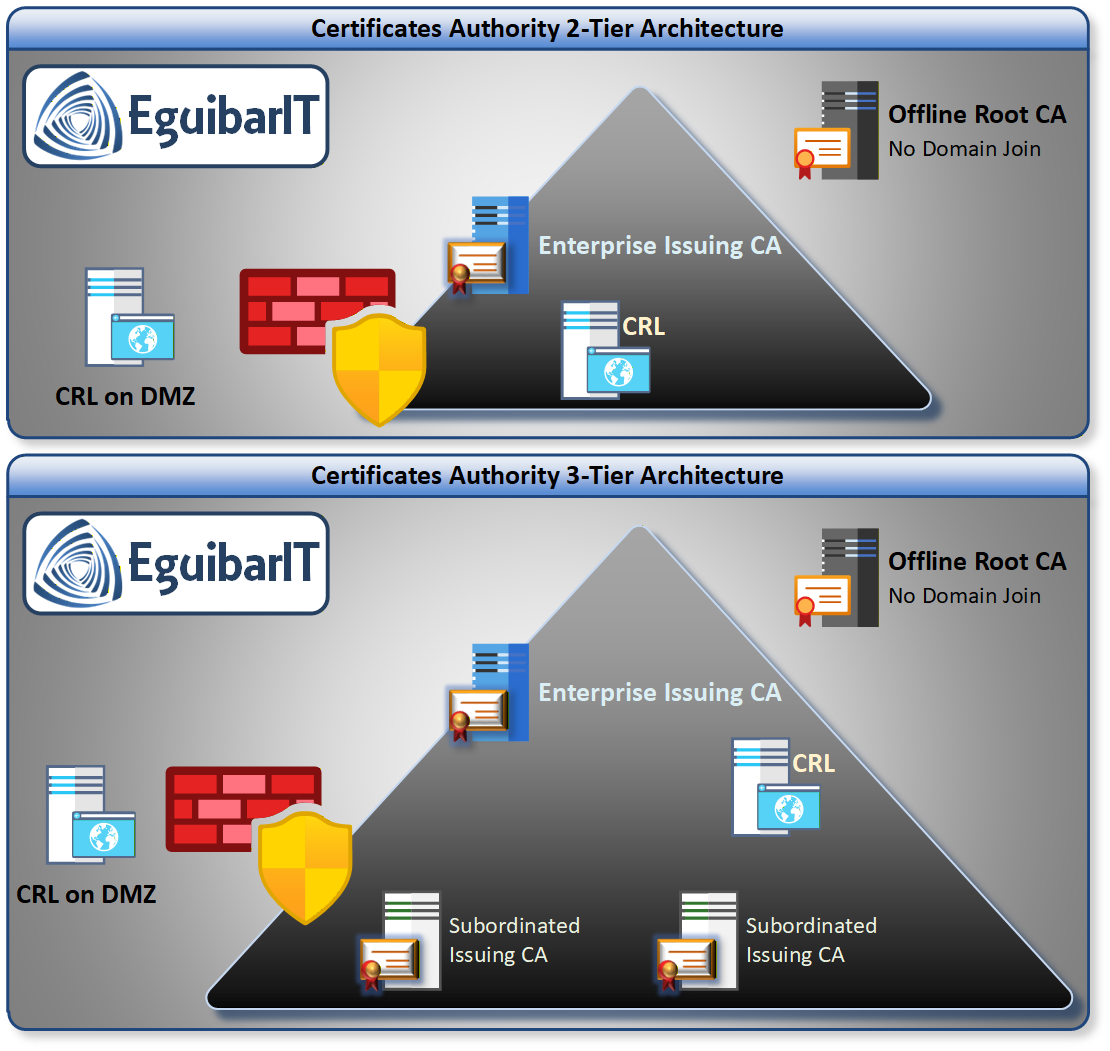
Choosing the right CA hierarchy is the most important design decision you will make. The hierarchy determines the blast radius if any CA is compromised, the operational complexity of day-to-day management, and the flexibility to issue certificates for different purposes and audiences.
Two-Tier Hierarchy (Recommended)
For the vast majority of enterprise environments, a two-tier hierarchy is the correct answer:
- Tier 1 — Offline Root CA: A standalone (not domain-joined) Windows Server that issues only the Issuing CA certificate and its own CRL. After initial setup, this server is powered off and stored offline (air-gapped). It is never connected to any network. Its role is to be the ultimate trust anchor for the forest.
- Tier 2 — Enterprise Issuing CA: A domain-joined Windows Server that is always online and issues certificates to users, computers, services, and domain controllers. This is the CA that enrollees interact with directly. You may have multiple Issuing CAs for availability or geographic distribution.
Key Design Principle: The Offline Root CA's certificate validity and CRL publication are the only things that require powering it on after initial setup — typically once every 6-12 months to publish a new CRL. All daily certificate operations run through the Issuing CA.
When Does Three-Tier Make Sense?
Three-tier hierarchies add a Policy CA between the Root CA and Issuing CAs. This is only justified when:
- You need to issue certificates to external parties and require separate certificate policies per issuing path
- You are operating under regulatory requirements (e.g., Federal PKI, WebTrust) that mandate a policy CA
- The organization has multiple separate business units that need independently operated PKIs under a shared root
For a typical enterprise AD environment, three-tier adds complexity and operational overhead with no security benefit. Stick with two-tier.
Planning & Design
Before installing a single role, answer these design questions. Changes to CA settings after deployment are difficult or impossible — cryptographic keys, CA names, and validity periods are baked into the CA certificate itself.
Cryptographic Settings
| CA Role | Algorithm | Key Length | Hash | Rationale |
|---|---|---|---|---|
| Offline Root CA | RSA | 4096-bit | SHA-256 | Long-lived trust anchor; higher key length for longevity |
| Enterprise Issuing CA | RSA | 2048-bit | SHA-256 | 2048 is the practical enterprise standard; ECDSA P-256 if all clients support it |
| Issued Certificates | RSA or ECDSA | 2048 / P-256 | SHA-256 | Match to client compatibility requirements |
Note: Do not use MD5 or SHA-1. Both are cryptographically broken. Windows Server 2025 will warn you if you attempt to use them. SHA-256 (SHA2) is the minimum accepted standard in all modern certificate validation stacks.
Validity Periods
| Certificate Type | Recommended Validity | Notes |
|---|---|---|
| Root CA certificate | 20 years | CA cert validity caps all downstream certs |
| Issuing CA certificate | 10 years | Must be < ½ of Root CA validity |
| Domain Controllers | 2-5 years | Auto-enrolled; Kerberos authentication |
| Computer certificates | 1-2 years | Auto-enrolled via Group Policy |
| User certificates | 1 year | Smart card, EFS, email signing |
| Web server (TLS) | 1 year | Browsers cap at 398 days for public trust |
| Code signing | 2-3 years | Must include RFC 3161 timestamping |
CRL & OCSP Planning
Certificate revocation is how you invalidate a compromised or expired certificate before its natural expiry. Two mechanisms exist:
- CRL (Certificate Revocation List): A signed list of revoked serial numbers, published periodically. Clients download the full list and cache it. Simple but can be large and stale.
- OCSP (Online Certificate Status Protocol): Clients query a real-time responder for the status of a specific certificate. Faster and more current, but adds an always-on infrastructure dependency.
For enterprise PKI, use both: CRL as the baseline (required by standards), and OCSP for your Issuing CA to reduce revocation check latency and CRL size for large deployments.
Publish CRL and AIA (Authority Information Access) URLs to an IIS web server — not just to LDAP. LDAP CDP/AIA works only for domain-joined devices. HTTPS publication is required for web servers, non-domain devices, and partner systems.
CA Naming
The CA Common Name (CN) is embedded in every certificate it issues and cannot be changed without re-issuing the entire CA. Choose carefully:
- Use a name that reflects your organization but is not overly specific to the
physical host or location:
Corp-RootCA,Corp-IssuingCA01 - Avoid including "Root", "Offline", or "Primary" — these hint at the role to attackers doing reconnaissance
- Do not use DNS hostnames (e.g.,
PKI-SRV01.corp.example.com) — if the server moves, the name becomes misleading - Keep names short and consistent with your organization's naming standard
Prerequisites & Requirements
Infrastructure Requirements
- Active Directory: Windows Server 2016+ domain and forest functional level. Schema version 87+ (Windows Server 2019 schema) recommended.
- Offline Root CA: Windows Server 2022 or 2025, standalone (workgroup), never domain-joined. Minimum: 2 vCPU, 4 GB RAM, 60 GB disk. No network adapter after initial setup.
- Enterprise Issuing CA: Windows Server 2022 or 2025, domain-joined. Minimum: 4 vCPU, 8 GB RAM, 100 GB disk (more for large environments). Static IP and FQDN. Must be a dedicated server — do not co-locate with domain controllers or other Tier 0 services.
- IIS Web Server (CDP/AIA/OCSP): A separate web server to host the CRL Distribution Point and AIA extension URLs. Can be an existing IIS server in a DMZ.
Permissions Required
Tier 0 Asset — Tier-Aware Permissions Required. Both the Root CA and the Enterprise Issuing CA are classified as Tier 0 assets under the Enterprise Access Model. Only dedicated Tier 0 admin accounts (never daily-use or Tier 1/2 accounts) may perform installation or configuration. This is enforced through the Delegation Model and the groups described below.
Installation-Time Privileges (One-Time)
- Root CA installation: Local Administrator on the Root CA server (standalone — no domain account needed or desired).
- Issuing CA installation: Schema Admin for the
initial AD schema extension and Enterprise Admin for publishing of the CA
object to the
CN=Configurationpartition. After installation, this privilege is surrendered — day-to-day CA management is handled through delegated groups. - AD CS schema extension: Performed automatically during
Issuing CA installation when run as Schema Admin. Extends the AD schema
with PKI-specific object classes and creates the
CN=Public Key Services,CN=Services,CN=Configurationcontainer.
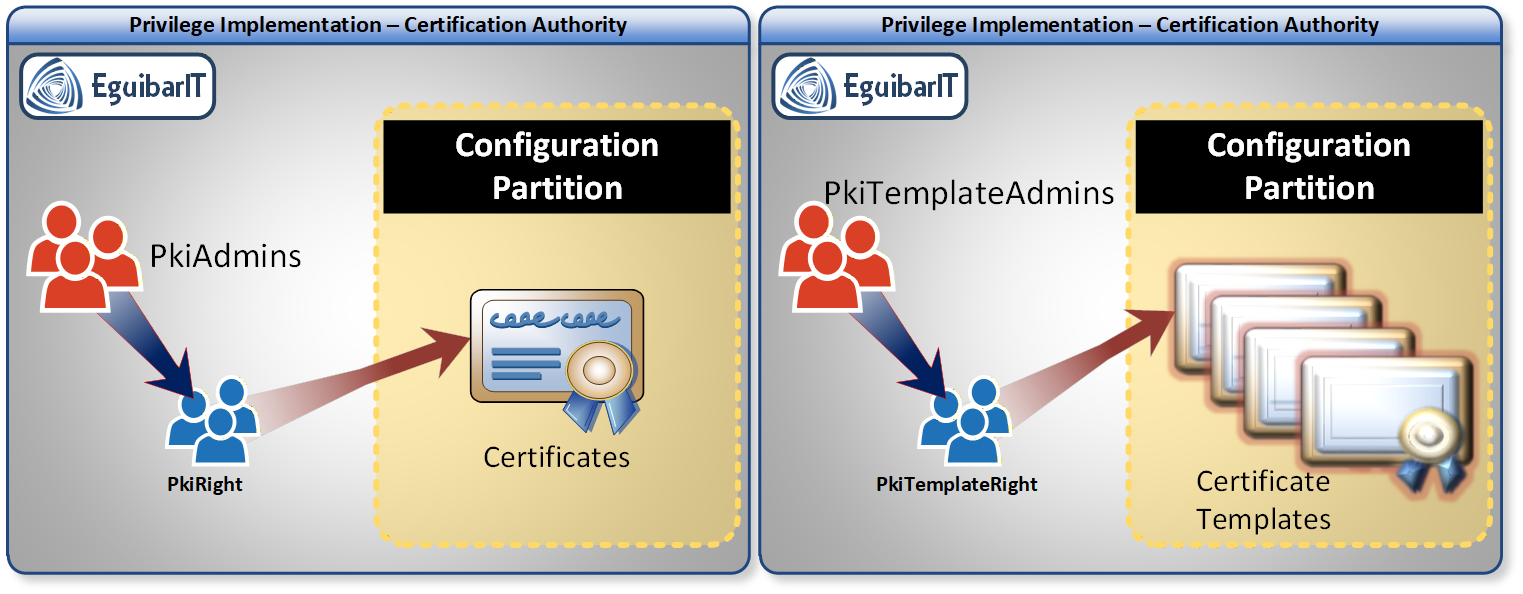
Ongoing Operational Permissions — Delegation Model Groups
After installation, the Enterprise Admin and Schema Admin roles must
not be used for routine PKI administration. Instead, the
Delegation Model defines
four role-specific groups that grant precisely scoped permissions through
the AGDLP nesting
pattern. These groups are created and wired up automatically by
New-CaObject
from the EguibarIT module (see below).
| Group | Scope | OU Location | Purpose |
|---|---|---|---|
SG_PkiAdmins |
Global | Privileged Groups OU (Tier 0 Admin area) | CA infrastructure administrators — full CA management rights |
SG_PkiTemplateAdmins |
Global | Privileged Groups OU (Tier 0 Admin area) | Certificate template administrators — manage and publish templates |
SL_PkiRight |
Domain Local | Rights OU | Resource ACL group — grants PKI CA management permissions |
SL_PkiTemplateRight |
Domain Local | Rights OU | Resource ACL group — grants certificate template management permissions |
The nesting chain follows the AGDLP pattern:
InfraAdmins(SG) →SG_PkiAdmins→SL_PkiRight→ CA management ACLsSG_PkiAdmins→SG_PkiTemplAdmins→SL_PkiTemplRight→ Template ACLsSG_PkiAdmins→ Cryptographic Operators (built-in) — required for KSP operations
All four groups receive the Fine-Grained Password Policy (PSO)
ItAdminsPSO, enforcing stricter password and lockout settings than the
Default Domain Policy. All four groups are also added to the
Denied RODC Password Replication Group, preventing PKI administrator
credentials from being cached on read-only domain controllers.
Windows PKI Built-In Role Principals — Separation of Duties
AD CS defines four distinct role principals that map to Windows rights on the CA server. Assigning them to separate groups prevents a single compromised identity from controlling both CA configuration and certificate issuance — a core separation of duties requirement for regulated environments (NIST SP 800-57, CIS Controls).
| AD CS Role Principal | Windows Right Required | What It Controls | Mapped AGDLP Group |
|---|---|---|---|
| CA Administrator | Manage CA | CA configuration, CRL settings, template publication, CA properties | SG_PkiAdmins → SL_PkiRight |
| Certificate Manager | Issue and Manage Certificates | Approve/deny pending requests, revoke and unrevoke certificates | Not yet mapped — see recommendation below |
| Template Administrator | Write access on template AD objects | Create, modify, and publish certificate templates in AD | SG_PkiTemplateAdmins → SL_PkiTemplRight |
| CA Auditor | Manage Audits and Security Log on the CA server | Configure and read CA audit logs; correlate with SIEM | Assign to your security/audit team group — kept separate from CA Administrator |
| CA Backup Operator | Back Up and Restore Files and Directories on the CA server | Back up and restore the CA database and private key material | Assign to a dedicated backup service account — never the same as CA Administrator |
Certificate Manager gap.
The current four AGDLP groups cover CA administration (SG_PkiAdmins)
and template management (SG_PkiTemplateAdmins), but there is no
dedicated group for the Certificate Manager role. Without it, CA
Administrators also hold Issue and Manage Certificates rights — meaning
the same account that configures the CA can also approve fraudulent certificate
requests and revoke legitimate ones without a second pair of eyes.
To implement full separation, extend the delegation model with two additional groups:
SG_PkiCertManagers(Global) — Certificate Manager role members; placed in the Privileged Groups OUSL_PkiCertManagerRight(Domain Local) — grants Issue and Manage Certificates on the CA; placed in the Rights OU
Grant Issue and Manage Certificates only to
SL_PkiCertManagerRight (not to SL_PkiRight), ensuring
that CA Administrators cannot unilaterally approve pending certificate requests.
Automating Installation and Delegation with New-CaObject
The
New-CaObject
cmdlet in the
EguibarIT PowerShell module
consolidates the entire Issuing CA deployment into a single, idempotent function.
It reads all naming conventions, OU paths, and CA settings from your organisation's
ConfigXML file — the same configuration file used by the rest of the
Delegation Model automation — ensuring that the PKI deployment is consistent with
the broader AD structure and requires no manual group creation or ACL editing.
The function performs ten phases automatically:
- Windows Feature install —
ADCS-Cert-Authority,ADCS-web-enrollment,ADCS-Online-Cert, RSAT tools, and the PSPKI module. - CAPolicy.inf generation and CA installation — type, crypto provider, key length, hash algorithm, validity, and DB paths all sourced from the ConfigXML.
- CDP and AIA configuration — removes defaults, adds local path,
LDAP, and HTTP publication points; sets
pki.<domain>as the HTTP base URL; creates the DNS CNAME record automatically. - CRL schedule tuning — CRL period, delta-CRL period, and overlap
period via
certutil -setreg. - CA audit enablement —
AuditFilter = 127(all nine event categories). - OCSP Online Responder — grants the CA computer account Read/Enroll on the OCSPResponseSigning template and publishes it.
- Delegation group creation — the four AGDLP groups above, hardened (Account Operators, Everyone, and Pre-Windows 2000 Compatibility access removed).
- PSO and RODC policy — applies
ItAdminsPSOand adds groups to Denied RODC Password Replication. - ACL delegation — calls
Set-AdAclPkiAdminandSet-AdAclPkiTemplateAdmin— both from the EguibarIT.DelegationPS module — to wire up the Domain Local groups to the correct AD objects. - Certificate template creation and publication — RemoteDesktopAuthentication, WindowsAdminCenter, WinRM, and Web Server V2 are created directly in AD and published to the CA as a reference.
What the function does — step by step
PHASE 1 — Windows Feature Installation
- Installs:
ADCS-Cert-Authority,ADCS-web-enrollment,ADCS-Online-Cert - On non-Core servers: RSAT-ADCS management tools
- Installs NuGet provider and the PSPKI PowerShell module
PHASE 2 — CAPolicy.inf + CA Installation
- Generates a
CAPolicy.infwith organisation-specific OID, validity, and CRL parameters derived from ConfigXML. - Calls
Install-AdcsCertificationAuthoritywith parameters from ConfigXML:-CAType(EnterpriseSubordinateCA)-CryptoProviderName(e.g. RSA#Microsoft Software Key Storage Provider)-KeyLength(e.g. 4096)-HashAlgorithmName(SHA256)-ValidityPeriodUnits(e.g. 5 years)-CACommonName(<DomainNetBIOSName>-CA)-DatabaseDirectory/-LogDirectory(C:\CaConfig\)
- Calls
Install-ADCSwebenrollmentfor the web enrollment role.
PHASE 3 — CDP, AIA, and CRL Configuration (via certutil)
- Removes all default distribution points (CDP + AIA).
- Adds:
- Local CDP:
C:\Windows\System32\CertSrv\CertEnroll\ - HTTP CDP:
http://pki.<domain>/CertEnroll/(published + delta) - HTTP AIA:
http://pki.<domain>/CertEnroll/
- Local CDP:
- Sets CRL schedule (period, delta period, overlap) from ConfigXML values.
- Enables full CA auditing (
AuditFilter = 127, all event categories). - Creates a DNS CNAME record
pkipointing to the Issuing CA's FQDN.
PHASE 4 — OCSP Online Responder
- Grants the CA computer account Read/Enroll on
OCSPResponseSigningtemplate. - Publishes the OCSP Response Signing template to the CA.
- Restarts the
CertSvcservice.
PHASE 5 — Delegation Model: AD Group Creation (AGDLP pattern)
- Creates FOUR hardened groups (
AccountOperators,Everyone,PreWin2000removed;ProtectedFromAccidentalDeletion = $true):- Global Groups — created in the Privileged Groups OU (Tier 0
Admin area):
SG_PkiAdmins— CA infrastructure administratorsSG_PkiTemplateAdmins— Certificate template administrators
- Domain Local Groups — created in the Rights OU (resource ACL
groups):
SL_PkiRight— Grants PKI CA management permissionsSL_PkiTemplateRight— Grants certificate template management permissions
- Global Groups — created in the Privileged Groups OU (Tier 0
Admin area):
PHASE 6 — Fine-Grained Password Policy
Applies ItAdminsPSO to all four PKI groups to enforce stronger passwords
and lockout policy than the Default Domain Policy.
PHASE 7 — Group Nesting (AGDLP wire-up)
InfraAdmins(SG) →SG_PkiAdmins→SL_PkiRight(CA rights)SG_PkiAdmins→SG_PkiTemplAdmins→SL_PkiTemplRight(Template rights)SG_PkiAdmins→ Cryptographic Operators (built-in group)
PHASE 8 — RODC Exclusion
Adds all four PKI groups to Denied RODC Password Replication Group so PKI administrator credentials are never cached on read-only DCs.
PHASE 9 — ACL Delegation
Set-AdAclPkiAdminon$SL_PkiRightin the Rights OUSet-AdAclPkiTemplateAdminon$SL_PkiTemplRight
PHASE 10 — Certificate Template Creation and Publication
Creates and publishes custom templates directly in AD
(CN=Certificate Templates):
RemoteDesktopAuthentication— secures RDP with certificatesWindowsAdminCenter— TLS for WAC gatewayWinRM— WinRM over HTTPSWeb Server V2— server authentication, SHA-512
Pre-Installation Checklist
- Time synchronization: both CA servers synced to domain time (NTP)
- DNS resolution: Issuing CA can resolve all domain controllers
- IIS web server prepared with a virtual directory for CRL/AIA publication
- CDP URL finalized (e.g.,
http://pki.corp.example.com/CRL/<CaName><CRLNameSuffix><DeltaCRLAllowed>.crl) - AIA URL finalized (e.g.,
http://pki.corp.example.com/AIA/<ServerDNSName>_<CaName><CertificateName>.crt) - USB drive prepared to transfer Root CA certificate and CRL to Issuing CA
Offline Root CA Setup
The Offline Root CA is a standalone Windows Server. It is never joined to the domain and is powered off after initial configuration. Its only job is to sign the Issuing CA certificate and periodically publish a CRL.
Phase 1: Install the AD CS Role
On the Root CA server, install the Certification Authority role without any additional role services (no Web Enrollment, no OCSP):
Standalone mode: The Root CA is configured as a Standalone CA (not Enterprise). It cannot be Enterprise because it is not domain-joined. This is by design — it keeps the trust anchor completely isolated from the domain.
Phase 2: CAPolicy.inf — Root CA Settings
Before running the CA configuration wizard, create a
CAPolicy.inf file in %SystemRoot%
(C:\Windows\CAPolicy.inf). This file sets cryptographic settings,
validity periods, and CRL parameters that cannot be changed after installation:
Phase 3: Configure the Root CA
Run the AD CS configuration wizard (or use PowerShell) to configure the standalone Root CA. Key settings:
- CA type: Standalone Root CA
- Key length: 4096-bit RSA
- Hash algorithm: SHA-256
- CA name (Common Name):
Corp-RootCA(or your naming standard) - Validity period: 20 years (set in CAPolicy.inf)
- Database location: Default or a dedicated volume
Phase 4: Post-Configuration Hardening
After installation, run the Root CA configuration script to set CRL publication extensions, lock down audit settings, disable unnecessary templates, and prepare the subordinate CA request file for transfer to the Issuing CA:
Critical: Take the Root CA Offline
After issuing the Issuing CA certificate and publishing the Root CA CRL, power off the Root CA server and store it securely (offline storage, access-controlled). The only time it should be powered on again is to:
- Publish a new Root CA CRL (every 6-12 months, before the current CRL expires)
- Issue a replacement Issuing CA certificate (rare)
- Renew the Root CA certificate (once every 10-15 years)
Enterprise Issuing CA Setup
The Enterprise Issuing CA is domain-joined, always online, and is what your users and computers interact with. Configuration is more complex because it integrates with Active Directory and requires CDP/AIA/OCSP URLs that are reachable by all clients.
Phase 1: CAPolicy.inf — Issuing CA Settings
Create CAPolicy.inf on the Issuing CA server before role installation.
Settings here control the CA's own certificate (issued by the Root CA), not the
end-entity certificates it will issue:
Phase 2: Install the CA Role and Request Subordinate CA Certificate
- Install the Active Directory Certificate Services role with the Certification Authority role service
- Configure as Enterprise Subordinate CA
- Generate the CA certificate request (
.reqfile) - Transfer the
.reqfile to the Offline Root CA via USB - On the Root CA, approve and issue the subordinate CA certificate
- Transfer the issued certificate (
.cer) back to the Issuing CA via USB - Complete the CA installation by importing the issued certificate
Phase 3: Configure CDP, AIA, and OCSP Extensions
After the CA is configured, set the CDP (CRL Distribution Point) and AIA (Authority Information Access) extensions to use your HTTPS web server URL. Remove the default LDAP-only CDP/AIA — these do not work for non-domain-joined clients:
Phase 4: Configure CRL Publication Settings
| Setting | Root CA | Issuing CA |
|---|---|---|
| CRL validity period | 6 months | 7 days |
| CRL overlap (next publish) | 4 weeks | 4 days |
| Delta CRL | Disabled | 1 day (optional) |
| Publish to LDAP | No (offline) | Yes + HTTPS |
| Publish to HTTP | Yes (via USB) | Yes (auto) |
Certificate Templates
Certificate templates define what certificates are issued, to whom, and with what attributes. Poor template design is the root cause of the majority of AD CS privilege escalation vulnerabilities (ESC1-ESC4).
Default Templates: Disable What You Don't Need
Windows Server ships with 30+ built-in certificate templates. Most enterprise environments use fewer than 10. Disable every template that is not actively used. Enabled templates are an attack surface — even if no certificates have been issued from them recently.
Essential Templates for Enterprise AD
| Template Name | Purpose | Who Enrolls | Validity |
|---|---|---|---|
| Domain Controller Authentication | DC Kerberos authentication (PKINIT) | Domain Controllers (auto-enroll) | 2 years |
| Kerberos Authentication | Kerberos auth for DCs | Domain Controllers (auto-enroll) | 2 years |
| Computer | Machine authentication, IPsec | Domain Computers (auto-enroll) | 1 year |
| User | EFS, email signing | Domain Users (auto-enroll) | 1 year |
| Web Server | TLS for internal web services | Administrators (manual) | 1 year |
| Code Signing | PowerShell script signing | Administrators (manual) | 2 years |
Secure Template Design Rules
Security Rules for All Templates
- Never enable CT_FLAG_ENROLLEE_SUPPLIES_SUBJECT (Supply Subject in the Request) unless absolutely required. This flag is the root cause of ESC1.
- Remove the Any Purpose EKU from all templates. Use explicit, minimal EKUs (Client Authentication, Server Authentication, etc.).
- Restrict enrollment to specific security groups — never to Domain Users, Domain Computers, or Authenticated Users for sensitive templates.
- Enable Manager Approval for high-value templates (Web Server, Code Signing) to prevent self-service issuance.
- Review ACLs on every template in the
CN=Certificate Templates,CN=Public Key Services,CN=Services,CN=Configurationcontainer. WriteDACL or WriteOwner for low-privilege groups is ESC4.
Security Hardening: ESC1-ESC16 Mitigations
The ESC (Escalation via Certificate) vulnerability classes — originally documented by SpecterOps in 2021 (ESC1-ESC8) and extended by the community through 2023-2024 (ESC9-ESC16) — describe the most common AD CS attack paths. Below is a concise reference with the mitigation for each. For detection, use the AD CS Templates Audit Script, which checks your environment against ESC1-ESC16 patterns.
| ESC # | Description | Mitigation |
|---|---|---|
| ESC1 | Template allows enrollee-supplied SAN + Client Auth EKU + low-privilege enrollment | Remove CT_FLAG_ENROLLEE_SUPPLIES_SUBJECT flag from all
templates |
| ESC2 | Template has Any Purpose EKU + low-privilege enrollment | Remove Any Purpose EKU; use explicit EKUs only |
| ESC3 | Template has Certificate Request Agent EKU + low privilege; used to enroll on behalf of another user | Restrict enrollment on Certificate Request Agent templates; enable Manager Approval |
| ESC4 | Template ACL grants WriteDACL, WriteOwner, or WriteProperty to low-privilege accounts | Audit and remove dangerous ACEs from template objects in AD |
| ESC5 | CA container object in AD has vulnerable ACL (non-admins control the CA object) | Review ACL on
CN=Public Key Services,CN=Services,CN=Configuration container
|
| ESC6 | CA has EDITF_ATTRIBUTESUBJECTALTNAME2 flag set — allows
attacker to specify SAN in any CSR |
Disable the flag:
certutil -setreg policy\EditFlags -EDITF_ATTRIBUTESUBJECTALTNAME2
|
| ESC7 | Non-admin has Manage CA or Issue and Manage Certificates rights on the CA | Restrict CA management rights to dedicated Tier 0 admin groups only |
| ESC8 | CA's enrollment service supports NTLM auth over HTTP (enables NTLM relay to get a certificate) | Require HTTPS for all enrollment endpoints; enable Extended Protection for Authentication (EPA) |
| ESC9 | Template has NO_SECURITY_EXTENSION flag — issued certificate
does not embed the requester's SID |
Remove the flag; ensure all templates embed SID (default in patched environments) |
| ESC10 | Weak certificate mapping in Kerberos allows certificate from one user to authenticate as another | Apply KB5014754 and enforce Full Enforcement mode for certificate-based authentication |
| ESC11 | CA RPC interface (MS-ICPR) does not enforce packet encryption or signing — enables NTLM relay directly over RPC (no HTTP required), bypassing the ESC8 HTTP-focused mitigations | Enable encryption on the CA RPC interface:
certutil -setreg CA\InterfaceFlags +IF_ENFORCEENCRYPTICERTREQUEST,
then restart CertSvc
|
| ESC12 | CA key archival is enabled — an attacker who gains CA Administrator or Certificate Manager rights can retrieve archived private keys for any certificate ever issued by this CA | Disable key archival unless strictly required by policy; restrict access to the Key Recovery Agent (KRA) certificate to a dedicated, audited role; audit all KRA-enabled templates |
| ESC13 | Template carries an OID issuance policy
(msPKI-RA-Policies attribute) linked to an AD group —
enrolling for the certificate implicitly grants the holder that group's
membership during authentication, enabling privilege escalation if the
linked group has elevated rights |
Audit all published templates for OID-group links
(msPKI-RA-Policies); remove issuance policy OIDs unless
required and reviewed; restrict enrollment on affected templates |
| ESC14 | Weak certificate-to-account mapping enforcement — an attacker who controls a target user's UPN or DNS SAN attribute can obtain a certificate that maps to a different (potentially privileged) account during Kerberos authentication | Apply KB5014754 and set
StrongCertificateBindingEnforcement=2 (Full Enforcement)
on all domain controllers
|
| ESC15 | Template uses schema version 1
(msPKI-Template-Schema-Version = 1) — allows EKU injection
via Application Policies in the CSR; the CA issues a certificate carrying
EKUs not defined in the template, enabling authentication or code-signing
abuse that should be blocked |
Upgrade all published templates to schema version 2 or higher; audit and unpublish any remaining schema version 1 templates that are not in active use |
| ESC16 | CA-level configuration globally disables the
szOID_NTDS_CA_SECURITY_EXT SID extension
(OID 1.3.6.1.4.1.311.25.2) — equivalent to ESC9 applied
to every certificate issued by the CA; none of the issued certificates
embed the requester's SID, enabling account-mapping abuse
|
Verify the SID extension OID is not in the CA's
DisableExtensionList:
certutil -getreg CA\DisableExtensionList;
remove it if present and restart CertSvc
|
CA-Level Hardening Settings
- Audit all CA events: Enable audit logging for certificate requests, issuance, revocation, and CA configuration changes. Pipe to SIEM.
- Restrict CA management: Only Tier 0 admin accounts should have Manage CA or Issue and Manage Certificates rights. Remove Domain Admins if not operating in tiered model.
- Disable Web Enrollment: The legacy CERTSRV web enrollment page is the primary target for ESC8. Disable it unless explicitly required.
- Enable HTTPS-only for CES/CEP: If using Certificate Enrollment Policy and Service, enforce HTTPS with EPA.
- Firewall the CA: The Issuing CA should accept enrollment requests only from domain-joined devices. RPC port 135 + dynamic ports (or 49152-65535). No direct internet access.
- CA server Tier 0 hardening: Apply all AD Hardening Checklist controls to the CA server itself — it is a Tier 0 asset.
PowerShell Automation
Manual GUI configuration is error-prone and not repeatable. The scripts below automate the most important AD CS operations. All scripts are externalized as plain-text files and have been tested against Windows Server 2022 and 2025.
Script 1: Configure Root CA Post-Installation
Sets CRL validity, publication paths, audit settings, and disables unused templates on the Offline Root CA. Run on the Root CA server after role installation:
Script 2: Configure Enterprise Issuing CA
Configures CDP/AIA extensions, CRL settings, audit policy, OCSP enrollment, and template assignments on the Enterprise Issuing CA. Run after the subordinate CA certificate has been installed:
Script 3: Audit Certificate Templates for ESC Vulnerabilities
Scans all enabled certificate templates and the CA configuration for ESC1-ESC16 misconfigurations. Outputs findings to CSV and JSON for SIEM ingestion or compliance reporting. This script should run weekly as a scheduled task:
See also: The dedicated AD CS Templates Audit Script page for the full script reference and usage examples.
Operations & Maintenance
Each task is tracked in the Operations Housekeeping Schedule by frequency.
Daily PKI Tasks
| # | Name | Description | Task | Impact Definition | Automated |
|---|---|---|---|---|---|
| 1 | Verify CRL Validity | Confirm the Issuing CA CRL has not expired and is reachable at all CDP URLs. | Run
certutil -url http://pki.<domain>/CertEnroll/<CA>.crl.
Alert if NextUpdate is <48 h. Verify IIS CDP returns HTTP 200.
|
An expired CRL causes every certificate from this CA to fail validation enterprise-wide — breaking Kerberos PKINIT, LDAPS, TLS, and smart card logon. Early detection allows an emergency CRL publish before expiry. | Yes — scheduled PowerShell monitors CRL NextUpdate and alerts on threshold breach |
| 2 | Verify OCSP Responder Health | Confirm the OCSP responder is online and returning valid, signed responses for recently issued certificates. | Run certutil -url http://pki.<domain>/ocsp against a
recently issued certificate. Verify response status is Good and
signature valid. Check IIS OCSP virtual directory availability. |
OCSP failure degrades revocation checking for all relying parties. Applications requiring OCSP stapling silently reject valid certificates. Early detection limits user-visible impact. | Yes — automated availability probe via monitoring platform or scheduled task |
Weekly PKI Tasks
| # | Name | Description | Task | Impact Definition | Automated |
|---|---|---|---|---|---|
| 1 | Certificate Template ESC Audit | Scan all published certificate templates for ESC1-ESC10 vulnerability patterns to detect misconfigurations before exploitation. | Run the AD CS Templates Audit Script. Review output for ESC-flagged templates. Remediate immediately; document accepted exceptions with business justification. | A single misconfigured template can allow privilege escalation from Domain User to Domain Admin. Weekly cadence catches templates added outside change management before exploitation. | Yes (scheduled task running audit script; review manual) |
| 2 | Review Issued Certificate Log | Inspect the CA issued-certificate log for anomalies — unexpected templates, unusual requesters, or high-volume issuance indicating abuse. | Run
certutil -view -restrict "Disposition=20" -out "RequesterName,CertificateTemplate,NotAfter"
or query via SIEM. Flag requests from non-standard accounts or sensitive
templates (Web Server, Code Signing).
|
Detects certificate abuse and ESC exploitation in progress. Provides audit evidence for compliance. No operational impact during review. | Partial (certutil / SIEM query automated; anomaly review manual) |
| 3 | Review CA Security Audit Events | Review CA security audit events for certificate requests (4886), issuance (4887), denials (4888), revocations (4890), and CA configuration changes (4896). | Query SIEM or the Security event log on the CA server for Event IDs 4886-4896. Alert on high request volume, sensitive-template issuance to unexpected accounts, or configuration changes outside the change window. | CA audit events provide the forensic trail for CA misuse.
AuditFilter = 127 (enabled by New-CaObject) logs
all event categories. Weekly review catches slow-burn attacks before
significant damage occurs.
|
Partial (SIEM query automated; investigation manual) |
| 4 | Backup CA Database and Private Key | Create a verified backup of the CA database and private key material to ensure recoverability from CA server failure. | Run certutil -backupDB <path>. Back up the CA private key
via the CA management console or HSM export procedure. Verify backup
integrity. Store an offline copy in an access-controlled location. |
Without a valid CA backup, recovery from hardware failure requires issuing a new CA certificate and re-enrolling all clients. Weekly backup limits RPO to 7 days. The private key is a Tier 0 secret — handle accordingly. | Yes (certutil scheduled backup; key backup manual per HSM procedure) |
Monthly PKI Tasks
| # | Name | Description | Task | Impact Definition | Automated |
|---|---|---|---|---|---|
| 1 | Review Auto-Enrollment Failures | Identify endpoints that failed to auto-enroll or renew certificates — failures that silently break authentication and TLS. | Query the Certificate Services event log for Event IDs 13 (auto-enroll failed) and 21 (renewal failed). Cross-reference with the CA issued log to find systems with no recent enrollment. Investigate and remediate per system. | Auto-enrollment failures leave systems with expired certificates, causing Kerberos PKINIT, LDAPS, and 802.1X failures that surface as intermittent authentication issues. Monthly review catches accumulation before it becomes widespread. | Partial (event log query automated; per-system remediation manual) |
Semi-Annual PKI Tasks
| # | Name | Description | Task | Impact Definition | Automated |
|---|---|---|---|---|---|
| 1 | Root CA CRL Publication | Power on the offline Root CA, publish a fresh CRL to all distribution points, then power it off and return it to secure offline storage. | 1. Power on Root CA (air-gapped — no network). 2. Publish new CRL:
certutil -crl. 3. Copy CRL to USB. 4. Transfer to IIS server
and LDAP publication point. 5. Verify CRL accessible at all CDP URLs and
that NextUpdate covers the next 12 months. 6. Power off and store Root CA
securely.
|
Expired Root CA CRL invalidates the entire trust chain — all Issuing CA certificates fail validation simultaneously, causing a catastrophic forest-wide outage. Publishing every 6 months with a 12-month validity window provides a safety margin. Physical access controls and the full procedure must be documented and tested. | No — manual procedure requiring physical access to offline Root CA media |
Annual PKI Tasks
| # | Name | Description | Task | Impact Definition | Automated |
|---|---|---|---|---|---|
| 1 | CA Certificate Renewal Planning | Review all CA certificate expiry dates and plan renewal at least 12 months before expiry to allow adequate preparation and testing time. | Check CA certificate expiry:
certutil -verify -urlfetch <CA-cert.crt>. If any CA
certificate expires within 12 months, initiate the renewal procedure (same
key or new key). For the Issuing CA, plan the Root CA power-on event to sign
the renewed certificate.
|
CA certificate expiry is the most severe PKI failure — every certificate issued by that CA is simultaneously invalidated. Planning 12 months ahead allows time to test the new CA certificate, update GPO auto-enrollment settings, and communicate with application teams. | Yes — expiry monitoring automated; renewal procedure manual |
Key Event IDs to Monitor
| Event ID | Source | Meaning | Action |
|---|---|---|---|
| 4886 | Security | Certificate was requested | Baseline / alert on unusual volume or templates |
| 4887 | Security | Certificate was issued | Alert if a sensitive template (Web Server, Code Signing) was issued to an unexpected account |
| 4888 | Security | Certificate request denied | Investigate repeated denials from the same account |
| 4890 | Security | Certificate Manager settings changed | Alert — Tier 0 change; correlate with change ticket |
| 4895 | Security | CA certificate published to AD DS | Alert — unexpected CA publication is a red flag |
| 4896 | Security | One or more rows deleted from the CA database | Alert — unexpected deletions may indicate CA tampering or evidence destruction; correlate with change ticket |
| 13 / 21 | Cert Services Client | Auto-enrollment failure | Investigate template permissions or CA connectivity |
Backup and Recovery
AD CS private key loss is catastrophic — it requires re-issuing all certificates from a new CA. Protect the CA private key as a Tier 0 asset:
- CA database backup: Use
certutil -backupDB <path>daily. Backup includes all issued certificate records. - Private key backup: Use
certutil -backupKey <path>to export the CA private key. Store in an HSM or an encrypted offline vault — never on a domain-joined file server. - Backup both Root CA and Issuing CA independently. The Root CA backup is your ultimate recovery artifact.
- Test restore procedures annually in a lab environment to verify backup integrity.
Hardware Security Module (HSM) Recommendation
Use an HSM for CA private keys in any regulated or high-security environment. A software-stored CA private key on a Windows Server can be exported, stolen from a backup, or extracted via memory attacks (e.g., lsass dump, hypervisor snapshot). An HSM stores the key in tamper-resistant hardware — the key is generated inside the HSM and never exists in exportable form.
| Storage Option | Key Exportable? | FIPS 140-2 Compliant? | Suitable For |
|---|---|---|---|
| Software KSP (default) | Yes — exportable via certutil -backupKey |
No | Lab / low-risk environments only |
| vTPM (Hyper-V or VMware) | No — bound to the VM | Partial (TPM 2.0) | Good baseline for virtualised CAs; does not survive VM migration without explicit TPM backup |
| Physical TPM (on bare-metal CA) | No — bound to the hardware | Yes (TPM 2.0, FIPS 140-2 Level 2) | Recommended for Enterprise Issuing CA when HSM is not feasible |
| Network HSM (nCipher, Thales, Utimaco) | No — never leaves HSM boundary | Yes (FIPS 140-2/3 Level 3) | Recommended for Root CA and any CA in PCI-DSS, HIPAA, or Federal PKI scope |
To configure an HSM as the CA key storage provider, specify the HSM's
KSP name during CA installation
(-CryptoProviderName parameter in
Install-AdcsCertificationAuthority) or in the
CAPolicy.inf. Most HSM vendors supply a Windows KSP driver that
integrates natively with AD CS. Refer to your HSM vendor's AD CS integration
guide and
Microsoft Learn: AD CS Cryptographic
Provider configuration for the specific steps.
Root CA key storage: Because the Offline Root CA is powered off and air-gapped, a physical TPM on the Root CA hardware provides a practical FIPS-compliant option without the cost and complexity of an HSM for most enterprise environments. Combine with full-disk encryption (BitLocker + TPM + PIN) and physical access controls for the storage media.
References & Related Articles
Related Articles on This Site
- Five Eyes: AD CS Compromise (Attack #7) — Attack details, indicators, and detection
- AD CS Templates Audit Script — ESC1-ESC16 automated detection script
- AD Hardening Checklist — Tier 0 hardening controls including PKI server hardening
- Enterprise Access Model — CA servers as Tier 0 assets
- Building Admin Area (Tier 0) — Tier 0 OU structure and CA server placement
- Credential Theft Defenses — How PKINIT abuse relates to credential theft