Overview
Credential theft is the root cause of most Active Directory compromises. Once an attacker extracts credentials from a compromised workstation, they move laterally using those credentials to gain deeper access until they reach domain-wide control. This article explains the full attack chain, shows exactly how each defense breaks a step in that chain, and provides production-ready PowerShell automation to implement and validate the controls.
We've implemented these defenses in dozens of enterprises. The article includes war stories from real incidents, specific GPO settings that work (and the ones that break applications), and a phased rollout approach tested in both quick-win scenarios and multi-year enterprise programs.
The Credential Theft Kill Chain
Before jumping to solutions, let's map the full attack sequence. Understanding each step helps you prioritize defenses and explain to stakeholders why each control matters. This is the pattern we've seen in dozens of post-incident forensics:
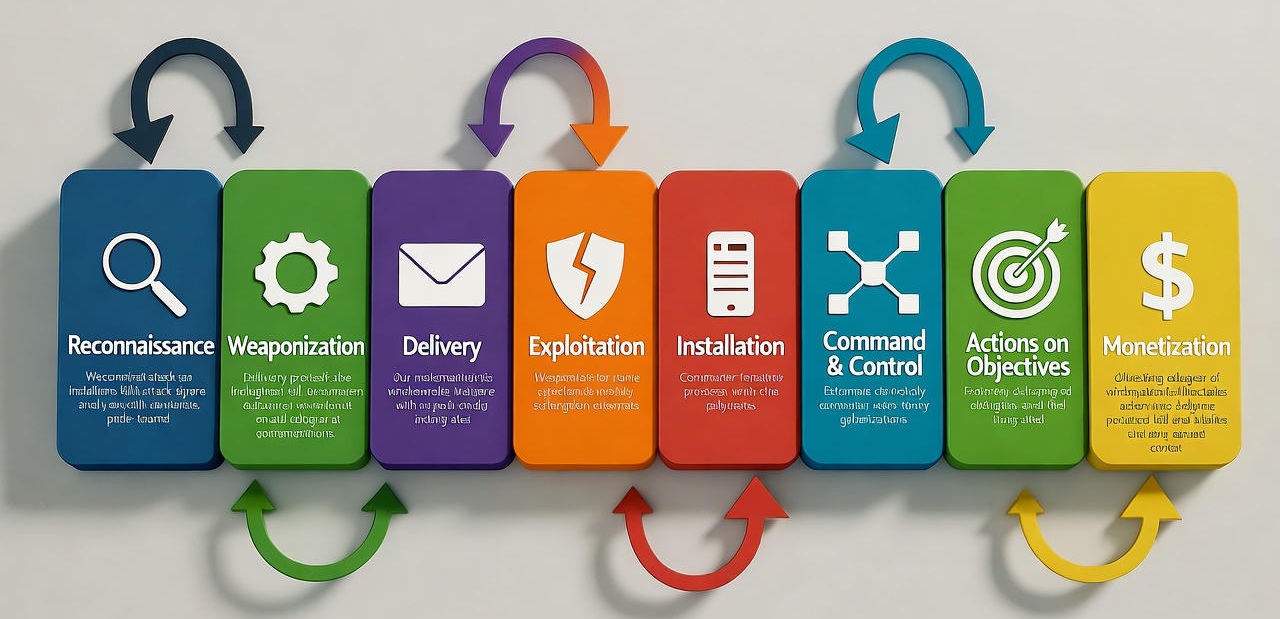
Step 1: Initial Compromise → Credential Extraction
An attacker compromises a workstation (phishing, vulnerability, weak password). They immediately dump credentials from LSASS memory using Mimikatz, ProcDump, or native tooling. What they extract:
| Credential Type | What it enables | Primary defense |
|---|---|---|
| NTLM hash | Pass-the-Hash: authenticate to any service accepting NTLM without knowing the password | Reduce/eliminate NTLM authentication |
| Kerberos TGT | Pass-the-Ticket: impersonate user for ticket lifetime (default 10 hours) | Credential Guard + shorter ticket lifetimes |
| Kerberos service ticket | Silver Ticket: forge service access if service account hash is known | PAC validation + gMSA (rotating passwords) |
| Plaintext password | Full account access, credential reuse across systems | LSA Protection + WDigest disabled |
War story: In a 2023 incident, an attacker compromised a developer workstation. Within 8 minutes, they dumped 47 NTLM hashes including a domain admin who had RDP'd to that machine months earlier. Why? LSASS cached every authentication. LSA Protection would have prevented this — memory dumps would fail without kernel-mode access.
Step 2: Lateral Movement
With credentials in hand, attackers scan the network for high-value targets. They use legitimate tools (PsExec, WMI, PowerShell Remoting) and stolen credentials to move machine-to-machine. Each hop exposes more credentials until they reach a Tier 0 system (domain controller, ADFS, PAW).
The Tier Model exists specifically to limit lateral movement: Tier 2 credentials should never touch Tier 0 systems, so even if compromised, they can't directly reach domain-wide control. Lateral movement is such a critical topic that we're preparing a dedicated article — it will cover network segmentation, JEA (Just Enough Admin), LAPS (Local Admin Password Solution), and credential tiering enforcement. For now, understand that NTLM and delegation abuse are the primary enablers of lateral movement.
Step 3: Privilege Escalation & Persistence
Once inside Tier 0, attackers create backdoors: add rogue domain admins, modify AdminSDHolder, create Golden Tickets, or deploy scheduled tasks. At this stage, remediation requires forest-wide password resets and extensive forensics. The goal of this article is to prevent attackers from reaching Step 3.
Defense Strategy: Tier Model & Delegation Model Integration
The Tier Model determines where controls are applied and how strictly. Understanding tiering is essential because it tells you which systems justify aggressive hardening (accept some application compatibility risk) versus which systems need a gentler rollout. Here's the practical interpretation:
| Tier | What it protects | Hardening stance | Example controls |
|---|---|---|---|
| Tier 0 | Domain controllers, ADFS, CA servers, PAWs | Strictest: AES-only, NTLM deny, no legacy protocols | Disable RC4 immediately; enforce Credential Guard; audit every authentication |
| Tier 1 | Member servers, application servers, infrastructure services | Balanced: AES preferred, NTLM audit → restrict → deny over 6-12 months | Pilot RBCD here; phase out legacy apps or isolate them |
| Tier 2 | End-user workstations, BYOD, kiosks | Pragmatic: focus on preventing credential caching (LSA Protection); allow NTLM where legacy devices exist | Deploy LAPS; enforce Credential Guard on Windows 10+ workstations |
The Delegation Model (read the full article) defines how service accounts are permitted to act on behalf of users. Traditional "unconstrained delegation" allows any service to impersonate any user to any resource — a massive security hole. The solution is Resource-Based Constrained Delegation (RBCD), which we'll explain next.
Resource-Based Constrained Delegation (RBCD) Explained
Delegation allows a service (like an IIS web server) to authenticate to another service (like SQL Server) on behalf of a user, without the user giving their credentials to the front-end service. The problem: legacy delegation models create security risks. RBCD is the secure, modern approach.
The three delegation models
| Delegation type | How it works | Risk | When to use |
|---|---|---|---|
| Unconstrained | Service can impersonate user to any resource in the forest | ❌ Critical: If the service is compromised, attacker gains user's full privileges forest-wide | Never. Eliminate all instances immediately. |
| Constrained (traditional) | Service can delegate to a pre-defined list of SPNs, configured on the service account | ⚠️ Moderate: Requires elevated privileges to configure; harder to audit | Legacy compatibility only. Migrate to RBCD. |
| Resource-Based Constrained | Resource controls who can delegate to it via
msDS-AllowedToActOnBehalfOfOtherIdentity attribute
|
✅ Low: Resource owner controls delegation; no domain-admin rights needed; easier to audit | Default for all new delegation scenarios |
Real-world scenario: IIS → SQL delegation
You have an IIS application pool running as svc_WebApp that needs to query
SQL
Server
SQL01 using the end-user's identity (not the service account's identity).
This
is a
classic delegation scenario. Here's how to implement it securely with RBCD:
Step 1: On the resource (SQL01), grant svc_WebApp
permission to delegate:
Step 2: Verify the configuration:
# Query the resource to see who can delegate to it
Get-ADComputer SQL01 -Properties msDS-AllowedToActOnBehalfOfOtherIdentity

# The output will show svc_WebApp has GenericAll rights
Why this is better: The SQL server owner controls delegation. If you need to revoke it, you modify SQL01's properties, not the service account. If the web server is compromised, the attacker can only delegate to SQL01 — not to domain controllers or other Tier 0 systems.
A client had 200+ service accounts with unconstrained delegation. An attacker compromised one web server and immediately had domain admin access because a DA had authenticated to that server in the past. We spent 6 months migrating every service to RBCD. The script we used is included below — it scans for unconstrained delegation and generates RBCD migration commands.
Practical rollout pattern
Now that you understand the attack chain and the role of RBCD, here's the phased rollout we use. This balances security improvement with operational safety. Each phase includes validation gates to ensure you don't break production.
| Phase | Action | Validation | Rollback |
|---|---|---|---|
| Discover | Inventory service accounts and client compatibility; capture NTLM/Kerberos telemetry | Coverage ≥ 95% of Tier 0/1 services mapped | None — discovery only |
| Pilot | Apply AES-only and NTLM-audit in a pilot OU (Tier 1 hosts) | No high-severity failures; service owners sign-off | Revert GP in pilot OU; re-target pilot hosts |
| Enforce | Move from audit to restrict/deny per service; deploy RBCD | Telemetry shows < 0.5% failed authentications attributable to policy change | Fallback GPO with exception OU; documented rollback runbook |
| Harden | Remove legacy protocols, tighten account protections, enable LSA protections | Periodic compliance scan passes; no business-impact incidents | Restore saved baseline configs and re-run validation |
Kerberos Hardening: Disable RC4 & Enable PAC Validation
Kerberos is the authentication protocol Windows prefers, but its default configuration includes legacy weaknesses. RC4 encryption is cryptographically weak (vulnerable to offline brute-force), and without PAC validation, attackers can forge service tickets. Here's how to harden it properly.
Understanding Kerberos encryption types
Every Kerberos ticket is encrypted. The msDS-SupportedEncryptionTypes
attribute
on accounts
controls which algorithms are negotiated. The bitmask values:
| Value | Algorithm | Security | Recommendation |
|---|---|---|---|
| 0x01 | DES-CBC-CRC | ❌ Broken (56-bit key) | Disable immediately |
| 0x02 | DES-CBC-MD5 | ❌ Broken (56-bit key) | Disable immediately |
| 0x04 | RC4-HMAC | ⚠️ Weak (128-bit, vulnerable to brute-force) | Phase out; required for pre-2008 systems only |
| 0x08 | AES128-CTS-HMAC-SHA1-96 | ✅ Strong | Minimum acceptable standard |
| 0x10 | AES256-CTS-HMAC-SHA1-96 | ✅ Strongest | Preferred for Tier 0/1 systems |
Step 1: Audit current encryption type usage
Before making changes, identify which accounts and services still use RC4. Run this inventory script:
What breaks when you disable RC4: Pre-Windows Server 2008 systems, some network appliances (older F5 load balancers, NetApp filers), and poorly-coded applications that hard-code RC4. We've seen Java applications from the mid-2000s fail. The fix: update the application or isolate it in a legacy OU with an exception policy.
Step 2: Configure GPO to enforce AES-only
Apply this Group Policy setting in a pilot OU (Tier 1 servers recommended for first wave):
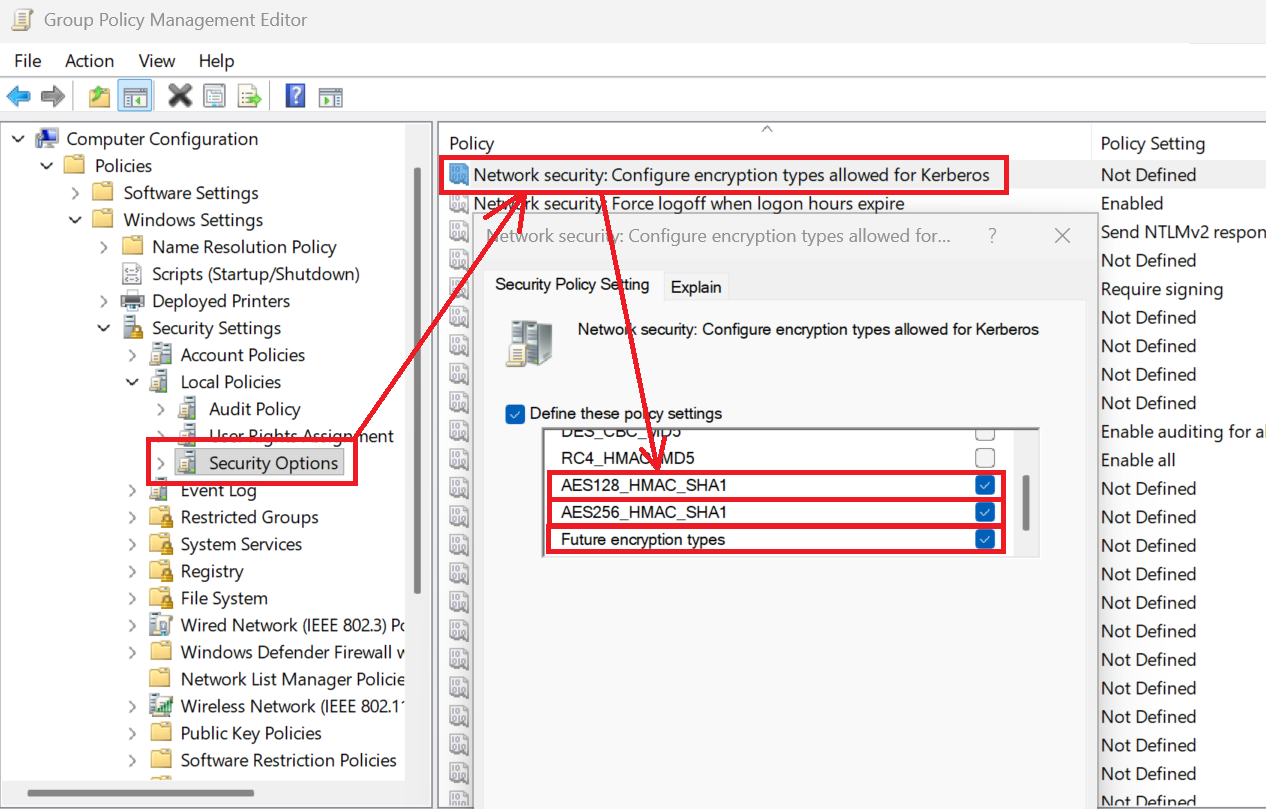
Alternatively, configure via PowerShell and registry (useful for DSC or automated deployment):
Step 3: Enable PAC validation
The Privilege Attribute Certificate (PAC) is a data structure inside Kerberos tickets that lists the user's group memberships. Without validation, attackers can forge a PAC claiming domain admin membership (Silver Ticket attack).
To enable PAC (Privilege Attribute Certificate) validation in Windows, ensure all domain controllers are updated to at least the November 8, 2022 update, and then use the PACRequestorEnforcement registry key to enable enforcement mode.
Enable PAC validation and signature enforcement:
War story: A penetration test in 2024 demonstrated Silver Ticket abuse on a client's network. The tester extracted the SQL service account hash (weak password) and forged a service ticket with Domain Admins group membership. PAC validation was disabled. Result: instant domain admin. We enabled PAC validation forest-wide; the same attack now fails with "KDC_ERR_BADOPTION" errors.
Step 4: FAST (Flexible Authentication Secure Tunneling)
FAST provides a security enhancement for the Kerberos protocol that uses a secure tunnel to protect initial authentication messages from interception. Also known as Kerberos armoring, FAST creates a protected channel between a client and the Key Distribution Center (KDC) using an "armored key," which is an extra encryption key generated during host machine authentication. This protects sensitive data like password hashes and strengthens the overall authentication process, especially for use with other technologies like two-factor authentication and Dynamic Access Control (DAC). It protects against password-guessing attacks and eavesdropping. It requires Windows 8.1 / Server 2012 R2 or later on both client and domain controller.
FAST is rarely the blocker in real-world deployments. If you've upgraded to Server 2016+ domain controllers and Windows 10+ clients, enable it. Legacy systems will gracefully fall back.
NTLM Reduction: The Complete Operational Playbook
NTLM is the legacy authentication protocol that enables Pass-the-Hash attacks. Unlike Kerberos (which uses tickets), NTLM sends password hashes over the network. If an attacker intercepts or extracts an NTLM hash, they can authenticate as that user indefinitely — no password needed. Our goal: reduce NTLM to near-zero, then deny it entirely except for documented exceptions.
Why NTLM is dangerous
| Attack | How NTLM enables it | Real-world impact |
|---|---|---|
| Pass-the-Hash | NTLM hash is the credential; no plaintext password needed | Attacker dumps hash from one machine, uses it to authenticate to 200+ servers laterally |
| NTLM relay | Attacker intercepts NTLM challenge-response and forwards it to another service | Compromise a workstation → relay authentication to domain controller → gain DA privileges |
| Brute-force | NTLM hashes are easier to crack offline than Kerberos tickets | Weak service account password cracked in hours, granting persistent access |
Phase 1: Audit — discover who uses NTLM
Before you can block NTLM, you must know where it's used. Enable NTLM auditing via Group Policy:
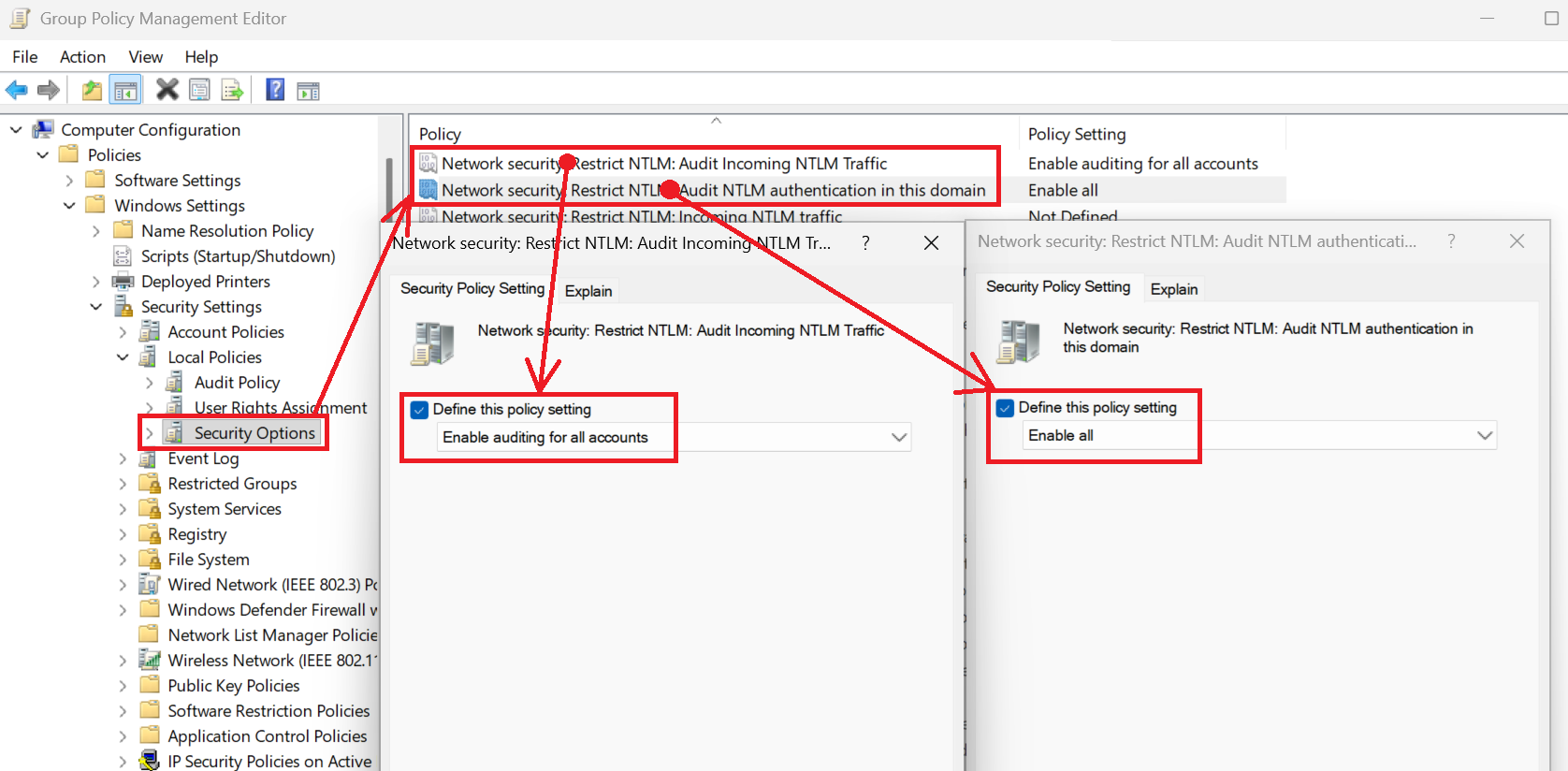
This generates Event ID 8004 in the NTLM Operational log on domain controllers. Now run the inventory script:
Common NTLM sources we've found: Printers/scanners (especially older HP/Canon models), NAS devices (QNAP, Synology), legacy Java applications, third-party backup agents, and — surprisingly — Windows Admin Center when not configured for Kerberos.
Phase 2: Restrict — enable LmCompatibilityLevel 5
Once you've audited and identified NTLM sources, incrementally restrict NTLM. The
LmCompatibilityLevel
registry value controls which NTLM versions are allowed. Here's the progression:
| Level | What it allows | Use case |
|---|---|---|
| 0-2 | LM and NTLM (ancient, insecure) | ❌ Never use. Windows 95/98 era. |
| 3 | NTLMv2 only (default on modern Windows) | Baseline. Acceptable if you can't eliminate NTLM yet. |
| 4 | NTLMv2 only, refuse LM | Slightly better; blocks ancient clients. |
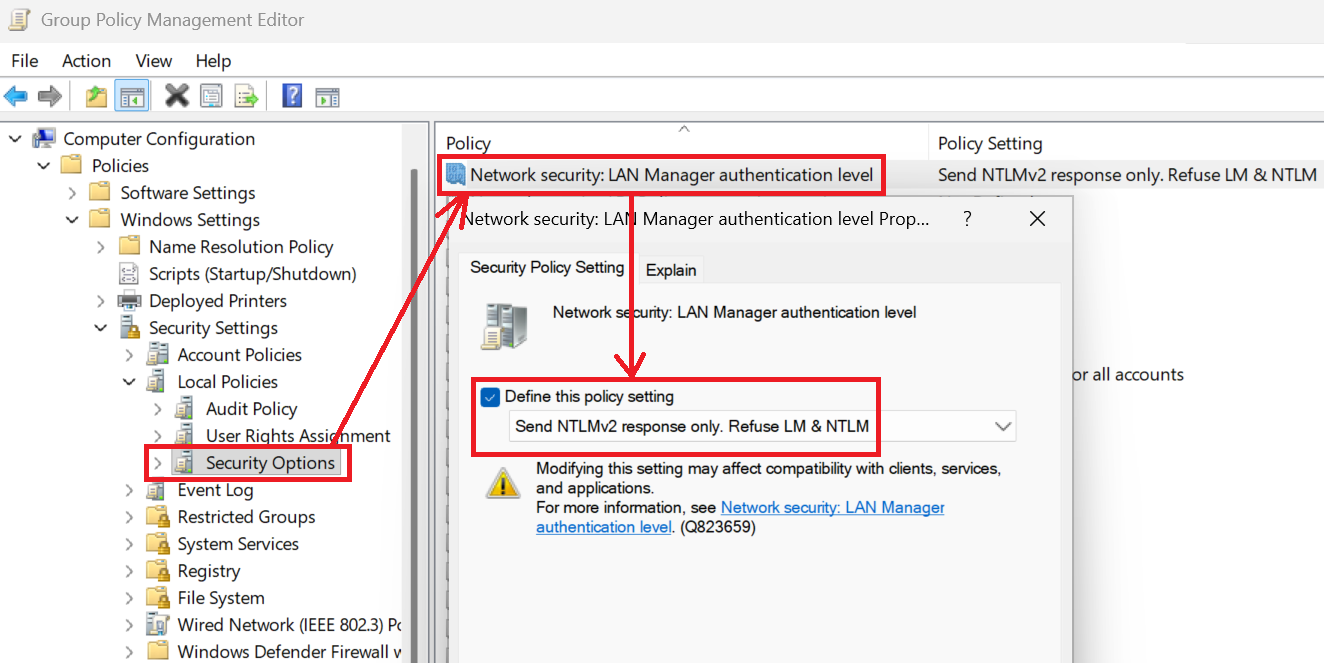
| 5 | NTLMv2 only, refuse LM and NTLM | ✅ Target state. Only NTLMv2 allowed; rejects weaker variants. |
Apply Level 5 via GPO or PowerShell:
Phase 3: Deny — block NTLM for Tier 0 systems
Once Tier 0 systems are validated (domain controllers, ADFS, etc.), move to outright NTLM blocking. This GPO setting denies NTLM authentication attempts:
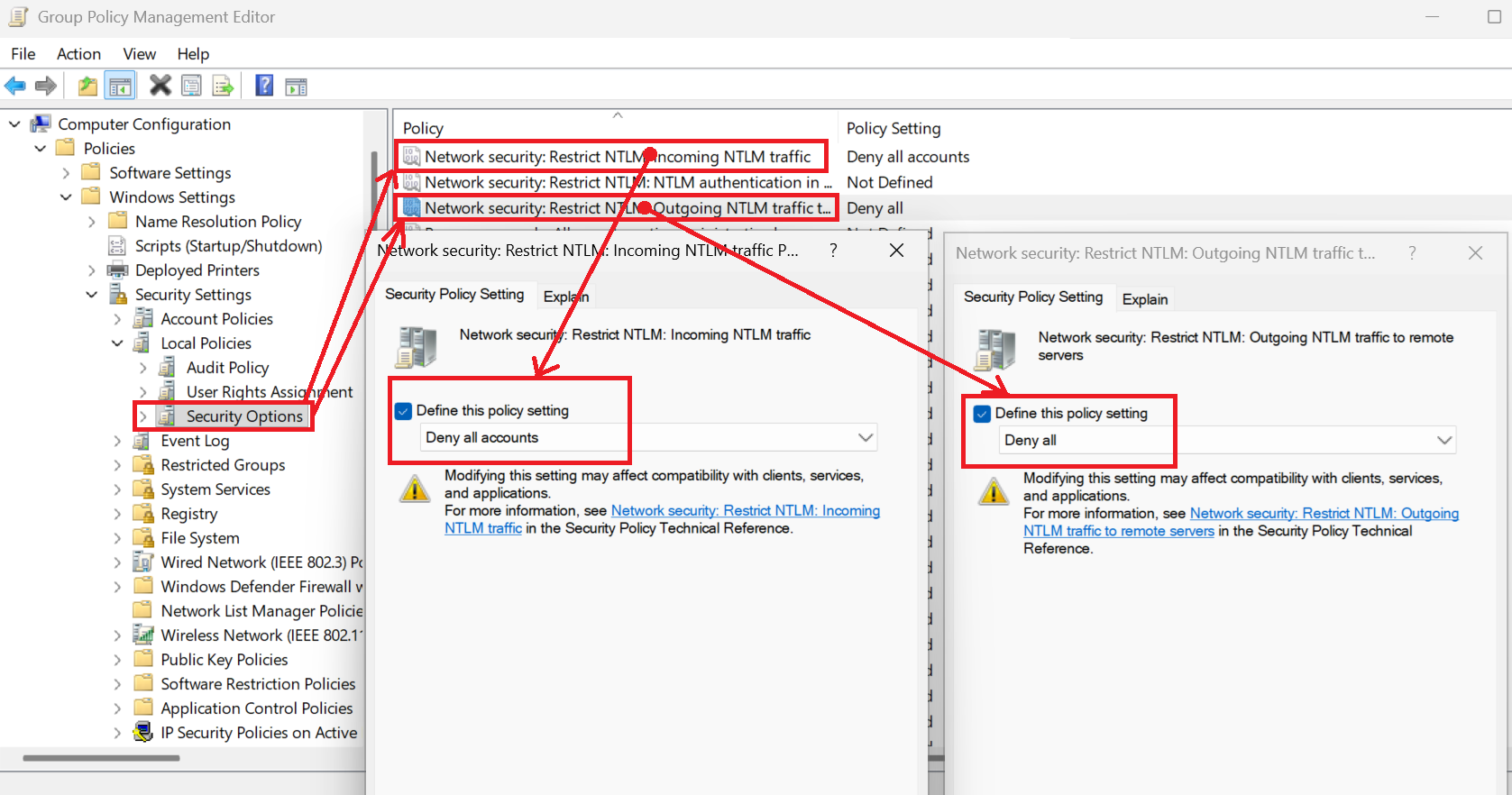
A Fortune 500 client took 18 months to fully block NTLM in Tier 0. The blocker? A legacy HR application that performed LDAP binds with NTLM. We isolated it in its own OU with an exception policy and forced the vendor to patch it. Result: NTLM fully blocked on DCs, and the HR app migrated to LDAPS with Kerberos. Lesson: sometimes you need to force vendors' hands.
Monitoring NTLM usage with Event IDs
After enabling auditing, these are the critical event IDs to track. Forward them to your SIEM and create alerting rules for any NTLM usage on Tier 0 systems:
| Event ID | Log | What it means | Action |
|---|---|---|---|
| 8004 | Microsoft-Windows-NTLM/Operational | NTLM authentication attempt (successful or blocked) | Identify source workstation and target service; contact owner |
| 4624 (LogonType 3, Package NTLM) | Security | Network logon using NTLM | Cross-reference with 8004; map to application |
| 4625 | Security | Failed logon (may indicate NTLM block) | Check if caused by your NTLM restriction policy; rollback if critical service |
Sample SIEM query (Splunk SPL):
index=windows EventCode=8004 OR (EventCode=4624 AND Logon_Type=3 AND Authentication_Package="NTLM*")
| stats count by src_ip, dest_host, user, EventCode
| where count > 10
| sort -count
Sample SIEM query (Microsoft Sentinel KQL):
SecurityEvent
| where EventID in (4624, 8004)
| where EventID == 4624 and LogonType == 3 and AuthenticationPackageName contains "NTLM"
      or EventID == 8004
| summarize Count=count() by SourceIP=IpAddress, TargetHost=Computer, Account, EventID
| where Count > 10
| order by Count desc
Validation & Monitoring: Prove your controls work
Deploying credential-theft defenses is step one. Validating they're working — and detecting when something bypasses them — is step two. Here's the full validation playbook with PowerShell automation, Event ID guidance, and screenshot examples for your SOC team.
Automated validation with PowerShell
The script below checks all the controls we've discussed: Kerberos encryption, NTLM restrictions, LSA Protection, Credential Guard, and more. It generates a CSV compliance report and displays results in a formatted table.
Output example: The script produces a table showing PASS / NEEDS ATTENTION for each control, plus exports results to CSV for audit records.
Critical Event IDs for credential-theft monitoring
Your SIEM must ingest and alert on these events. Without monitoring, you're flying blind — an attacker could be using NTLM or RC4 right now and you'd never know.
| Event ID | Log | What to look for | Detection logic |
|---|---|---|---|
| 4768 | Security (DCs) | Kerberos TGT request with RC4 encryption | Filter: TicketEncryptionType == 0x17 (RC4). Alert if any Tier 0
account uses RC4. |
| 4769 | Security (DCs) | Kerberos service ticket with RC4 encryption | Filter: TicketEncryptionType == 0x17. Cross-reference with
service
account list; investigate if unexpected. |
| 4771 | Security (DCs) | Kerberos pre-authentication failure (may indicate brute-force) | Threshold: >5 failures from same IP in 10 minutes. Automated account lockout should trigger. |
| 4624 (LogonType 3, NTLM) | Security | Network logon using NTLM instead of Kerberos | Filter: LogonType == 3 AND AuthenticationPackageName == "NTLM".
Alert if source is Tier 1/2 connecting to Tier 0. |
| 8004 | Microsoft-Windows-NTLM/Operational | NTLM authentication attempt (audit mode) | Create inventory: group by SourceWorkstation and TargetServer. Identify service owners for remediation. |
| 3004 | Microsoft-Windows-Kerberos-Key-Distribution-Center/Operational | PAC validation failure (may indicate Golden/Silver Ticket) | Always alert. This means an attacker forged a ticket and the DC rejected it. Investigate immediately. |
Sample SIEM correlation rule: detect credential-theft activity
This Splunk correlation rule detects a credential-stuffing attack: an attacker extracts hashes from one machine, then uses them to authenticate to many servers in a short time window.
index=windows EventCode=4624 LogonType=3
| where AuthenticationPackageName="NTLM" AND TargetUserName!="ANONYMOUS LOGON"
| stats dc(ComputerName) as unique_targets by SourceNetworkAddress, TargetUserName
| where unique_targets > 10
| eval severity="HIGH: Possible Pass-the-Hash lateral movement detected"
Microsoft Sentinel equivalent (KQL):
SecurityEvent
| where EventID == 4624 and LogonType == 3
| where AuthenticationPackageName == "NTLM" and TargetUserName != "ANONYMOUS LOGON"
| summarize UniqueTargets=dcount(Computer) by SourceIP=IpAddress, TargetUserName
| where UniqueTargets > 10
| extend Severity="HIGH: Possible Pass-the-Hash lateral movement detected"
Screenshot examples for your SOC playbook
These are the visuals your SOC analysts need in their runbooks. Train them to recognize credential-theft indicators.
- Event Viewer: Security log filtered for Event ID 4768 showing RC4 encryption (0x17). Include annotation: "This should be AES256 (0x12)."
- Event Viewer: NTLM Operational log showing Event ID 8004 with source workstation and target service. Include annotation: "Identify service owner and remediate."
- PowerShell output:
Get-ComputerInfo | Select-Object DeviceGuardSmartStatusshowing "Running" (good) vs. "Off" (bad). - GPO Result:
gpresult /h report.htmlfiltered for "Restrict NTLM" policies, showing which OUs have NTLM blocking enabled.
Pro tip: Create a SharePoint page or Confluence space with these screenshots side-by-side. Title it "Credential Theft — What Good Looks Like." When a junior analyst gets an alert, they can compare their Event Viewer to your baseline and know instantly if it's normal or suspicious.
Continuous validation: monthly audit script
Run this on the first Monday of every month. It re-checks all your controls and emails the compliance report to your security team. Schedule it as a domain-joined server scheduled task using a gMSA (see our scheduled task guide).
# Monthly-Credential-Defense-Audit.ps1
# Run as scheduled task; email results

$ReportPath = "C:\Reports\credential-defense-audit_$(Get-Date -Format 'yyyy-MM-dd').csv"
$Results = & "C:\Scripts\Test-CredentialTheftDefenses.ps1" -ExportPath $ReportPath

# Email to security team
Send-MailMessage -From "security-automation@corp.local" `
                 -To "security-team@corp.local" `
                 -Subject "Monthly Credential Defense Audit — $(Get-Date -Format 'MMMM yyyy')" `
                 -Body "Attached: automated validation report. Review for any NEEDS ATTENTION items." `
                 -Attachments $ReportPath `
                 -SmtpServer "smtp.corp.local"
Rollback & Exception Handling
Always deploy in audit-first mode. If a change causes service disruption, revert the policy in the affected OU and triage the application. Maintain a short rollback window (24–72 hours) for each wave.
Immediate rollback procedures (break-glass)
If a critical service fails after applying credential-theft controls, use these one-liners to revert changes immediately:
# Revert LmCompatibilityLevel to permissive (Level 3)
Set-ItemProperty -Path "HKLM:\SYSTEM\CurrentControlSet\Control\Lsa" `
                 -Name "LmCompatibilityLevel" -Value 3 -Type DWord
Restart-Computer -Force

# Disable NTLM blocking for specific server
Set-ItemProperty -Path "HKLM:\SYSTEM\CurrentControlSet\Control\Lsa\MSV1_0" `
                 -Name "RestrictReceivingNTLMTraffic" -Value 0 -Type DWord

# Re-enable RC4 for specific service account (temporary!)
Set-ADServiceAccount -Identity "svc-webapp" -KerberosEncryptionType "RC4, AES128, AES256"
Exception OU strategy
Create a "Credential-Defense-Exceptions" OU with a separate GPO that allows NTLM or RC4. Document every exception in a centralized SharePoint list with: service name, business owner, technical contact, exception expiry date, and mitigation plan. Review exceptions quarterly and force remediation or renewal.
| Service | Owner | Exception | Expiry | Mitigation plan |
|---|---|---|---|---|
| Legacy HR app (hrportal.corp.local) | Jane Doe (HR IT) | NTLM allowed for this server only | 2025-06-30 | Vendor patch scheduled for Q2 2025 to enable Kerberos |
| Printer fleet (Canon iR-ADV) | John Smith (Facilities) | RC4 allowed for printer SPN | 2025-12-31 | Firmware upgrade to v12.5 enables AES; pilot in Q3 |
Why this article needs the Tier Model and Delegation Model (and why you should read them now)
Credential-theft defenses are not standalone technical controls — they're part of a larger attack-surface reduction strategy. If you deploy the controls in this article without understanding the Tier Model, you'll apply them inconsistently (e.g., blocking NTLM on low-risk workstations but leaving it wide open on domain controllers). If you don't understand the Delegation Model, you'll create RBCD configurations that accidentally grant lateral-movement paths to attackers.
Tier Model: why it matters for this article
The Tier Model divides your environment into three security zones: Tier 0 (domain controllers, ADFS, PKI), Tier 1 (member servers, applications), and Tier 2 (workstations, user devices). Each tier has different risk tolerance and control requirements.
How it applies here: Tier 0 systems must have zero tolerance for NTLM and RC4 — any use is a potential privilege-escalation path. Tier 1 systems are the pilot zone where you test NTLM blocking before rolling to Tier 0. Tier 2 is where most NTLM usage lives (printers, NAS, legacy apps), so your exception-handling strategy focuses here. If you roll out credential-theft defenses without a tier-aware deployment plan, you'll either break production (too aggressive) or leave gaping holes (too cautious).
Read the Tier Model article to understand:
- How to map your OUs to Tier 0/1/2
- Which controls are mandatory vs. aspirational per tier
- How to sequence your rollout (always Tier 1 → Tier 0 → Tier 2)
Delegation Model: why it matters for this article
The Delegation Model explains how to safely delegate administrative rights without granting "keys to the kingdom." It covers ACL-based delegation, constrained delegation (Kerberos-only), and resource-based constrained delegation (RBCD).
How it applies here: RBCD is the modern replacement for unconstrained delegation, which is a massive credential-theft risk (any service with unconstrained delegation can impersonate any user to any service — attackers love this). But RBCD has its own pitfalls: if you configure it incorrectly, you create a privilege-escalation path (e.g., a web server with RBCD to a DC allows an attacker to compromise the web server and immediately escalate to domain admin).
Read the Delegation Model article to understand:
- The three types of delegation and when each is appropriate
- How to audit existing delegation with PowerShell
(
Get-ADComputer -Filter {TrustedForDelegation -eq $true}) - How to safely implement RBCD for front-end → back-end scenarios (e.g., IIS → SQL)
- How to avoid creating lateral-movement paths with delegation
Privileged Account Hygiene: the operational glue
The Privileged Account Hygiene article contains reusable PowerShell scripts for auditing and remediating privilege creep. It's the operational playbook that makes credential-theft defenses sustainable over time.
How it applies here: You'll use the hygiene scripts to:
- Audit service accounts with weak passwords or missing SPNs
- Find accounts with "Trusted for Delegation" enabled (unconstrained delegation = credential theft risk)
- Enforce password rotation for gMSAs and service accounts
- Generate compliance reports for your quarterly access review
Bottom line: Don't implement credential-theft defenses in a vacuum. Read the Tier Model to understand where to apply controls, read the Delegation Model to understand how to configure RBCD safely, and use the Privileged Account Hygiene scripts to maintain your defenses over time. All three articles are designed to work together — they reference each other's concepts and scripts.
Summary: Your 90-day credential-theft defense roadmap
This article gave you the complete technical playbook for defending against credential theft. Here's the execution plan:
| Phase | Timeline | Key activities | Success criteria |
|---|---|---|---|
| Phase 1: Audit | Weeks 1-2 | Enable NTLM/Kerberos auditing; run inventory scripts; map service owners | Complete inventory CSV with owner contacts; SIEM alerts configured |
| Phase 2: Pilot (Tier 1) | Weeks 3-6 | Deploy AES-only + NTLM Level 5 to Tier 1 pilot OU; monitor for 2 weeks; triage breaks | Zero service disruptions for 14 days; all NTLM usage accounted for |
| Phase 3: Tier 0 lockdown | Weeks 7-10 | Deploy full controls to Tier 0 (DCs, ADFS, etc.); block NTLM entirely; enable PAC validation + FAST | Event ID 8004 = zero on Tier 0 systems; all Kerberos tickets use AES256 |
| Phase 4: Tier 2 rollout | Weeks 11-12 | Deploy to workstations/user devices; create exception OU for legacy apps; schedule quarterly review | Exception list documented in SharePoint; automated monthly validation report running |
What you've learned
- The credential-theft kill chain — extraction → lateral movement → privilege escalation — and how to break it at each stage
- Kerberos hardening: disable RC4, enable PAC validation, deploy Kerberos FAST, and enforce AES-only encryption
- NTLM reduction: audit → restrict (Level 5) → deny, with exception handling for legacy systems
- RBCD best practices: front-end → back-end delegation models, avoiding lateral-movement paths, auditing delegation rights
- Validation & monitoring: critical Event IDs (4768, 4769, 4624, 8004, 3004), SIEM correlation rules, automated compliance reports
- Rollback procedures: break-glass PowerShell commands, exception OU strategy, documented service exceptions
Next article: Lateral Movement Defenses
This article covered how attackers steal credentials. The next article covers how they use those credentials to move laterally across your network. Topics include: PsExec/WMI/WinRM hardening, JEA (Just Enough Administration), tiered administrative forests, and network segmentation with host-based firewall rules.
Why you should read it: Even if you block credential theft perfectly, attackers will find ways to pivot. Lateral movement defenses are the second layer — they assume the attacker has a foothold and limit how far they can spread. Combined with credential-theft defenses, you create defense-in-depth that forces attackers to trigger multiple detection points.