Introduction
IPv6 is no longer optional—it's the present and future of network infrastructure. With IPv4 address exhaustion complete since 2011 and mobile carriers, cloud providers, and government agencies mandating IPv6 support, enterprise IT must treat IPv6 deployment as a strategic infrastructure priority, not a distant migration project. Windows Server has provided robust IPv6 support since Windows Server 2008, yet many organizations continue operating IPv4-only networks, accumulating technical debt and limiting future flexibility.
This guide provides battle-tested strategies for deploying IPv6 in enterprise Windows Server environments. Unlike basic tutorials that focus solely on address configuration, this article addresses the real challenges IT professionals face: designing scalable address plans, integrating IPv6 with Active Directory services, securing dual-stack networks, managing transition mechanisms, and maintaining operational excellence during and after deployment.
A War Story: The IPv6 Security Blind Spot
I once inherited an environment where a previous administrator had "disabled IPv6" by unchecking the protocol binding in network adapter properties—a common but incorrect approach. While this removed the GUI checkbox, Windows continued using IPv6 link-local addresses (fe80::) and temporary privacy addresses for IPv6 traffic. The organization's firewalls, IDS/IPS, and SIEM were configured only for IPv4, creating a massive blind spot.
When investigating unusual network behavior, we discovered that malware was using IPv6 neighbor discovery and link-local communication to propagate laterally across VLANs, completely bypassing all security controls. The attacker exploited the fact that IPv6 was "enabled but ignored"—the worst possible state. Organizations learned three critical lessons:
- Never leave IPv6 in a semi-disabled state. Either deploy it properly with full security controls, or disable it completely (Microsoft does not recommends this!) using registry settings and Group Policy.
- Firewalls and security tools must cover IPv6. Single-stack security monitoring creates exploitable gaps.
- IPv6 privacy extensions and temporary addresses require policy. Random addresses break centralized logging and make incident response nearly impossible.
This incident cost the organization over $2M in remediation and drove executive support for a proper dual-stack deployment with unified security controls. Sometimes the most expensive way to learn is the best teacher.
Why IPv6 Matters for Enterprise IT
Organizations delay IPv6 deployment for various reasons—perceived complexity, lack of immediate business pressure, working IPv4 infrastructure, or simply "if it ain't broke, don't fix it" mentality. However, strategic IT leadership recognizes several compelling reasons to prioritize IPv6:
- Address Exhaustion is Real: Global IPv4 exhaustion occurred in 2011. Regional registries have depleted their pools. New networks, acquisitions, or cloud expansions increasingly cannot obtain sufficient IPv4 space. Carrier-Grade NAT (CGN) and complex NAT schemes create operational nightmares, break end-to-end connectivity, and complicate troubleshooting.
- Cloud and SaaS Mandate IPv6: Major cloud providers (Azure, AWS, GCP) charge premiums for IPv4 addresses and prioritize IPv6. Office 365, Azure AD, and modern SaaS applications optimize for IPv6. Organizations without IPv6 connectivity pay more and experience degraded performance as providers deprioritize IPv4 traffic.
- Security Blind Spots: Partially deploying IPv6 (enabled but unmanaged) creates security vulnerabilities. Attackers exploit IPv6 tunneling mechanisms (Teredo, 6to4, ISATAP) to bypass firewalls designed for IPv4-only networks. Proper IPv6 deployment with unified security controls eliminates these gaps.
- Mobile and IoT Growth: Mobile carriers operate IPv6-primary networks using NAT64/DNS64 for legacy IPv4 connectivity. Enterprise mobile apps and IoT device fleets require IPv6 support. Organizations without dual-stack infrastructure struggle to support modern device ecosystems.
- Operational Simplification: Contrary to popular belief, IPv6 can simplify operations. Eliminating NAT restores end-to-end connectivity, simplifies troubleshooting, and enables cleaner network designs. IPv6 neighbor discovery and stateless address autoconfiguration (SLAAC) reduce DHCP dependency for workstations.
- Regulatory and Compliance Pressure: Government agencies (particularly US federal agencies under OMB mandates) require IPv6 support. Organizations serving public sector customers must demonstrate IPv6 readiness for contract eligibility.
What You'll Learn
This comprehensive guide covers everything you need to deploy and operate IPv6 in enterprise Windows Server environments:
- IPv6 Fundamentals: Address types, notation, subnetting, and addressing architecture—understanding the building blocks
- Enterprise Address Planning: Designing scalable, hierarchical IPv6 address plans aligned with network topology and security zones
- Static Configuration: GUI and PowerShell methods for configuring static IPv6 addresses on servers and infrastructure
- Active Directory Integration: DNS, DHCP, and Group Policy configuration for dual-stack AD environments
- Security Hardening: IPv6-specific threats, firewall rules, Router Advertisement (RA) guard, and unified security policies
- Transition Mechanisms: Understanding and managing 6to4, Teredo, ISATAP, NAT64/DNS64, and when to use (or disable) each
- Operations & Troubleshooting: Monitoring, diagnostics, common issues, and operational best practices
- PowerShell Automation: Production-ready scripts for IPv6 deployment, configuration management, and auditing
Deployment Philosophy
The recommended IPv6 deployment strategy for enterprise environments is dual-stack—running IPv4 and IPv6 simultaneously on the same infrastructure. This approach provides maximum compatibility, allows gradual application migration, and enables thorough testing without disrupting production services. Avoid tunnel-based deployments (6to4, Teredo) for production infrastructure—they introduce complexity, performance penalties, and security risks. Deploy native IPv6 with proper routing and security controls.
IPv6 Fundamentals
Before deploying IPv6, understanding fundamental differences from IPv4 is critical. IPv6 is not simply "IPv4 with longer addresses"—it introduces new concepts, simplified header structures, and different operational behaviors that affect network design, security policy, and troubleshooting procedures.
Address Structure and Notation
IPv6 uses 128-bit addresses (compared to IPv4's 32-bit), written as eight groups of four hexadecimal digits separated by colons:
2001:0db8:85a3:0000:0000:8a2e:0370:7334IPv6 notation allows two compression rules to improve readability:
- Leading Zero Compression: Leading zeros in each 16-bit group can be omitted:
2001:db8:85a3:0:0:8a2e:370:7334 - Double Colon (::) Compression: One sequence of consecutive all-zero groups can be
replaced with
::(once per address):2001:db8:85a3::8a2e:370:7334
Special addresses include:
::1/128— Loopback address (equivalent to 127.0.0.1 in IPv4)::/128— Unspecified address (0.0.0.0 in IPv4)fe80::/10— Link-local addresses (automatic, non-routable, used for neighbor discovery)ff00::/8— Multicast addresses (replaces broadcast in IPv6)
Related Reading: TCP/IP Addressing Fundamentals
For comprehensive coverage of IPv4 and IPv6 addressing fundamentals, including address notation, compression rules, and address classes, see our IP Addressing Guide. This article focuses specifically on Windows Server IPv6 implementation and enterprise deployment—refer to the IP Addressing Guide for foundational TCP/IP concepts and addressing theory that applies across all platforms.
Address Types and Scopes
IPv6 defines three address types (unicast, anycast, multicast) and multiple address scopes that determine routing behavior:
| Address Type | Prefix | Purpose and Characteristics |
|---|---|---|
| Global Unicast | 2000::/3 |
Globally routable addresses (like public IPv4). Assigned by ISPs or RIRs. Used for
internet-facing services and external communication. Current allocations primarily from
2001::/16 range.
|
| Unique Local (ULA) | fc00::/7( fd00::/8 in practice) |
Private addresses (like RFC1918 10.0.0.0/8, 172.16.0.0/12, 192.168.0.0/16). Not globally routable. Used for internal networks. Algorithmically generated to minimize collision risk. Recommended for enterprise internal networks. |
| Link-Local | fe80::/10 |
Automatically configured on all IPv6 interfaces. Valid only on local link (not routed). Used for neighbor discovery, router advertisements, and local communication. Critical for IPv6 operation—cannot be disabled. |
| Multicast | ff00::/8 |
One-to-many communication (replaces IPv4 broadcast). Scope field defines reach: link-local (ff02::), site-local (ff05::), organization-local (ff08::), global (ff0e::). Essential for neighbor discovery and service discovery. |
| Loopback | ::1/128 |
Single address for localhost communication (IPv4 equivalent: 127.0.0.1). Used for local service binding and testing. |
| Unspecified | ::/128 |
Indicates absence of address. Used during DHCPv6 negotiation before address assignment. Never assigned to interface or used as destination. |
Subnetting and Prefix Length
IPv6 uses prefix length notation (CIDR) exclusively—no subnet masks. The standard subnet size for
end-user networks is /64, providing 18.4 quintillion addresses per subnet. This massive
address space eliminates the address conservation mentality from IPv4:
/48— Typical enterprise allocation (65,536 /64 subnets). Standard size for organizations from RIRs or ISPs./56— Small site or branch office (256 /64 subnets). Common for residential and small business allocations./64— Single subnet (standard size). Mandatory for SLAAC to function. Do not use longer prefixes for LAN segments./128— Single host (point-to-point links, loopback). Equivalent to /32 in IPv4.
Enterprise address planning typically allocates a /48 per site, subdividing into /64 subnets by VLAN, function, or security zone. The 16-bit space between /48 and /64 provides 65,536 subnets—more than sufficient for complex datacenter environments.
Critical: Always Use /64 for LANs
Do not deploy prefixes longer than /64 on LAN segments. Stateless Address Autoconfiguration (SLAAC) requires /64 to function correctly. Some applications and protocols (e.g., SEND, CGA) mandate /64. Using /127 for point-to-point links is acceptable, but avoid /126 (creates subnet-router anycast complications). When in doubt, use /64—address space is not a constraint in IPv6.
Stateless Address Autoconfiguration (SLAAC)
IPv6 introduces SLAAC, allowing hosts to automatically configure addresses without DHCP. Routers periodically send Router Advertisement (RA) messages containing network prefix information. Hosts combine the advertised prefix with an interface identifier (derived from MAC address or randomly generated for privacy) to create a complete IPv6 address:
Network Prefix (from RA): 2001:db8:1234:5678::/64
Interface ID (EUI-64):    1a2b:3c4d:5e6f:7890
Resulting Address:        2001:db8:1234:5678:1a2b:3c4d:5e6f:7890/64
SLAAC simplifies workstation address management but introduces security and operational considerations:
- Rogue RA Attack: Attackers can send malicious RAs, causing clients to adopt incorrect addresses or default gateways. Deploy RA Guard on switches to prevent unauthorized RA messages.
- Privacy Extensions (RFC 4941): Windows generates temporary random addresses for outbound connections instead of using EUI-64 addresses derived from MAC. This protects user privacy but complicates logging and troubleshooting. Consider disabling for servers and managed devices.
- No Centralized Address Tracking: Unlike DHCP lease databases, SLAAC provides no centralized record of address assignments. Implement IPv6 address tracking through Neighbor Discovery (ND) monitoring, IPAM integration, or DHCPv6 (stateful or stateless).
DHCPv6 and Address Assignment Strategies
Organizations have multiple options for IPv6 address assignment:
| Method | Description | Use Cases |
|---|---|---|
| SLAAC Only | Hosts configure addresses from RA messages. No DHCPv6 server required. DNS servers provided via RA RDNSS option (RFC 8106). | Simple networks, guest Wi-Fi, environments without centralized address management requirements. Limited enterprise adoption due to lack of address tracking. |
| Stateless DHCPv6 | SLAAC for addresses, DHCPv6 for options (DNS, domain name, NTP). Clients self-configure addresses but query DHCPv6 for additional configuration. | Balance between simplicity and central management. Provides DNS configuration without maintaining DHCPv6 lease database. Recommended for workstations in many enterprises. |
| Stateful DHCPv6 | DHCPv6 server assigns addresses and options. Similar to IPv4 DHCP operation. Maintains lease database for tracking. | Environments requiring centralized address management, static reservations, or compliance with address tracking policies. Recommended for servers and infrastructure. |
| Static Assignment | Manual configuration on each host. Addresses do not change. | Servers, network infrastructure, load balancers, and devices requiring predictable addresses for firewall rules or DNS registration. |
Enterprise recommendation: Use stateful DHCPv6 with statically assigned addresses for servers and infrastructure. For workstations, choose stateless DHCPv6 (SLAAC + DHCPv6 options) or stateful DHCPv6 based on address tracking requirements and operational preferences.
Planning & Design
Successful IPv6 deployment requires careful planning before configuration. Address space design, network topology considerations, and migration strategy significantly impact long-term operational success. Organizations that rush into IPv6 without proper planning create technical debt, security gaps, and operational complexity.
IPv6 Address Planning
Unlike IPv4 where address conservation dominated design decisions, IPv6 address planning focuses on hierarchy, aggregation, and future scalability. The typical enterprise receives a /48 allocation (65,536 /64 subnets)—plan address space to reflect organizational structure and network topology:
Hierarchical Address Allocation Example
Consider an organization with a /48 allocation: 2001:db8:1234::/48
| Subnet Range | Purpose | Examples |
|---|---|---|
2001:db8:1234:0000::/52 |
Datacenter 1 (4,096 subnets) | Server VLANs, storage networks, management |
2001:db8:1234:1000::/52 |
Datacenter 2 (4,096 subnets) | DR site, backup datacenter |
2001:db8:1234:2000::/52 |
Branch Offices (4,096 subnets) | Regional offices, remote sites |
2001:db8:1234:3000::/52 |
Corporate Campus (4,096 subnets) | Employee workstations, conference rooms |
2001:db8:1234:4000::/52 |
DMZ and External (4,096 subnets) | Public-facing servers, external services |
2001:db8:1234:5000::/52 |
Management Networks (4,096 subnets) | Out-of-band management, IPMI, iLO |
Within each /52 allocation, further subdivide by function, security zone, or VLAN. For example, Datacenter 1 server VLANs:
2001:db8:1234:0010::/64— Domain Controllers (Tier 0)2001:db8:1234:0020::/64— File Servers2001:db8:1234:0030::/64— SQL Servers2001:db8:1234:0040::/64— Web/Application Servers2001:db8:1234:0050::/64— Exchange/Email Servers
Unique Local Addresses (ULA) vs. Global Unicast
Organizations must decide whether to use Unique Local Addresses (ULA, fd00::/8) for internal networks or Global Unicast Addresses (GUA, 2000::/3). Both approaches have merits:
| Approach | Advantages | Disadvantages |
|---|---|---|
| ULA (fd00::/8) |
|
|
| Global Unicast |
|
|
Enterprise Recommendation: Use Global Unicast Addresses (GUA) for production networks with appropriate firewall policies to control access. Reserve ULA for lab environments, disconnected networks, or specialized scenarios requiring ISP independence. Avoid NAT66—it defeats core IPv6 benefits and complicates operations.
Deployment Strategy: Dual-Stack vs. Alternatives
Multiple strategies exist for introducing IPv6 into existing IPv4 networks:
| Strategy | Description | Recommendation |
|---|---|---|
| Dual-Stack | Run IPv4 and IPv6 simultaneously on all network devices and hosts. Both protocols fully operational. | Strongly Recommended for enterprise environments. Provides maximum compatibility, gradual migration, and operational flexibility. Security controls must cover both protocols. |
| IPv6-Only | Deploy IPv6 exclusively, using NAT64/DNS64 for legacy IPv4 connectivity. | Suitable for greenfield deployments or modern application environments. Requires careful application compatibility testing. Not recommended for general enterprise use with legacy applications. |
| Tunneling (6to4, Teredo, ISATAP) | Encapsulate IPv6 traffic within IPv4 packets to traverse IPv4-only networks. | Not Recommended for production. Introduces complexity, performance penalties, and security risks. Use native dual-stack instead. Disable tunneling protocols on enterprise networks. |
| Translation (NAT64/DNS64) | Convert between IPv6 and IPv4 at network edge, enabling IPv6-only clients to reach IPv4-only services. | Useful for specific scenarios (IPv6-only mobile clients, datacenter migration). Complexity and troubleshooting challenges limit broad adoption. Consider for targeted use cases. |
The recommended deployment approach for Windows Server environments:
- Phase 1: Infrastructure Preparation — Enable IPv6 on network infrastructure (routers, switches, firewalls). Implement dual-stack routing and security policies.
- Phase 2: Pilot Deployment — Deploy dual-stack IPv6 in isolated test environment. Validate AD integration, DNS, DHCP, and application compatibility.
- Phase 3: Production Rollout — Gradually enable IPv6 on production segments, starting with infrastructure (servers, domain controllers) before workstations.
- Phase 4: Operational Maturity — Achieve parity between IPv4 and IPv6 monitoring, security, and operational processes. Begin preferring IPv6 for new services.
- Phase 5: IPv4 Reduction (Long-Term) — As applications and dependencies migrate to IPv6, reduce IPv4 footprint. Ultimate goal: IPv6-primary with minimal IPv4 legacy support.
Phased Migration Timeline
Enterprise IPv6 deployment typically spans 12-24 months from planning to operational maturity. Phase 1 (infrastructure) takes 2-3 months, Phase 2 (pilot) requires 3-6 months for thorough testing, Phase 3 (production rollout) spans 6-9 months depending on environment size, and Phase 4 (operational maturity) continues as ongoing refinement. Do not rush—thorough planning and testing prevent costly mistakes. Organizations that try to "flip the switch" on IPv6 overnight inevitably encounter security gaps, application breakages, and operational chaos.
Static IPv6 Configuration
Configuring static IPv6 addresses on Windows Server follows similar principles to IPv4 but introduces important differences in notation, autoconfiguration behavior, and best practices. This section provides both GUI and PowerShell methods for static address assignment.
Prerequisites and Planning
Before configuring static IPv6 addresses, ensure you have:
- IPv6 Address: Assigned from your organization's address plan (GUA or ULA)
- Prefix Length: Typically /64 for LAN segments, /128 for point-to-point
- Default Gateway: IPv6 address of the router/gateway on the local subnet
- DNS Servers: IPv6 addresses of DNS servers (can be IPv4 or IPv6)
- Documentation: Record address assignments in IPAM or network documentation
Link-Local Addresses Persist
Even with static IPv6 configuration, Windows automatically generates and maintains link-local addresses (fe80::/10). These addresses are essential for IPv6 operation and cannot be disabled. Your server will have multiple IPv6 addresses: link-local, static global/ULA, and potentially temporary privacy addresses. This is normal and expected IPv6 behavior.
GUI Configuration Method
For server core environments or headless systems, use PowerShell. For servers with GUI, follow these steps:
- Open Control Panel → Network and Internet → Network and Sharing Center
- Click Change adapter settings in the left navigation
- Right-click the appropriate network adapter and select Properties
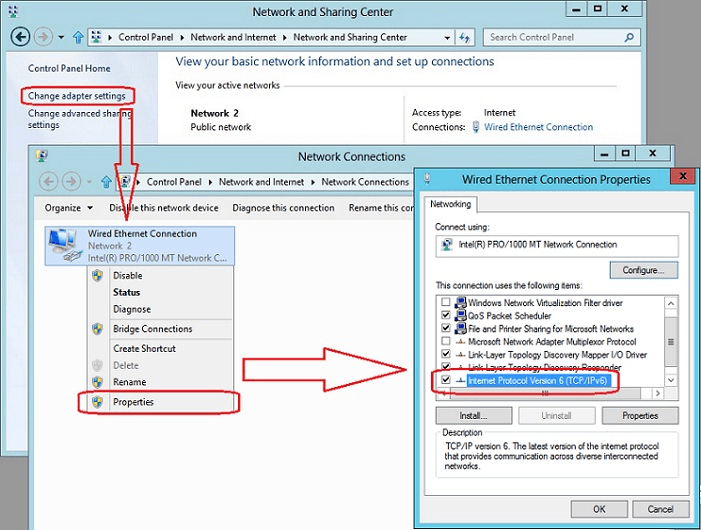
- Select Internet Protocol Version 6 (TCP/IPv6) and click Properties
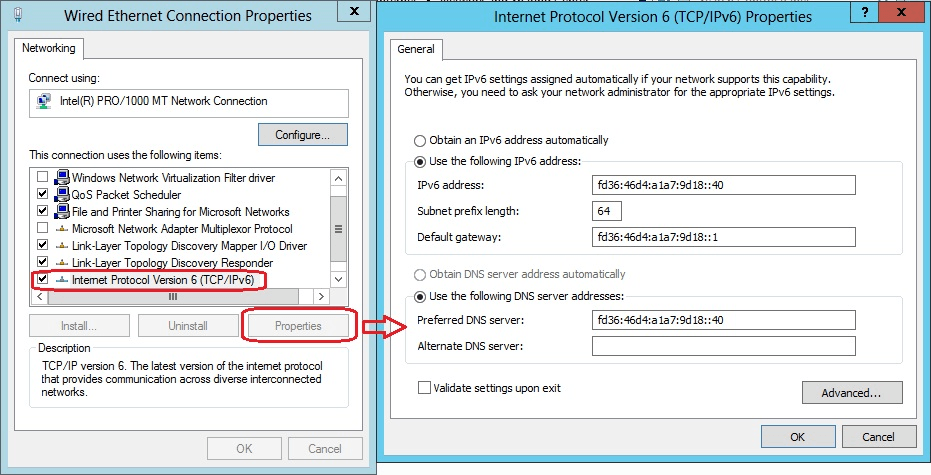
- Select Use the following IPv6 address and configure:
- IPv6 address: Your assigned address (e.g.,
2001:db8:1234:10::50orfd36:46d4:a1a7:9d18::40) - Subnet prefix length: Typically
64for LAN segments - Default gateway: Router address on local subnet (e.g.,
2001:db8:1234:10::1)
- IPv6 address: Your assigned address (e.g.,
- Select Use the following DNS server addresses and configure:
- Preferred DNS server: Primary DNS (IPv6 address)
- Alternate DNS server: Secondary DNS (IPv6 address)
- Click OK to apply changes
- Verify configuration using
ipconfig /allin PowerShell/CMD
DNS Server Flexibility
IPv6 hosts can use IPv4 DNS servers, IPv6 DNS servers, or both. During dual-stack deployment, many organizations initially configure IPv4 DNS addresses even on IPv6-enabled hosts. As DNS servers gain IPv6 connectivity, update client configurations to prefer IPv6 DNS addresses for better performance and future-proofing.
PowerShell Configuration (Recommended)
PowerShell provides programmatic configuration essential for automation, Server Core deployments, and infrastructure-as-code practices. The following scripts demonstrate static IPv6 configuration:
Step 1: Identify Network Adapter
First, identify the network adapter interface index or name:
Note the ifIndex value (e.g., 12) or Name (e.g., "Ethernet") for the target
adapter.
Step 2: Configure Static IPv6 Address
Use New-NetIPAddress to assign a static IPv6 address:
Parameter Explanations:
-InterfaceIndex 12— Target adapter (use value from Get-NetAdapter)-AddressFamily IPv6— Specifies IPv6 (not IPv4)-IPAddress "2001:db8:1234:10::50"— Static IPv6 address-PrefixLength 64— Subnet size (standard for LANs)-DefaultGateway "2001:db8:1234:10::1"— Router address
Step 3: Configure DNS Servers
Use Set-DnsClientServerAddress to configure DNS:
Specify multiple DNS servers as comma-separated addresses in the -ServerAddresses parameter.
Step 4: Verify Configuration
Validate the configuration using PowerShell cmdlets:
Step 5: Test Connectivity
Test IPv6 connectivity to verify proper configuration:
Advanced Configuration: Multiple Addresses
Windows supports multiple IPv6 addresses per interface (common in dual-stack environments). Add
additional addresses using New-NetIPAddress without removing existing addresses:
Disabling IPv6 Privacy Extensions for Servers
Windows enables IPv6 privacy extensions (temporary addresses) by default for client protection. On servers, disable this behavior to ensure consistent, predictable addressing:
Explanation: UseTemporaryAddresses controls privacy extensions. Set to Disabled
for servers and infrastructure requiring stable addresses. Leave enabled for workstations to protect user
privacy.
Configuration Checklist
After configuring static IPv6 addresses, verify:
- ✓ Static address assigned and shows in
Get-NetIPAddress - ✓ Link-local address (fe80::) present and autoconfigured
- ✓ Default gateway configured and reachable
- ✓ DNS servers configured and resolving names
- ✓ Connectivity to other IPv6 hosts (Test-NetConnection)
- ✓ Firewall rules permit necessary IPv6 traffic
- ✓ Privacy extensions disabled (servers only)
- ✓ Address registered in DNS (if using dynamic DNS)
- ✓ Configuration documented in IPAM/network documentation
Active Directory Integration
Deploying IPv6 in Active Directory environments requires careful coordination across DNS, DHCP, and Group Policy. Dual-stack AD deployments (IPv4 + IPv6) are the recommended approach for enterprise environments, providing backward compatibility while enabling gradual IPv6 adoption.
DNS Configuration for IPv6
Active Directory-integrated DNS must support both A records (IPv4) and AAAA records (IPv6). Windows DNS Server automatically supports AAAA records—no special configuration is required.
Verify DNS IPv6 Readiness
Ensure DNS servers have IPv6 connectivity and are listening on IPv6 addresses:
Register IPv6 Addresses in DNS
Windows clients and servers automatically register AAAA records when configured with IPv6 addresses. Verify dynamic registration is enabled:
DHCPv6 Server Configuration
Windows Server DHCP supports DHCPv6 starting with Windows Server 2012. DHCPv6 configuration differs significantly from DHCPv4—it operates in stateless or stateful modes:
Install DHCPv6 Server Role
Configure DHCPv6 Scope
DHCPv6 vs SLAAC: Choosing the Right Strategy
| Scenario | Recommended Approach | Rationale |
|---|---|---|
| Enterprise Managed Networks | Stateful DHCPv6 (M-flag set) | Centralized address management, auditing, and control. Consistent with IPv4 DHCP practices. Required for address tracking and compliance. |
| Branch Offices / Remote Sites | SLAAC with Stateless DHCPv6 (O-flag) | Reduced infrastructure dependency. SLAAC for addressing, DHCPv6 for DNS and options. Survives DHCP server outages. |
| Guest / Public Wi-Fi | SLAAC only | Simplicity and zero configuration. No central server required. Acceptable address randomization for guest networks. |
| Infrastructure / Servers | Static addressing (no DHCP/SLAAC) | Predictable, stable addresses required for DNS, configuration management, and troubleshooting. |
Group Policy Configuration for IPv6
Use Group Policy to standardize IPv6 configuration, security settings, and transition mechanism policies across Windows clients and servers:
Disable Transition Mechanisms (Recommended)
For dual-stack environments with native IPv6, disable legacy transition mechanisms (Teredo, 6to4, ISATAP) to eliminate security risks and routing complexity:
Configure IPv6 Privacy Extensions Policy
Control temporary address generation to balance privacy (workstations) vs. stability (servers):
Dual-Stack Domain Controllers
Domain controllers should support both IPv4 and IPv6 to ensure seamless client connectivity during transition periods:
Domain Controller Consideration
Enabling IPv6 on domain controllers requires careful planning:
- DNS Registration: Ensure AAAA records for _ldap, _kerberos, _gc SRV records are registered correctly
- Replication: Verify IPv6 connectivity between all DCs before enabling
- Firewall Rules: Update firewall rules to permit IPv6 AD traffic (LDAP, Kerberos, RPC, DNS, SMB)
- Authentication: Test Kerberos authentication over IPv6 before production rollout
- Rollback Plan: Document procedure to disable IPv6 if issues arise
Verify Domain Controller IPv6 Readiness
Security & Hardening
IPv6 introduces unique security considerations that require explicit configuration—simply enabling IPv6 without security hardening creates significant vulnerabilities. Many security tools and policies designed for IPv4 do not automatically protect IPv6 traffic, leading to "IPv6 blind spots" in network security.
Common IPv6 Security Risks
| Threat | Description | Mitigation |
|---|---|---|
| Rogue Router Advertisements | Attackers send fake RAs to hijack default gateway, redirect traffic, or cause DoS by misconfiguring hosts. | Enable RA Guard on switches. Disable SLAAC on servers using Group Policy or PowerShell. |
| Neighbor Discovery Spoofing | Similar to ARP poisoning in IPv4. Attackers send spoofed Neighbor Advertisement (NA) messages to intercept traffic. | Implement SEND (Secure Neighbor Discovery) where supported. Deploy switch-level ND inspection. |
| ICMPv6 Attacks | ICMPv6 is essential for IPv6 operation but can be exploited for reconnaissance, DoS, or tunneling attacks. | Filter ICMPv6 traffic at borders. Permit only necessary types (Types 1,2,3,4,128,129,133-137). |
| Transition Mechanism Exploits | Teredo, 6to4, ISATAP tunnels bypass firewalls and security controls, enabling lateral movement. | Disable all transition mechanisms in native dual-stack environments via Group Policy. |
| Extension Header Manipulation | IPv6 extension headers can be used to fragment, obfuscate, or evade inspection by security devices. | Drop packets with unknown extension headers. Limit fragmentation reassembly. |
Windows Firewall Configuration for IPv6
Windows Firewall must be explicitly configured to protect IPv6 traffic. By default, firewall rules apply to IPv4 only—IPv6 rules must be created separately or configured to apply to both protocols.
Verify Firewall Protects IPv6
Create IPv6 Firewall Rules
Application-Specific IPv6 Rules
Common server roles require specific IPv6 firewall rules. Examples for Active Directory and web servers:
Disable Unnecessary IPv6 Features
Minimize attack surface by disabling IPv6 features not required in your environment:
Router Advertisement Guard
RA Guard is a Layer 2 security feature (implemented on switches) that blocks unauthorized Router Advertisement messages. This prevents rogue RA attacks that redirect traffic or misconfigure hosts.
RA Guard Configuration
RA Guard must be configured on network switches—it is not a Windows Server feature. Coordinate with network team to:
- Enable RA Guard on access switch ports (client-facing ports)
- Permit RAs only on uplink/trunk ports connected to authorized routers
- Configure RA Guard policies to validate RA parameters (prefix, lifetime, flags)
- Monitor logs for blocked rogue RAs
Without RA Guard, any device on the network can advertise itself as the default router and hijack IPv6 traffic.
Unified Security Policy (IPv4 + IPv6)
Critical: Security policies, monitoring, and incident response procedures must cover both IPv4 and IPv6. Common gaps include:
| Security Control | IPv6 Considerations |
|---|---|
| Firewall Rules | Create parallel IPv6 rules for all IPv4 rules. Test both protocols independently. |
| IDS/IPS Signatures | Verify IDS/IPS inspects IPv6 traffic and includes IPv6-specific attack signatures (RA spoofing, ND poisoning). |
| Log Aggregation/SIEM | Ensure logs capture IPv6 source/destination addresses. Update correlation rules and dashboards. |
| Vulnerability Scanning | Scan hosts over IPv6 addresses. Many scanners default to IPv4 only. |
| Access Control Lists (ACLs) | Update router/firewall ACLs to explicitly permit/deny IPv6 traffic. Implicit deny may not apply. |
| Network Segmentation | VLANs and subnets must enforce segmentation for IPv6. Verify routing policies apply to both protocols. |
Transition Mechanisms
IPv6 transition mechanisms were designed to facilitate gradual IPv6 adoption when native IPv6 connectivity was unavailable. However, in modern enterprise environments with dual-stack infrastructure, most transition mechanisms introduce more problems than they solve—including security vulnerabilities, performance degradation, and troubleshooting complexity.
Transition Mechanism Overview
| Mechanism | Purpose | Status | Enterprise Recommendation |
|---|---|---|---|
| Dual-Stack | Run IPv4 and IPv6 simultaneously on same infrastructure | Standard | ✓ Recommended – Preferred approach |
| 6to4 | Automatic tunneling using IPv4 infrastructure (2002::/16 prefix) | Deprecated (RFC 7526) | ✗ Disable – Security risk, unreliable |
| Teredo | Tunnel IPv6 over IPv4 UDP, works through NAT | Obsolete | ✗ Disable – Bypasses firewalls, slow |
| ISATAP | Intra-Site Automatic Tunnel Addressing Protocol | Deprecated | ✗ Disable – Adds complexity, rarely needed |
| NAT64/DNS64 | Allow IPv6-only clients to access IPv4 services | Active | △ Situational – Use for IPv6-only segments only |
Why Disable Transition Mechanisms?
In dual-stack environments (the recommended deployment model), transition mechanisms create significant operational and security issues:
| Issue Category | Problems Introduced |
|---|---|
| Security |
|
| Performance |
|
| Reliability |
|
| Compliance |
|
Disabling Transition Mechanisms
For dual-stack environments, disable all legacy transition mechanisms using PowerShell or Group Policy:
PowerShell Method (Per-Server)
Group Policy Method (Organization-Wide)
Deploy via Group Policy for consistent configuration across all Windows clients and servers:
Exception: DirectAccess Environments
If your organization uses DirectAccess for remote access, do NOT disable transition mechanisms without consulting your DirectAccess configuration. DirectAccess may rely on 6to4, Teredo, or IP-HTTPS for remote client connectivity. Disabling these mechanisms will break DirectAccess connections. Coordinate with your VPN/remote access team before making changes.
NAT64/DNS64 for IPv6-Only Segments
NAT64 and DNS64 enable IPv6-only clients to access IPv4-only services—useful for isolated IPv6-only network segments (e.g., IoT networks, guest Wi-Fi). This is not a transition mechanism for dual-stack networks.
When to Use NAT64/DNS64
- IPv6-Only Networks: Segments where dual-stack is not feasible (cost, complexity, or policy reasons)
- Simplified Client Configuration: Clients receive only IPv6 addresses, no IPv4 configuration required
- Controlled IPv4 Access: Provides gateway to legacy IPv4 services while encouraging IPv6 adoption
When NOT to Use NAT64/DNS64
- Dual-Stack Environments: Adds unnecessary complexity when native IPv4 and IPv6 are both available
- Performance-Critical Networks: Translation introduces latency and processing overhead
- Application Compatibility: Some applications hardcode IPv4 addresses or fail with translated connections
NAT64/DNS64 Implementation
Windows Server does not natively provide NAT64/DNS64 functionality. Implementation requires third-party solutions or network appliances:
- Commercial: F5 BIG-IP, Cisco ASA, Juniper SRX
- Open Source: Jool (Linux), Tayga (Linux), DNS64 (BIND/Unbound)
- Cloud: AWS NAT64, Azure Load Balancer (IPv6)
Evaluate carefully—for most enterprise scenarios, dual-stack provides better compatibility and performance.
Operations & Troubleshooting
Effective IPv6 operations require adapting familiar IPv4 tools and procedures to IPv6's different architecture. This section covers monitoring, diagnostics, common issues, and operational best practices for production Windows Server IPv6 deployments.
IPv6 Monitoring and Health Checks
Basic IPv6 Connectivity Verification
Comprehensive IPv6 Configuration Review
Common IPv6 Issues and Solutions
| Symptom | Common Causes | Diagnostic Steps |
|---|---|---|
| No IPv6 Connectivity |
|
|
| IPv6 DNS Not Resolving |
|
|
| Duplicate Address Detection (DAD) Failure |
|
|
| Intermittent IPv6 Connectivity |
|
|
Advanced Troubleshooting Commands
Packet Capture for IPv6 Traffic
IPv6 Neighbor Discovery Diagnostics
Performance Tuning for IPv6
Adjust IPv6 Prefix Policy Table
Windows uses the IPv6 prefix policy table to determine address selection preference (which source/destination address to use when multiple are available). Tune this to prefer native IPv6 over transition mechanisms:
Optimize TCP Parameters for IPv6
Operational Best Practices
| Practice | Implementation |
|---|---|
| Document IPv6 Address Plan | Maintain centralized IPAM documenting all IPv6 allocations, prefixes, and assignments. Include site codes, VLAN mappings, and address reservation ranges. |
| Monitor IPv6 Adoption Metrics | Track percentage of traffic, connections, and services using IPv6. Set adoption targets and review quarterly. |
| Dual-Stack Parity Testing | Verify all services work identically over IPv4 and IPv6. Test failover scenarios and measure performance for both protocols. |
| Security Posture Validation | Audit firewall rules, IDS/IPS coverage, and SIEM dashboards to ensure IPv6 traffic receives equal security scrutiny as IPv4. |
| Regular Configuration Audits | Quarterly review of IPv6 configurations, addressing assignments, and policy compliance. Identify and remediate configuration drift. |
| Change Management Integration | Include IPv6 impact analysis in all network change requests. Test changes in both IPv4 and IPv6 contexts. |
Operational Readiness Checklist
Before declaring IPv6 production-ready:
- ✓ Monitoring covers IPv6 connectivity, addressing, and routing
- ✓ Security tools (firewall, IDS/IPS, SIEM) inspect IPv6 traffic
- ✓ Runbooks updated with IPv6 troubleshooting procedures
- ✓ NOC staff trained on IPv6 diagnostics and tools
- ✓ Address plan documented in IPAM with clear allocation policies
- ✓ Transition mechanisms disabled (or justified exceptions documented)
- ✓ Disaster recovery procedures tested with IPv6
- ✓ Change management process includes IPv6 impact analysis
Resources & References
Microsoft Documentation
- IPv6 Overview for Windows Server
- NetTCPIP PowerShell Module Reference
- Deploy DHCP Using Windows PowerShell
- Configure IPv6 in Windows
IETF RFCs (Standards)
- RFC 8200 – Internet Protocol, Version 6 (IPv6) Specification
- RFC 4291 – IP Version 6 Addressing Architecture
- RFC 4862 – IPv6 Stateless Address Autoconfiguration (SLAAC)
- RFC 8415 – Dynamic Host Configuration Protocol for IPv6 (DHCPv6)
- RFC 4443 – Internet Control Message Protocol (ICMPv6) for IPv6
- RFC 4861 – Neighbor Discovery for IP version 6 (IPv6)
- RFC 7526 – Deprecating the Anycast Prefix for 6to4 Relay Routers
Related EguibarIT Articles
- IP Addressing Fundamentals – TCP/IP addressing concepts, IPv4 and IPv6 notation, subnetting basics
- DHCP Configuration & Best Practices – IPv4 DHCP deployment, scopes, options, failover
- DNS Configuration for Windows Server – DNS zones, records, Active Directory integration
- Least Privileged Access Model – Security best practices for infrastructure administration
- Infrastructure Housekeeping Tasks – Regular maintenance procedures including IPv6 monitoring
Tools & Utilities
- IPv6 Subnet Calculator: https://www.vultr.com/resources/subnet-calculator-ipv6/
- IPv6 Test: https://test-ipv6.com/ – Test your browser's IPv6 connectivity
- Hurricane Electric IPv6 Certification: https://ipv6.he.net/certification/ – Free IPv6 training and certification
- Wireshark: https://www.wireshark.org/ – Network protocol analyzer supporting IPv6
Training & Certification
- Hurricane Electric IPv6 Sage Certification – Free online IPv6 training program covering fundamentals through advanced topics
- Cisco CCNA – Includes comprehensive IPv6 addressing, routing, and troubleshooting
- Microsoft Certified: Windows Server Hybrid Administrator Associate – Covers Windows Server networking including IPv6
This guide reflects enterprise best practices for IPv6 deployment on Windows Server 2019, Windows Server 2022, and newer versions. Configuration steps may differ for older Windows Server versions. For environment-specific guidance, consult your network architecture team or contact EguibarIT for professional services.