Introduction: Why PAW Matters
Privileged Access Workstations (PAW) are dedicated, hardened endpoints for administrative tasks in Tier 0 and other sensitive control planes, like Azure. A proper PAW deployment dramatically reduces attack surface, credential theft exposure, and lateral movement risk. Is a MUST for a Secure Administration strategy.
War Story: Admin Laptop Compromise
The Situation: A shared admin laptop was used without proper hardening, and worst, implementing restrictions to help secure and maintain a healthy environment. This device was used for both browsing and domain administration. It took just a brief moment to have Malware harvested cached creds.
The Impact: Attacker took advantage of wrongly configured device until he finally pivoted to DCs via compromised sessions. IR required forest-wide password resets and a potential rebuild of the environment.
The Lesson: Separate privileged admin activities on hardened PAWs; enforce strong isolation and policy.
Planning & Design Considerations
Architecture Overview
Adopt a Tier 0-first model: PAWs live in the Admin area (Control Plane) with restricted network paths, dedicated OU structure, scoped policies and logon restrictions. Use separate identities (Semi-Privileged and/or Privileged Users) for admin duties, conditional access, and strict gateway rules.
Decision Matrix: Provisioning Strategy
| Criteria | Golden Image | Config-as-Code | Recommendation |
|---|---|---|---|
| Build & Rollout Speed | Fastest day-0 scale via MDT/SCCM/Intune; limited traceability of drift after imaging | Slower first build, but fast, low-risk incremental updates through pipelines | Use image for factory deployment; enforce all changes via policy/config pipelines |
| Drift & Consistency | High drift risk post-join unless continuously reimaged | Low drift; continuous compliance reporting and remediation | Monthly image refresh + always-on GPO/Intune baselines |
| Security Assurance | Depends on patch cadence and reimage discipline | Guardrails enforced; tamper reported | Policy-first; image only for minimal secure starting point |
| Automation & Repeatability | Works with task sequences but opaque versioning | Versioned configs, pull requests, change history | Keep an image pipeline + config pipeline; treat both as code |
| Recovery & Rollback | Reimage to latest build; limited rollback choices | Rollback to prior config/baseline version | Retain last two images; tag and rollback configs by version |
| Compliance & Audit | Static build doc; limited ongoing evidence | Policy compliance, drift reports, CI logs | Use config compliance as source of truth; archive build notes |
| Supply Chain Integrity | Requires trusted media and checksum validation | Requires signed configs/packages and repo integrity | Sign images and configs; store hashes and provenance |
| Offline / Air-Gapped | Viable with local WSUS and offline media | Needs staged/offline content for policies and packages | Stage content locally; mirror policy artifacts; avoid internet dependencies |
Prerequisites & Requirements
Infrastructure Requirements
Hardware & Firmware
- Processor: Intel 8th Gen or newer (Xeon E5-2600+ series); AMD EPYC or newer for laptops. Avoid older CPUs lacking hardware-backed security.
- TPM 2.0: Discrete module preferred over firmware TPM (fTPM). Validate TPM firmware is updated via BIOS and manufacturer tools (Dell DSET, HP SupportAssist, Lenovo TLDR).
- Secure Boot: Enabled with UEFI firmware. Sign boot process with organization-controlled certificates; avoid manufacturer defaults alone.
- Memory: Minimum 16 GB RAM; 32 GB+ for workstations running multiple admin tools or virtualization (nested Hyper-V for lab work).
- Encryption: NVMe SSDs with hardware-backed encryption (AES-NI) or encrypted storage controllers. BitLocker encryption mandatory on C: drive, separate volume for logs.
- Form Factor: Enterprise-grade laptops (Lenovo ThinkPad, Dell Latitude, HP EliteBook) with physical privacy screens, tamper-detection alerts, and kill switches for cameras/microphones.
Operating System
- Edition: Windows 11 Enterprise (N-variant if EU-based). At publication (January 2026), Windows 11 23H2+ is mandatory. Transition from Windows 10 before EOL (October 2025).
- Build: Current LTSC build only; no Home, Pro, or Education editions. Disable update deferral; receive monthly cumulative updates immediately upon release.
- Activation: KMS or volume licensing tied to organizational AD. Avoid retail keys; enforce clean reinstall every 18-24 months via Golden Image refresh.
Network Isolation & Segmentation
- VLAN Separation: PAWs on isolated VLAN (e.g.,
VLAN 700: Admin-Tier0) with separate IP subnet (e.g.,10.20.0.0/24). No shared broadcast domain with user endpoints. - Firewall Rules (Ingress):
- Allow inbound: RDP (3389), WinRM (5985/5986), LDAP (389/636), Kerberos (88, 464) from Tier 0 DCs and admin jump hosts only.
- Block: SMB relaying (445), DCOM (135), WMI (6000+), NetBIOS (137-139) from untrusted subnets.
- Explicit allow-list for cloud-based tools: Azure portal via HTTPS (443) to specific IPs or via Conditional Access + MFA only.
- Firewall Rules (Egress): Deny-by-default. Allow only:
- DNS to internal authoritative servers (port 53) and optional external resolvers (Quad9, Cloudflare) via proxied tunnel.
- NTP to internal NTP servers (port 123).
- Windows Update (WSUS) via internal on-premises mirror, no direct internet unless air-gapped mitigation in place.
- HTTPS (443) to approved repositories: Microsoft Learn, GitHub (signed releases), internal artifact repos only.
- No direct internet browsing; proxy all HTTP/HTTPS through authenticated forward proxy with content filtering.
- Jump Host Architecture: Implement PAM/jump hosts in same VLAN for lateral movement between PAW and production systems. Use RDP-over-HTTPS with certificate pinning, multi-factor authentication, and session recording.
Active Directory & Identity
- OU Structure: Create
OU=PAW0,OU=PAW,OU=Admin,DC=EguibarIT,DC=local(or equivalent). Isolate from user/server OUs to prevent accidental policy inheritance. - Group Policy Objects: Dedicated PAW GPOs:
Administration OU Monolithic GPO— Common settings for any managed Tier0 asset (Assigned assets to different tiers are still considered as Tier0, thus are managed as a regular Tier0 device with specific configurations and restrictions)PAWs OU Monolithic GPO— General settings that are common to any PAW regarding the tier is assigned to.Specific TIER Monolithic GPO— Configurations that are specific to the given tier where the PAW is assigned to.
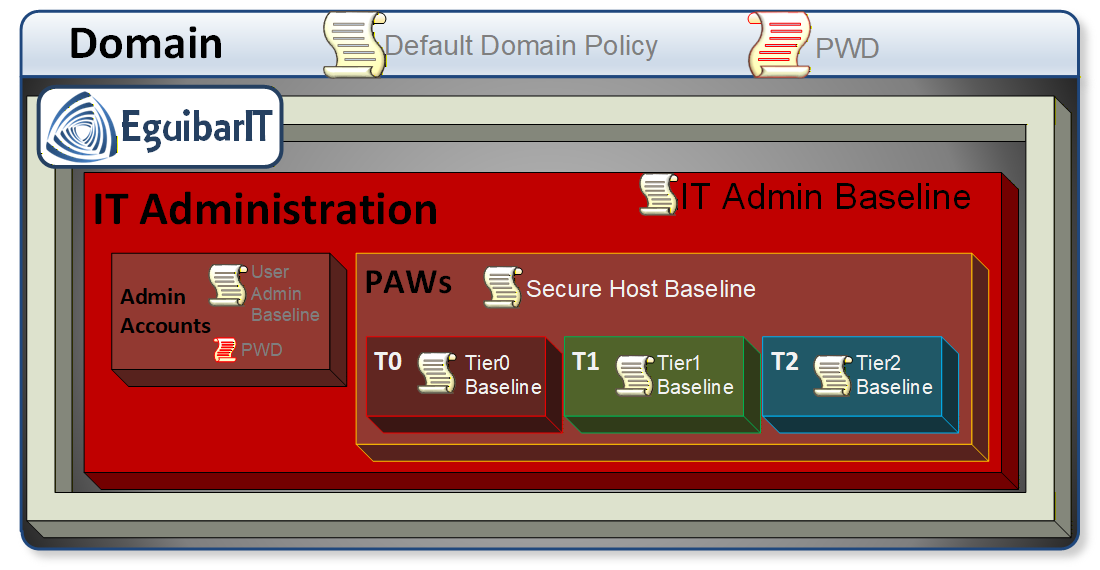 Privileged Access Workstation (PAW) Group Policy Objects (GPOs)
 - Logon Restrictions: Link PAW OU to
Domain AdminsandEnterprise Adminsgroups only. Applyms-DS-User-Account-Control-Computedattribute to prevent interactive logons from non-PAW sources. - Separate Admin Identities: Create tier-specific admin accounts (e.g.,
UserID_t0,UserID_t1) with passwords 32+ characters, rotated quarterly. Store offline in HSM or password manager (1Password, Dashlane) for break-glass scenarios.
Patching & Maintenance Infrastructure
- WSUS or Autopatch: Dedicated WSUS server (or Microsoft Autopatch tier) for Tier 0 endpoints. Approve all patches within 7 days of Microsoft release (monthly). Test in offline lab first.
- Patching Schedule: Automated on second Tuesday of each month; emergency out-of-band patches deployed within 48 hours of disclosure.
- Bios/Firmware Updates: Manual, quarterly, via trusted media (signed USB, boot ISO). Validate manufacturer hashes; never auto-update firmware.
Software & Administrative Tools
- PowerShell: PowerShell 7.4+ for admin automation (preferred); 5.1 legacy for RSAT compatibility. Disable Remote Signing; require all scripts signed by organizational CA. Enable PowerShell transcript logging to SIEM.
- RSAT Tools: Install only required modules:
RSAT.ActiveDirectory.DS-LDS.ToolsRSAT.DnsServer.ToolsRSAT.GroupPolicy.Management.Tools- Avoid
RSAT.RasPbx.Tools,RSAT.Print.Admin.Tools, or other low-risk modules unless required.
- Visual Studio Code: Required for PowerShell script development and IaC (Bicep, Terraform). Install via Microsoft Store (auto-update) or SCCM with code-signing extensions enforced (e.g., Microsoft PowerShell, HashiCorp Terraform).
- VPN Client: Use organizational-approved VPN (Cisco AnyConnect, Palo Alto GlobalProtect, OpenVPN via tunneling software). Enforce split-tunneling disable; route all traffic through organization proxy with PAC (Proxy Auto-Config) URLs.
- Proxy & Forward Filtering: Web proxy (Squid, Zscaler, Palo Alto
Networks) with content filtering, URL categorization, and SSL/TLS inspection. Whitelist
only:
learn.microsoft.com,docs.microsoft.comgithub.com(release/raw download only)- Internal artifact repositories (Artifactory, Nexus)
- Time sync (ntp.org, local NTP)
- Antivirus / EDR: Windows Defender Advanced Threat Protection (Microsoft Defender for Endpoint) or third-party EDR (CrowdStrike Falcon, Cortex XDR) in detection-only mode (no auto-remediation). Enable AMSI (Antimalware Scan Interface) logging. Send all alerts to SIEM for correlation. Exclude SCCM and WSUS update cache from real-time scanning to avoid conflicts.
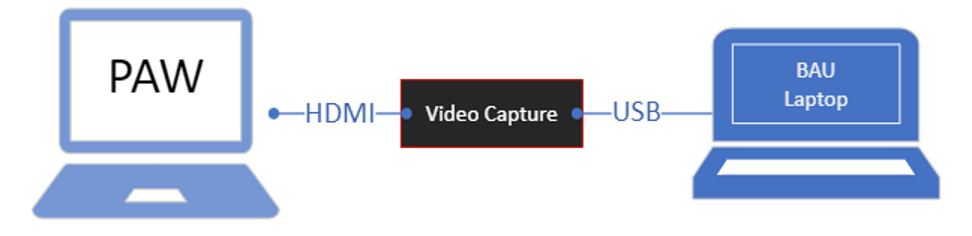
- Communication Tools: Not permitted in any case. Email (either internal or external) is specifically forbidden. Any other communication tool (like Teams, WhatsApp, Slack, etc.) is also disallowed. Provision a video capture dongle to share screen to BAU Computer.
Monitoring & Logging
- Event Log Forwarding: Send Windows Event Logs (Security, System, PowerShell Operational, Sysmon) to centralized SIEM (Splunk, Azure Sentinel, ELK) with guaranteed delivery and integrity checks.
- Endpoint Detection & Response (EDR): Real-time behavioral analysis, not signature-based. Generate alerts for living-off-the-land binaries (lolbins), credential access attempts, and lateral movement.
- Device Compliance: Use Intune Device Compliance or third-party MDM to verify TPM, BitLocker, Defender status. Non-compliant PAWs barred from accessing Tier 0 resources.
Software & Tools
- PowerShell: 7.x for automation; 5.1 for legacy RSAT
- RSAT Tools: Install only required MMCs/PowerShell modules
- Baseline: CIS, Microsoft Security Baselines for Windows
Configuration Templates & Downloads
PAW Device Hardening Configuration Guide
Download our comprehensive Excel-based configuration helper tool for Tier0 devices (Privileged Access Workstations). This spreadsheet includes:
- Security Baselines: Evaluate settings aligned with CIS Benchmarks and Microsoft Security Baselines
- GPO Templates: Recommended Group Policy configurations settings for PAW hardening
- Configuration Matrix: Hardware, software, and network requirements in structured format
- Security Controls: AppLocker rules, firewall configurations, and service hardening settings
Use this template to: Plan your PAW deployment, document configurations, track compliance, and maintain consistency across your fleet.
Step-by-Step Implementation
Phase 1: Build Hardened Base Image (Offline)
Create the baseline once, sign and version it. Use the same artifacts for pilot and prod.
Step 1.1: Apply Security Baselines (Offline)
- Download the latest Windows Security Baseline (Security Compliance Toolkit). Export to GPO backups.
- Use
LGPO.exe /g .\\BaselineBackupon a staging VM to apply settings. Snapshot the VM first. - Harden PowerShell: Constrained Language Mode, script block logging, transcription to a dedicated log volume.
- Remove bloatware and consumer apps (
Get-AppxPackage | Remove-AppxPackageon the image).
Step 1.2: Credential & Device Guard
- Enable VBS + HVCI (Memory Integrity) in the image; verify via
SystemInformation.exe→ Device Security. - Enable Credential Guard: set
VirtualizationBasedSecurityGPO,Lsaiso.exeprotections, block debugging LSASS. - Disable NTLMv1, restrict NTLM outbound, and enforce SMB signing in the baseline.
Step 1.3: BitLocker & Boot Integrity
- Require TPM + PIN protectors; disallow password-only BitLocker.
- Store recovery keys in AD (msFVE-RecoveryInformation) or Azure AD; verify escrow on each pilot device.
- Configure preboot to block external boot media; lock BIOS with admin password managed in a vault.
Step 1.4: Application Allowlisting
- Use AppLocker (or WDAC) allowlists for admin tools only (RSAT, VS Code, VPN, security agents).
- Block unsigned PowerShell except from trusted paths; allow signed scripts from internal CA.
- Audit mode for 7 days in pilot; then enforce.
Step 1.5: Local Accounts & Services
- Disable built-in Administrator; randomize and vault its password (LAPS if allowed in Tier0, otherwise no enable).
- Disable Guest; remove Remote Assistance and legacy SMB 1.0/CIFS.
- Stop and disable unneeded services: Xbox services, Remote Registry, consumer update assistants.
Step 1.6: Seal and Sign the Image
- Sysprep with
/oobe /generalize /shutdownand capture WIM via DISM. - Hash the WIM (SHA-256) and store checksum + release notes in source control.
Phase 2: Join & Enforce Domain Policies
Move the device into the Tier 0 PAW OU and apply the dedicated GPOs.
Step 2.1: Domain Join to Tier 0 OU
- Join using offline domain join (djoin.exe) or autopilot profile bound to the PAW OU.
- Verify DNS points only to Tier 0 DCs; disable secondary public resolvers.
Step 2.2: Apply PAW GPO Set
- Link the three PAW GPOs (Administration Monolithic, PAW Monolithic, Tier-specific Monolithic) at the corresponding PAW OU.
- Enforce: Device Guard, Credential Guard, BitLocker, AppLocker policies; inheritance from parent OUsis disabled at Admin OU, so there is no need to continue blockin inheritance within this OU sub-tree.
- Run
gpupdate /force; validate withrsop.mscandgpresult /h.
Step 2.3: Network & Proxy Enforcement
- Apply firewall rules via GPO: inbound allow only DCs/jump hosts; outbound allow only WSUS, NTP, DNS, approved HTTPS via proxy.
- Configure WinHTTP proxy (
netsh winhttp set proxy) and PAC file; block direct internet traffic. If using core edition, use the Computer Context variables. - Force NTP to internal sources; disable peer time.
Step 2.4: Admin Rights & Access
- Use Restricted Groups or Group Policy Preferences to ensure only Tier 0 break-glass accounts (if any) are local admins; all others denied.
- Create a "Staging PAW" OU under the PAWs OU for maintenance tasks that require local admin
- Configure User Rights Assignment: deny logon locally, via RDP, and via WinRM for non-privileged accounts.
- Enable Just Enough Administration (JEA) endpoints for PowerShell remoting; disable unrestricted PS remoting listeners.
- Require smartcard/Hello for Business for interactive logon; block password-only sign-in.
Phase 3: Deploy via Pipeline
Automate build + config so every PAW is identical and reproducible.
- MDT/SCCM/Intune Task Sequence: Steps: apply WIM → set BIOS/UEFI settings → enable TPM/BitLocker → install VPN/EDR/RSAT/VS Code → join domain to PAW OU → run post-join scripts (AppLocker in audit then enforce).
- Configuration-as-Code: Store task sequence JSON, GPO backups, AppLocker/WDAC policies, and proxy lists in git. Require pull requests for any change.
- Signing & Integrity: Sign WDAC/AppLocker policies; verify hashes in pipeline before deployment.
Phase 4: Validation & Acceptance
- Run
Test-NetConnectionto Tier 0 DCs, jump hosts, WSUS; confirm all other outbound is blocked. - Check Device Guard/Credential Guard status (System Information → Device Security) and BitLocker escrow in AD/AAD.
- Validate AppLocker/WDAC in enforce mode: only approved admin tools launch.
- Confirm SIEM receives Security, Sysmon, PowerShell logs with correct device ID.
- Conduct break-glass test: ensure break-glass account can sign in when MFA is unavailable (time-bound), then revoke.
Phase 5: Go-Live & Run
- Move devices from pilot collection to production deployment ring; freeze image changes for 2 weeks while monitoring.
- Document known-good versions (WIM hash, AppLocker policy version, EDR agent version) and store in the runbook.
- Schedule monthly compliance reports: drift, AppLocker blocks, Credential Guard status, BitLocker escrow state.
Security & Hardening
Security Best Practices
- Isolation: PAWs never access internet directly; implement a "Secure Copy Process" in/out of Tier 0 with scanned media, checksums, and dual-approval.
- Least Privilege: Admin identities scoped; remove unnecessary tools; no browser/email/chat. All admin actions via approved toolset.
- Logging: Centralize Security, Sysmon, PowerShell, AppLocker/WDAC logs to SIEM; alert on policy deviations.
Security Warning
Critical: Do not install general-purpose software on PAWs. Browsers, email clients, and chat tools increase attack surface.
Use policy to enforce application whitelisting and restrict outbound traffic.
Proactive Controls
- Attack Surface Reduction: AppLocker/WDAC enforced; PowerShell CLM; block Office macros; disable USB mass storage except signed encrypted media.
- Identity Hardening: MFA required; smartcard/Hello; passwordless preferred; disable legacy protocols (NTLMv1, LM, unsigned LDAP).
- Network Safeguards: Outbound deny-by-default; TLS inspection via proxy; DNS sinkhole for known bad domains; no direct internet.
- Health & Compliance: Daily compliance check (Defender, BitLocker, Credential Guard, WDAC). Non-compliant PAWs auto-quarantined via NAC/Intune.
- Baseline Drift Detection: Weekly WDAC/AppLocker and GPO integrity verification (hash compare); alert on drift; auto-remediate via config pipeline.
- Tamper Protection: Enable Defender tamper protection; lock BIOS/UEFI with vault-managed password; USB boot disabled.
Reactive Playbook (Security Events)
- Containment (Target: <10 min): Immediately isolate host from network (EDR network quarantine or NAC); preserve power to retain volatile artifacts.
- Triage (Target: <30 min): Collect triage bundle (EDR snapshot, Windows Event Logs, Sysmon, PowerShell, AppLocker, WDAC, prefetch, SRUM). Capture memory (e.g., LiveKD/AVML) if policy allows.
- Credential Exposure Check (Target: <30 min): Invalidate tokens/creds used from the PAW session; reset Kerberos tickets; force password/PKI credential rotation for accounts active on the PAW.
- Forensic Path (Target: <60 min): Mount disk read-only; hash evidence; export WDAC/AppLocker logs to correlate blocked vs allowed executions.
- Eradication & Rebuild (Target: same business day): Do not clean in place. Reimage from signed WIM + reapply GPOs + revalidate escrow. Replace VPN/EDR keys if compromised.
- Post-Incident Actions (Target: within 24 hours): Update allow/block lists; tighten proxy allowlists; rotate break-glass credentials; add new detections in SIEM for observed TTPs; document timeline.
Operations & Maintenance
Establish routine operational procedures to maintain PAW security posture, detect drift, and ensure compliance. Automated monitoring reduces manual overhead while preserving audit trails.
Daily Operations
| # | Name | Description | Task | Impact Definition | Automated |
|---|---|---|---|---|---|
| 1 | Compliance Check | Verify security controls are active and compliant on all PAWs | Verify BitLocker status, Credential Guard active, WDAC/AppLocker enforced, Defender definitions current (<24 hours old). Query Intune/SCCM compliance status. | Non-compliant PAWs detected immediately preventing security drift. Alert on failures; auto-quarantine non-compliant devices via NAC/Intune. No operational impact during check. | Can be automated with Intune compliance policies or PowerShell script scheduled via Task Scheduler |
| 2 | Log Health Monitor | Ensure audit logs are forwarded to SIEM without gaps | Confirm SIEM receives logs from all PAWs (Security, Sysmon, PowerShell transcription). Validate log volume within expected range. | Log forwarding failures detected early ensuring forensic capability maintained. Alert if log forwarding stops or gaps detected. Compliance requirements met. | Can be automated with SIEM query/alert for missing log sources or log volume anomalies |
| 3 | EDR Health Check | Validate EDR agent status and tamper protection | Validate EDR agent connected, tamper protection enabled, last heartbeat <15 minutes. Check for agent version currency. | EDR protection gaps detected immediately preventing compromise. Escalate if agent offline or disabled. Real-time threat detection maintained. | Can be automated with EDR console API or PowerShell script querying agent status |
| 4 | Network Connectivity | Verify PAW network isolation and authorized connectivity | Verify PAW connectivity to Tier 0 DCs, WSUS, NTP, proxy. Test DNS resolution to internal zones. Check for unauthorized VLAN bridging or internet bypass. | Network isolation breaches detected early preventing lateral movement. Alert if outbound internet bypass detected or unauthorized VLAN bridging. Tier 0 segmentation enforced. | Can be automated with PowerShell script testing connectivity and firewall rules |
Weekly Maintenance
| # | Name | Description | Task | Impact Definition | Automated |
|---|---|---|---|---|---|
| 1 | Baseline Drift Detection | Detect unauthorized configuration changes from signed baseline | Compare current GPO settings, WDAC policies, AppLocker rules against signed baseline (hash comparison). Generate drift report. | Configuration drift detected before security impact. Remediate drift via config pipeline; escalate manual changes. Baseline integrity maintained. | Can be automated with PowerShell script comparing hashes and generating reports |
| 2 | Patch Status Review | Ensure all PAWs receive monthly cumulative updates within SLA | Verify all PAWs received latest monthly cumulative update within 7 days of release. Identify patch failures and exceptions. | Patch coverage gaps identified early preventing vulnerability exposure. Track exceptions; reimage stragglers if patch install fails twice. Compliance maintained. | Can be automated with WSUS/SCCM/Intune reporting queries and alerts |
| 3 | AppLocker/WDAC Audit | Review application control blocks to tune policies and detect attacks | Review blocked execution events; identify false positives (legit admin tools blocked). Monitor for suspicious block patterns (LOLBins, unsigned scripts). | False positives reduced improving admin productivity. Potential attacks detected via block patterns. Update allowlists via pull request. | Can be automated with PowerShell script querying event logs and generating reports |
| 4 | Certificate & Key Rotation Check | Prevent certificate expiration disruptions | Verify PKI certificates valid >30 days; VPN/proxy certs not expired. Check break-glass account credential age. | Certificate expiration prevented avoiding service disruptions. Rotate break-glass account credentials (if time-bound access used). PKI health maintained. | Can be automated with PowerShell script checking certificate validity and sending alerts |
| 5 | Admin Identity Hygiene | Ensure admin sessions follow security best practices | Review active admin sessions; verify no stale sessions >8 hours. Confirm smartcard/MFA used for all logons (no password fallback). | Session hygiene maintained preventing credential exposure. Confirm smartcard/MFA used for all logons. Tier 0 access controls enforced. | Can be automated with PowerShell script querying AD and generating reports |
Monthly Reviews
| # | Name | Description | Task | Impact Definition | Automated |
|---|---|---|---|---|---|
| 1 | Image & Baseline Refresh | Update golden image with latest security baselines and patches | Release new signed WIM if Microsoft Security Baseline or major OS patch requires update. Document changes and version control. | Latest security controls deployed fleet-wide preventing vulnerability exposure. Test in pilot ring (3 devices) for 7 days; then production rollout. Baseline currency maintained. | Can be partially automated with image build pipeline; pilot testing requires manual validation |
| 2 | Firmware & BIOS Updates | Deploy firmware updates addressing security vulnerabilities | Check manufacturer sites for BIOS/UEFI/TPM firmware updates addressing CVEs. Validate hashes; deploy via signed USB in maintenance window. | Firmware vulnerabilities patched preventing low-level attacks. Reboot and verify Secure Boot/TPM health post-update. Hardware security maintained. | Manual process; validation of Secure Boot/TPM can be automated with PowerShell script |
| 3 | Network Allowlist Review | Maintain least-privilege network access and detect C2 attempts | Audit proxy allowlist; remove stale URLs; tighten rules if new Microsoft Learn domains added. Review DNS sinkhole hits for potential C2 attempts. | Attack surface reduced through network allowlist hygiene. Potential C2 communication detected via sinkhole analysis. Least-privilege networking enforced. | Can be automated with PowerShell script analyzing proxy logs and DNS sinkhole hits |
| 4 | EDR Policy Tuning | Optimize detection rules based on operational feedback | Adjust detection sensitivity based on false positive rate. Add custom detections for new TTPs observed in threat intel or incidents. | Detection accuracy improved reducing alert fatigue. New threats covered through custom detections. Threat detection maintained current. | Can be partially automated with EDR tuning recommendations; custom detection creation requires manual analysis |
| 5 | Compliance Report | Executive dashboard for PAW security posture | Generate monthly dashboard: drift detections, AppLocker blocks, non-compliance rate, patch coverage, incident count. | Leadership visibility into PAW security maintained. Share with leadership and audit team. Compliance evidence documented. | Can be automated with PowerShell script or BI tool querying data sources and generating report |
Quarterly Activities
| # | Name | Description | Task | Impact Definition | Automated |
|---|---|---|---|---|---|
| 1 | Admin Account Lifecycle Review | Maintain Tier 0 admin account hygiene and credential rotation | Audit all Tier 0 admin accounts: disable unused accounts; verify separation of duties; confirm no over-privileged accounts (e.g., Domain Admins with Tier 1 access). Rotate passwords/PKI credentials for all active admins. | Tier 0 account hygiene maintained preventing over-privileged access. Credential rotation completed reducing credential exposure risk. Separation of duties enforced. | Can be partially automated with PowerShell script querying AD and generating reports; credential rotation manual |
| 2 | PAW Inventory Audit | Maintain accurate asset inventory and remove orphaned records | Verify all physical PAWs accounted for; confirm serial numbers, asset tags, assigned users. Remove decommissioned devices from AD, Intune, EDR consoles. | Asset inventory accuracy maintained. Orphaned records cleaned preventing management console clutter. Compliance evidence documented. | Can be partially automated with asset management system integration; physical verification manual |
| 3 | Break-Glass Test | Validate emergency access procedures work when needed | Conduct break-glass scenario drill: simulate MFA outage; verify break-glass account can sign in; test password vault access. Revoke time-bound access after test. | Break-glass procedures validated ensuring emergency access available. Document test results; update procedures if failures detected. Compliance requirements met. | Manual process; test results can be documented in automated system |
| 4 | Disaster Recovery Drill | Validate PAW rebuild procedures and recovery time objectives | Simulate PAW fleet rebuild: restore from WIM, reapply GPOs, validate escrow keys, reconnect to DCs. Measure time-to-recovery (target <4 hours per device). | Recovery procedures validated ensuring business continuity. Recovery time measured against target; identify bottlenecks. Runbook updated with lessons learned. | Manual process; timing and results can be automated with script tracking |
| 5 | Tabletop Exercise | Test incident response procedures through scenario simulation | Run incident response tabletop with security team: PAW compromise scenario; validate containment, triage, eradication procedures. Update runbook with lessons learned. | Incident response procedures validated ensuring team readiness. Gaps identified and remediated. Runbook currency maintained. | Manual process; exercise documentation can be stored in automated system |
Annual Reviews
| # | Name | Description | Task | Impact Definition | Automated |
|---|---|---|---|---|---|
| 1 | Architecture Assessment | Validate PAW architecture against current best practices | Review PAW deployment model against latest Microsoft Security Compass and CIS Benchmarks. Identify gaps; prioritize remediation. Evaluate emerging controls (e.g., Pluton, passwordless-only). | Architecture currency validated against industry standards. Security gaps identified and prioritized for remediation. Document roadmap; executive summary delivered. | Manual assessment; gap analysis can be partially automated with compliance scanning tools |
| 2 | Third-Party Audit | Independent validation of Tier 0 PAW security controls | Engage external auditor for Tier 0 PAW controls assessment (penetration test, compliance audit vs. CIS/NIST). Remediate findings; document exceptions. | Independent security validation completed. Compliance evidence documented for regulatory requirements. Executive summary delivered to leadership. | Manual audit process; findings remediation tracking can be automated with ticketing system |
| 3 | Hardware Lifecycle | Plan PAW hardware refresh to maintain security capabilities | Identify PAWs >4 years old or EOL hardware (no firmware updates). Plan budget for refresh; prioritize devices with TPM 1.2, non-UEFI, or insufficient RAM. | Hardware lifecycle managed preventing EOL security risks. Budget planning completed; refresh roadmap documented. Security capabilities maintained. | Can be partially automated with asset management system reporting; prioritization requires manual review |
| 4 | Admin Training & Awareness | Maintain admin security awareness and test readiness | Conduct annual PAW security training: secure copy procedures, incident reporting, break-glass usage, phishing recognition. Test via simulated attack (USB-based); track completion rate. | Admin security awareness maintained. Simulated attack tests readiness; results documented. Compliance requirements met. | Training delivery can be automated with LMS; simulated attack requires manual coordination |
Operational Metrics & KPIs
| Metric | Target | Measurement Frequency |
|---|---|---|
| Compliance Rate | >99% (BitLocker, Credential Guard, WDAC) | Daily (automated) |
| Patch Coverage | 100% within 7 days of release | Weekly |
| Baseline Drift | <1% devices with unauthorized changes | Weekly |
| EDR Agent Uptime | >99.9% (max 1 hour downtime/month) | Daily |
| Log Delivery Success | 100% (no gaps in SIEM) | Daily |
| AppLocker False Positives | <5 blocks/month per device (after pilot) | Weekly |
| Incident Response Time (containment) | <10 minutes | Per incident |
| Mean Time to Rebuild | <4 hours (imaging + validation) | Quarterly test |
Change Management
- Config Pipeline: All PAW changes (GPO, WDAC, AppLocker, proxy rules) via pull request in git. Require peer review + security approval. Deploy to pilot ring first (3 devices, 7 days soak).
- Emergency Changes: Break-glass change process for critical patches or zero-day mitigations. Document justification; apply change; post-incident review within 48 hours; backfill pull request.
- Rollback Plan: Retain last two WIM versions; tag GPO backups by date; retain AppLocker/WDAC policy history in git. Rollback target: <2 hours to previous known-good state.
Documentation & Runbooks
- PAW Runbook: Maintain living document in version control: build procedures, GPO settings, allowlists, network rules, incident playbook, escalation contacts. Review quarterly; update after incidents.
- Break-Glass Procedures: Document offline/print: break-glass account locations, vault access, emergency contacts, offline domain join steps. Store in secure physical location (safe, locked cabinet).
- Incident Post-Mortems: Document all PAW security events: timeline, root cause, containment actions, lessons learned, corrective actions. Share sanitized versions with broader IT security team.
Resources & References
Internal Resources
- PAW Conceptual Overview — Foundational PAW principles and Why PAWs matter in on-prem, hybrid, and cloud environments
- Enterprise Access Model (EAM) — Cloud-extended privilege management and how PAWs integrate with Azure/Microsoft 365
- EAM Reference Architecture — Detailed EAM design patterns and PAW placement in cloud-native deployments
- GPO Monolithic Approach — Policy design strategies including PAW hardening baselines and group policy configuration
- Active Directory Q&A — Detailed FAQ on PAW implementation, troubleshooting, and governance
- Active Directory Tier Model — Tier 0/1/2 architecture and PAW integration with tiering policies
- Delegation Model Design — RBAC strategy and PAW user role assignments
- Active Directory Housekeeping Tasks — 316 maintenance checks including dedicated PAW compliance, health monitoring, baseline drift detection, and lifecycle management tasks organized across all frequencies