Overview
The monolithic GPO approach consolidates scattered, overlapping policies into a small, layered set of authoritative baselines. Instead of hundreds of functional GPOs each carrying a few settings, you maintain a predictable order: Core Baseline → Platform Overlay (workstation, server, specialty) → Exceptions (time-bound or narrowly scoped). This reduces precedence conflicts and makes outcomes deterministic.
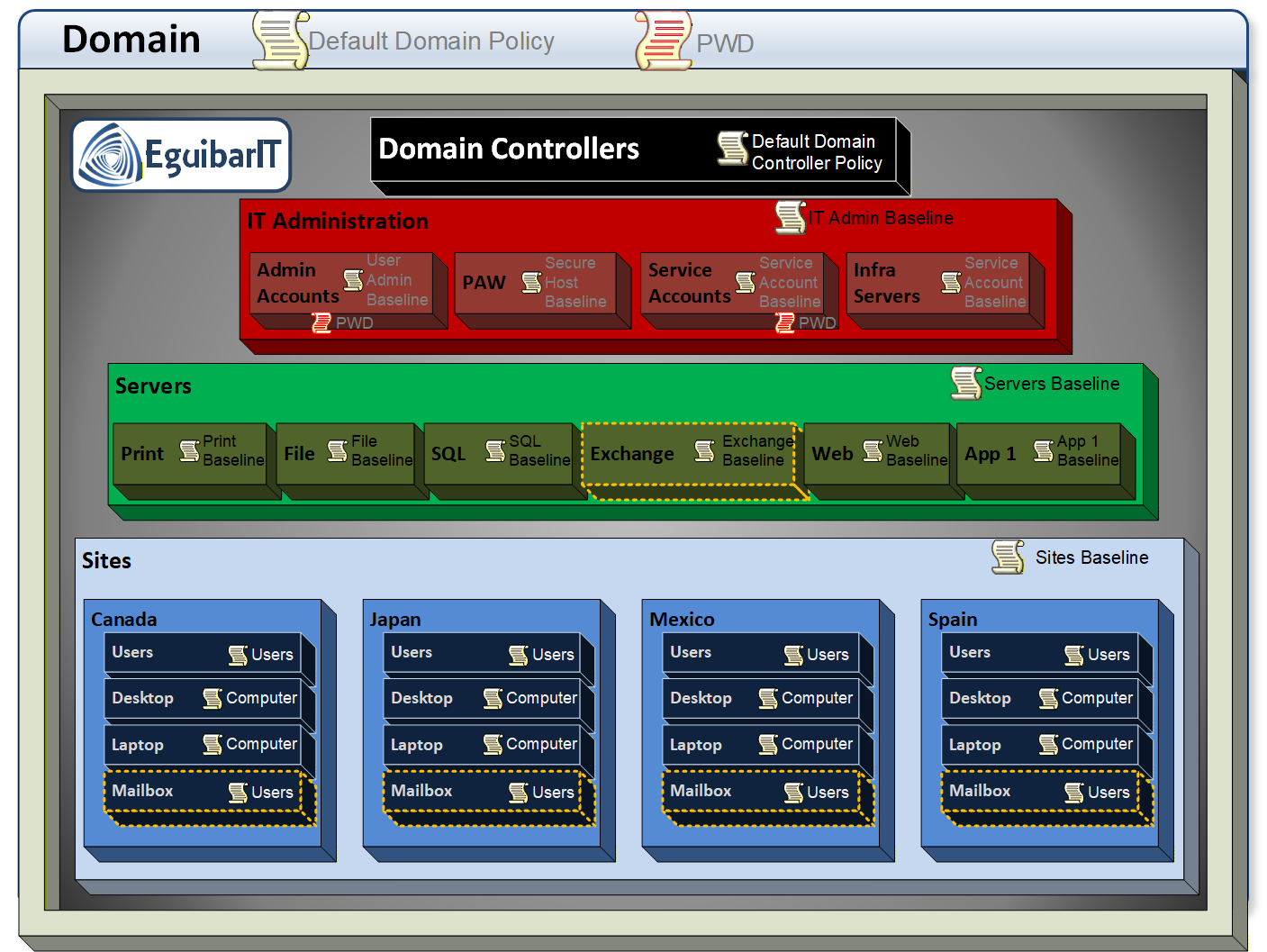
GPO is a set of configurations which can be centrally applied. Applied to whom? Simple, just to Users and/or computers. So here we define the first rule: Any GPO created must be defined to be either for Users or for Computers, but not for both.
A very common bad practice is that every time a new setting is need, a new GPO is created. In order to avoid these bad practices, we have to define how are we going to manage these GPOs, and when is “valid” to create a new one.
To start with, we will define the only 2 predefined GPOs: “Default Domain Policy” and “Default Domain Controllers Policy”. These 2 GPO will not be modified except for very precise configurations. Following, the GPOs will be created as Monolithic GPO. This means that 90% or 95% of the configurations will be done using the same GPO object, and only the remaining configurations which are not compatible with the monolithic GPO will be configured on another GPO. A new GPO will ONLY be created when the existing (monolithic) GPO is not compatible with the new setting. This will provide us with GPO which have almost all configuration for the corresponding container.
The GPO hierarchy is inheritable, so if a configuration is done at the top most GPO, this setting will be applied to all child objects, unless that the same setting is defined on a lower layer; in this case, the last setting getting configured is, most likely, the winner.
This model directly supports the Tiering model (Tier0, Tier1, Tier2) by keeping Tier boundaries clean and preventing lower-tier or functional GPOs from overriding high-value hardening. Baselines for each tier are maintained by accountable owners and promoted through a change process (for example with AGPM).
- Operational clarity: Fewer links, known order, minimal RSoP noise.
- Maintainability: Versioned baselines; changes applied once per layer.
- Security: Centralized hardening; exceptions isolated and reviewed.
- Auditability: Evidence collection from a handful of baseline GPOs.
Below we contrast GPO sprawl with monolithic design, explain when to create exceptions, and show how to scope policies cleanly for User-only and Computer-only use cases.
Monolithic Philosophy
War Story: The 200-GPO Nightmare
A mid-sized financial services organization accumulated over 200 functional GPOs across a decade. Each time a compliance requirement emerged, a security setting needed tweaking, or an application demanded a registry key, the team created a new GPO. No one dared consolidate for fear of breaking something.
The Breaking Point:
- Outage incident: A "quick fix" GPO linked at OU root with Enforced inadvertently disabled Windows Defender across 400 workstations. Security team only discovered it during a scheduled audit 6 weeks later.
- Precedence paralysis: Troubleshooting a single registry value required reviewing RSoP for 47 GPOs. The setting was being overridden by GPO #38 in the processing order—no one remembered why it existed.
- Audit nightmare: Compliance auditors requested "proof of baseline hardening." The team manually exported 89 GPO HTML reports and spent 12 hours collating evidence.
- Change freeze fear: Every patch Tuesday became a gamble. Rolling back a GPO change meant navigating AGPM history across dozens of objects with unclear interdependencies.
The Transformation:
A 90-day consolidation project reduced the estate to 15 monolithic baselines:
- 3 Tier0 GPOs: Domain Controllers, Tier0 Admin Computers, Tier0 Admin Users
- 5 Tier1 GPOs: Server Baseline, SQL overlay, File Server overlay, IIS overlay, Server Admin Users
- 5 Tier2 GPOs: Workstation Baseline, VDI overlay, Standard Users, Developer Users, Kiosk
- 2 Exception GPOs: Time-bound regulatory override; legacy application compatibility (scheduled for decommission)
Results:
- ✅ Precedence conflicts dropped from 12/month to zero in 6 months.
- ✅ Audit evidence collection: 8 minutes (export 15 baselines + diff tool).
- ✅ Change velocity: Baseline updates deployed in 1-hour windows vs. previous 4-hour marathons.
- ✅ Security posture: Centralized hardening eliminated 23 "shadow relaxations" buried in functional GPOs.
- ✅ Team confidence: Junior admins could now model changes without fear; RSoP became predictable.
Lesson Learned: "Every new GPO is technical debt. Favor baseline evolution over proliferation."
Problems With Fragmented GPO Sprawl
- Unclear ownership: dozens of legacy GPOs have no accountable maintainer.
- Precedence nightmares: link order + enforced + block inheritance combinations impossible to reason about.
- Hidden drift: overlapping settings redefined differently across multiple functional GPOs.
- Slow troubleshooting: RSoP parsing of hundreds of objects obscures the true source of a value.
- Weak change control: emergency fixes added as new GPOs instead of adjusting baselines.
- Security gaps: baseline hardening diluted by late-link functional GPO overriding values.
Benefits of Monolithic Baselines
| Aspect | Fragmented Model Pain | Monolithic Benefit |
|---|---|---|
| Governance | Diffuse ownership / orphaned GPOs | Clear baseline owners + change workflow (AGPM) |
| Predictability | Complex precedence chains | Layered ordering: Core → Overlay → Exceptions |
| Troubleshooting | High RSoP noise | Small set of authoritative sources |
| Security | Late functional GPO overrides hardening | Hardening centralized; exceptions isolated |
| Change Velocity | Many touch points per update | Single baseline revision per layer |
| Audit & Evidence | Manual collation of numerous GPOs | Export a handful of baselines quickly |
Decision Matrix for Separate (Exception) GPOs
Not every setting belongs inside a monolithic baseline. Use this matrix to decide when a separate exception GPO is justified rather than modifying the core:
| Scenario | Criteria | Separate GPO? | Guidance |
|---|---|---|---|
| Temporary change | Short-lived (≤ 30 days) with clear expiry | Yes | Avoid polluting baseline; schedule removal |
| Application-specific hardening | Applies to < 15% of target computers | Yes | Keep baseline widely applicable |
| Regulatory override | Mandated by audit / compliance | Yes (tagged) | Document authority & review cycle |
| Permanent global improvement | Improves security for ≥ 80% estate | No | Incorporate into next baseline revision |
| Legacy policy migration | Old setting with unclear ownership | Maybe | Assess necessity; prefer retiring |
| Break-fix emergency | Restores availability; security neutral | Yes (temporary) | Create ticket; merge / remove after RCA |
Favor baseline evolution over proliferation. If a change will be permanent and broadly beneficial, refactor the baseline; only carve out exceptions when scope or lifetime is constrained.
Alignment with Tiering Model
Monolithic baselines map naturally to Tier 0/1/2. Link Tier0 baselines only within Tier0 administrative scopes; never below. Link Tier1 baselines to server OUs; Tier2 baselines to workstation OUs. Avoid Block Inheritance and prefer a clear link order with enforced baselines only when truly required. Combine with the Delegation Model (RBAC) so ownership and change approval are unambiguous.
Right-size Each GPO's Status
Having a GPO with both sections enabled (users & computers) means the GPO can be processed 2 times; First during Computer pass and once more during user processing. This makes the GPO inefficient due processing times of the objects. Set the GPO Status to disable the unused half for faster processing and clearer intent:
- User policy only: set Computer configuration settings disabled.
- Computer policy only: set User configuration settings disabled.
- Both: avoid using it. Only when fully justified (for example, Loopback).
Scope with OU links and security filtering (groups). Prefer WMI filters sparingly.
Examples
- User (Disable Computer):
U-Tier1-AdminUser— contains User Configuration (e.g., shell restrictions, elevation prompts for admin users). GPO Status: Computer configuration settings disabled. Linked to the Admin Users OU; security filtered to the appropriate admin groups. - Computer (Disable User):
C-Tier1-Workstation-Baseline— contains Computer Configuration hardening (Defender, firewall, SMB, LAPS). GPO Status: User configuration settings disabled. Linked to Workstations OU. - Kiosk/VDI with Loopback:
C-VDI-Kiosk(Computer settings) +U-VDI-Kiosk(User settings applied via Loopback Processing = Merge). Keep both enabled only on theC-VDI-KioskGPO where loopback is defined; ensure the user GPOs are scoped to the device context. - Temporary Application Exception:
X-App-USB-Relax-30d— narrowly scoped exception to enable a device class for a pilot group; documented expiry; reviewed weekly; removed or merged into baseline if it becomes a permanent need.
WMI common filters
When a WMI Filter is defined in a GPO, only the resultant objects from the query will be applied/Denied the GPO settings. These filters are used to specifically target to the objects that the query is finding/filtering. The inconvenient of these filters is that only 1 filter can be applied to the GPO, and the full GPO content is applied to the selected object. The creation of such objects is a Tier0 Administrator task and cannot be sub-delegated. Some common WMI queries examples grouped in categories:
WMI Computer Properties
| Description | Query |
|---|---|
| Computer is a laptop (because it has a battery) | SELECT * FROM Win32_Battery |
| Screen resolution is at least 1280x720 | SELECT * FROM Win32_DisplayControllerConfiguration WHERE HorizontalResolution>1279 AND VerticalResolution>719
|
| System is running on batteries NOTE: Namespace for this filter: \root\WMI |
SELECT * FROM BatteryStatus Where Discharging = True |
| Computer has at least 2GB RAM memory | SELECT * FROM Win32_ComputerSystem WHERE TotalPhysicalMemory > 2000000000
|
| Drive D: contains at least 100GB free space | SELECT * FROM Win32_LogicalDisk WHERE FreeSpace > 100000000000 AND Caption = "D:"
|
| Computer contains an Intel Processor | SELECT * FROM Win32_Processor WHERE Manufacturer = "GenuineIntel"
|
| Computer has more than 2 logical processors | SELECT * FROM Win32_ComputerSystem WHERE NumberOfLogicalProcessors > 2
|
| Computer has more than 1 physical processor | SELECT * FROM Win32_ComputerSystem WHERE NumberOfProcessors > 1
|
| Computer contains an active Trusted Platform Module
(TPM) NOTE: Namespace for this filter: root\CIMV2\Security\MicrosoftTpm |
SELECT * FROM Win32_Tpm WHERE IsEnabled_InitialValue = True
|
WMI Windows Operating System
| Description | Query |
|---|---|
| 64 bits OS installed | SELECT OSArchitecture FROM Win32_OperatingSystem WHERE OSArchitecture = "64-bit"
|
| OS Windows 7 | SELECT * FROM Win32_OperatingSystem WHERE Version = "6.1%" AND ProductType = "1"
|
| OS Windows 7 with service pack 1 | SELECT * FROM Win32_OperatingSystem WHERE Version = "6.1%" AND ProductType = "1" AND ServicePackMajorVersion = "1"
|
| OS Windows Vista | SELECT * FROM Win32_OperatingSystem WHERE Version = "6.0%" AND ProductType = "1"
|
| OS Windows 2008 R2 server DC | SELECT * FROM Win32_OperatingSystem WHERE Version = "6.1%" AND ProductType <> "2"
|
| OS Windows 2008 R2 server | SELECT * FROM Win32_OperatingSystem WHERE Version = "6.1%" AND ProductType <> "3"
|
| OS Windows 2008 R2 server with service pack 1 | SELECT * FROM Win32_OperatingSystem WHERE Version = "6.1%" AND ProductType <> "3" AND ServicePackMajorVersion = "1"
|
WMI Software and Settings
| Description | Query |
|---|---|
| Time zone + 1 (bias is the time zone GMT+0 offset in minutes) | SELECT * FROM win32_timezone WHERE bias = 60 |
| Windows feature webserver is installed | SELECT * FROM Win32_ServerFeature WHERE Name="Web Server (IIS)"
|
| Service DHCP Server starts automatically | SELECT * FROM Win32_Service WHERE Caption="DHCP Server" AND StartMode="Auto"
|
| Share Backup$ is defined on this computer | SELECT * FROM Win32_Share WHERE Caption="Backup$" |
| File C:\windows\system32\notepad.exe exists | SELECT * FROM CIM_Datafile WHERE Name="C:\\windows\\system32\\notepad.exe"
|
| Local user JDoe exists | SELECT * FROM Win32_UserAccount WHERE Name="JDoe" AND LocalAccount=True
|
| Local group WSUS-administrators exists | SELECT * FROM Win32_Group WHERE LocalAccount=True AND Name="WSUS-administrators"
|
WMI Active Directory
| Description | Query |
|---|---|
| Computer is an AD client computer | SELECT ProductType FROM Win32_OperatingSystem WHERE ProductType = "1"
|
| Computer is an AD domain controller | SELECT ProductType FROM Win32_OperatingSystem WHERE ProductType = "2"
|
| Computer is an AD member server | SELECT ProductType FROM Win32_OperatingSystem WHERE ProductType = "3"
|
| AD Site-name is Mexico | SELECT * FROM Win32_NTDomain WHERE ClientSiteName = "Mexico"
|
Advanced Group Policy Management (AGPM) Workflow
The Advanced Group Policy Management (AGPM) feature of Microsoft Desktop Optimization Pack (MDOP) provides version control, change approval workflows, and role-based delegation for GPOs. When combined with monolithic baselines, AGPM ensures that each change is reviewed, tested, and auditable.
AGPM Change Lifecycle
- Check-out: Editor (delegated role) checks out the GPO from the archive. AGPM creates a working copy; the production GPO is locked to prevent concurrent edits.
- Edit: Editor modifies the working copy using GPMC. Settings are saved within the AGPM archive; production remains unchanged.
- Check-in: Editor checks in the modified GPO with a change description. The new version is stored in the archive history.
- Approval Request: Editor requests deployment. Approver receives notification and reviews the diff (GPO comparison report).
- Approval & Deployment: Approver accepts or rejects. On acceptance, AGPM deploys the new version to production. The archive retains full version history for rollback.
AGPM Delegation per Tier
Align AGPM roles with the Tiering model and Delegation Model (RBAC). Tier0 GPOs must never be editable by lower-tier administrators.
| Tier | GPO Scope | AGPM Editor Role | AGPM Approver Role | Notes |
|---|---|---|---|---|
| Tier0 | Domain Controllers, Tier0 Admin | SL_InfraAdmins orSL_Tier0Admins |
SL_InfraApprovers |
Highest privilege; dual approval; enforce MFA; PAW-only access. |
| Tier1 | Servers, Tier1 Admin | SL_ServerAdmins |
SL_ServerApprovers |
Server baseline + specialty overlays (SQL, IIS, etc.). |
| Tier2 | Workstations, Standard Users | SL_WorkstationAdmins |
SL_WorkstationApprovers |
Workstation baselines; user policies (often separate GPOs). |
Tier0 AGPM roles must be assigned to Tier0 admin accounts
only. Use delegated shadow groups
(e.g., SL_InfraAdmins) rather than direct user membership. Automate
delegation with the New-DelegateAdGpo cmdlet (see PowerShell examples
below).
Migrate AGPM Service Account to gMSA
Microsoft Advanced Group Policy Management (AGPM) extends the capabilities of the Group Policy Management Console AGPM can:
- Provide change control for GPOs by implementing a check-in and check-out process.
- Perform offline editing of GPOs so that you can create and test them before you deploy them to a production environment.
- Maintain multiple versions of a GPO in a central archive so that you can roll back if a problem occurs.
- Share the responsibility for editing, approving, and reviewing GPOs among multiple people by using role-based delegation.
- Eliminate the danger of multiple Group Policy administrators overwriting one another's work by using the check-in and check-out capability for GPOs.
- Analyze changes to a GPO, comparing it to another GPO or another version of the same GPO by using difference reporting.
- Simplify creating new GPOs by using GPO templates, storing common policy settings and preference settings to use as starting points for new GPOs.
- Delegate access to the production environment.
- Search for GPOs with specific attributes and filter the list of GPOs displayed.
- Export a GPO to a file so that you can copy it from a domain in a test forest to a domain in a production forest.
By default, AGPM runs under a standard service account. Migrate to a Group Managed Service Account (gMSA) for automatic password rotation and improved security:
-
Create the gMSA:
New-ADServiceAccount -Name "gMSA-AGPM" -DNSHostName "gMSA-AGPM.EguibarIT.local" -PrincipalsAllowedToRetrieveManagedPassword "SL_AGPMServers$" - Add gMSA-AGPM$ as a member to the AD group “Group Policy Creator Owners” and “Backup Operators”
- Assign gMSA-AGPM$ “Logon as a Service” right on the AGPM server.
- Remove the ServicePrincipalNname (SPN) for AGPM from the AD users original service account and place it on gMSA-AGPM$ instead
- Install on AGPM server:
Install-ADServiceAccount -Identity "gMSA-AGPM" Test-ADServiceAccount -Identity "gMSA-AGPM" - stop the service “AGPM Service”
- Set the registry value at HKLM\Software\Microsoft\AGPM\ArchiveOwner to have the SID of gMSA-AGPM$
- Set the permissions on the AGPM data folder (by default this is C:\ProgramData\Microsoft\AGPM) and on the folder %windir%\temp to grant 'Full Control' on these 2 folders and all sub files and folder to gMSA-AGPM$
-
Set permissions on all GPOs to grant gMSA-AGPM$ full control using:
Set-GPPermission -All -PermissionLevel GpoEditDeleteModifySecurity -TargetName CONTOSO\gMSA-AGPM$ -TargetType Computer - Set permissions to the root of each domain to all gMSA-AGPM$ to have “Link GPO” rights to all OU objects
-
Update AGPM service to use
CORP\gMSA-AGPM$(note trailing$); leave password blank. - Remove all other accounts as having Editor rights to all GPOs.
- Grant necessary rights (see delegation cmdlets for automated ACL assignment).
- Start the AGPM service.
Alternatives to AGPM
If AGPM licensing is unavailable or infrastructure is cloud-focused:
- Git-based workflow: Export baselines as XML/HTML reports; version in Git; import after peer review. Manual but effective for small teams.
- Azure Automation / Azure DevOps: Use PowerShell DSC or custom runbooks to apply GPO configurations as code. Suitable for hybrid/cloud-native environments.
- Manual change log + backups: Minimum viable process: document changes
in a wiki, maintain GPO backups via
Backup-GPO, and restore on errors.
AGPM Best Practices
- Enforce change descriptions: Require detailed check-in comments (reference ticket/RFC number).
- Regular archive backups: The AGPM archive is the authoritative source; back it up daily.
- Periodic audit: Review AGPM history logs; identify orphaned GPOs or stale exceptions.
- Test in non-production: Maintain a parallel lab OU structure; deploy baselines there first.
- Automate delegation: Use
New-DelegateAdGpoand cmdlets to grant AGPM roles consistently (see PowerShell examples).
Tier 0/1/2 GPO Design Patterns
The Tiering model segments administrative access into Tier0 (domain/forest critical), Tier1 (servers/applications), and Tier2 (workstations/users). Monolithic GPOs align with these tiers to enforce clean security boundaries and prevent credential theft across tiers.
Naming Convention
Use a prefix-based naming standard to immediately identify scope and purpose:
| Prefix | Meaning | Example |
|---|---|---|
C- |
Computer Configuration (User settings disabled) | C-Tier0-DomainControllers |
U- |
User Configuration (Computer settings disabled) | U-Tier0-AdminUsers |
X- |
Exception / Temporary (time-bound or narrowly scoped) | X-Tier1-SQL-TempFix-30d |
Follow the prefix with Tier designation and scope:
{Prefix}-Tier{N}-{Scope}. Examples: C-Tier0-Baseline,
U-Tier1-ServerAdmins, C-Tier2-Workstations.
Tier0 GPO Examples
Tier0 protects domain controllers, identity infrastructure (CA, ADFS), and Tier0 administrative accounts. GPOs here enforce the strictest controls and must never be editable by lower-tier admins.
| GPO Name | Type | Linked To | Key Settings | Status |
|---|---|---|---|---|
C-Tier0-DomainControllers |
Computer | OU=Domain Controllers |
SMBv1 disabled, AppLocker, Defender ATP, event log sizing, credential guard | User disabled |
C-Tier0-Baseline |
Computer | OU=Admin,OU=Tier0 |
PAW enforcement, device guard, network isolation (Tier0 subnets only) | User disabled |
U-Tier0-AdminUsers |
User | OU=Users,OU=Admin,OU=Tier0 |
Restricted shell (Admin Tools only), screensaver lock, no removable media | Computer disabled |
C-Tier0-PAW |
Computer | OU=PAW,OU=Admin,OU=Tier0 |
AppLocker whitelist, local admin restrictions (LAPS), firewall hardening | User disabled |
Link order (enforced if needed): Core baseline first, then specialty (PAW, DC), then exceptions. Use Enforced sparingly; rely on link order.
Tier1 GPO Examples
Tier1 governs servers and application infrastructure. Baselines cover common server hardening; overlays add settings for SQL, IIS, file servers, etc.
| GPO Name | Type | Linked To | Key Settings | Status |
|---|---|---|---|---|
C-Tier1-ServerBaseline |
Computer | OU=Servers,OU=Tier1 |
SMB signing, firewall profiles, Defender, audit policy (4624, 4625, 4648), LAPS | User disabled |
C-Tier1-SQL |
Computer | OU=SQL,OU=Servers,OU=Tier1 |
SQL-specific firewall rules, event log forwarding (1433 access), TLS 1.2+ enforcement | User disabled |
C-Tier1-FileServers |
Computer | OU=FileServers,OU=Servers,OU=Tier1 |
SMB encryption, access-based enumeration, share permissions audit | User disabled |
U-Tier1-ServerAdmins |
User | OU=Users,OU=Admin,OU=Tier1 |
Restricted admin tools, session timeout, credential caching disabled | Computer disabled |
Tier2 GPO Examples
Tier2 manages workstations and standard user accounts. Focus on user experience, security controls (BitLocker, Defender), and productivity tooling.
| GPO Name | Type | Linked To | Key Settings | Status |
|---|---|---|---|---|
C-Tier2-WorkstationBaseline |
Computer | OU=Workstations,OU=Tier2 |
BitLocker, Defender ATP, firewall, SMBv1 disabled, LAPS, update policies | User disabled |
C-Tier2-VDI |
Computer | OU=VDI,OU=Workstations,OU=Tier2 |
Loopback processing (merge), profile management (FSLogix), app whitelisting | Both enabled (loopback) |
U-Tier2-StandardUsers |
User | OU=Users,OU=Tier2 |
OneDrive redirection, screen lock, USB device restrictions, printer deployment | Computer disabled |
U-Tier2-Developers |
User | OU=Developers,OU=Users,OU=Tier2 |
Relaxed AppLocker (dev tools allowed), extended session timeout | Computer disabled |
GPO Linking Strategy
Follow a layered linking order to maintain predictability:
- Domain root: Minimal settings (e.g., password policy via fine-grained password policy, not GPO).
- Tier OU root: Link core baseline (e.g.,
C-Tier1-ServerBaselinetoOU=Servers,OU=Tier1). - Specialty sub-OUs: Link overlays (e.g.,
C-Tier1-SQLtoOU=SQL,OU=Servers,OU=Tier1). - Exception GPOs: Link last or at the sub-OU with highest link order number (processed last if not enforced).
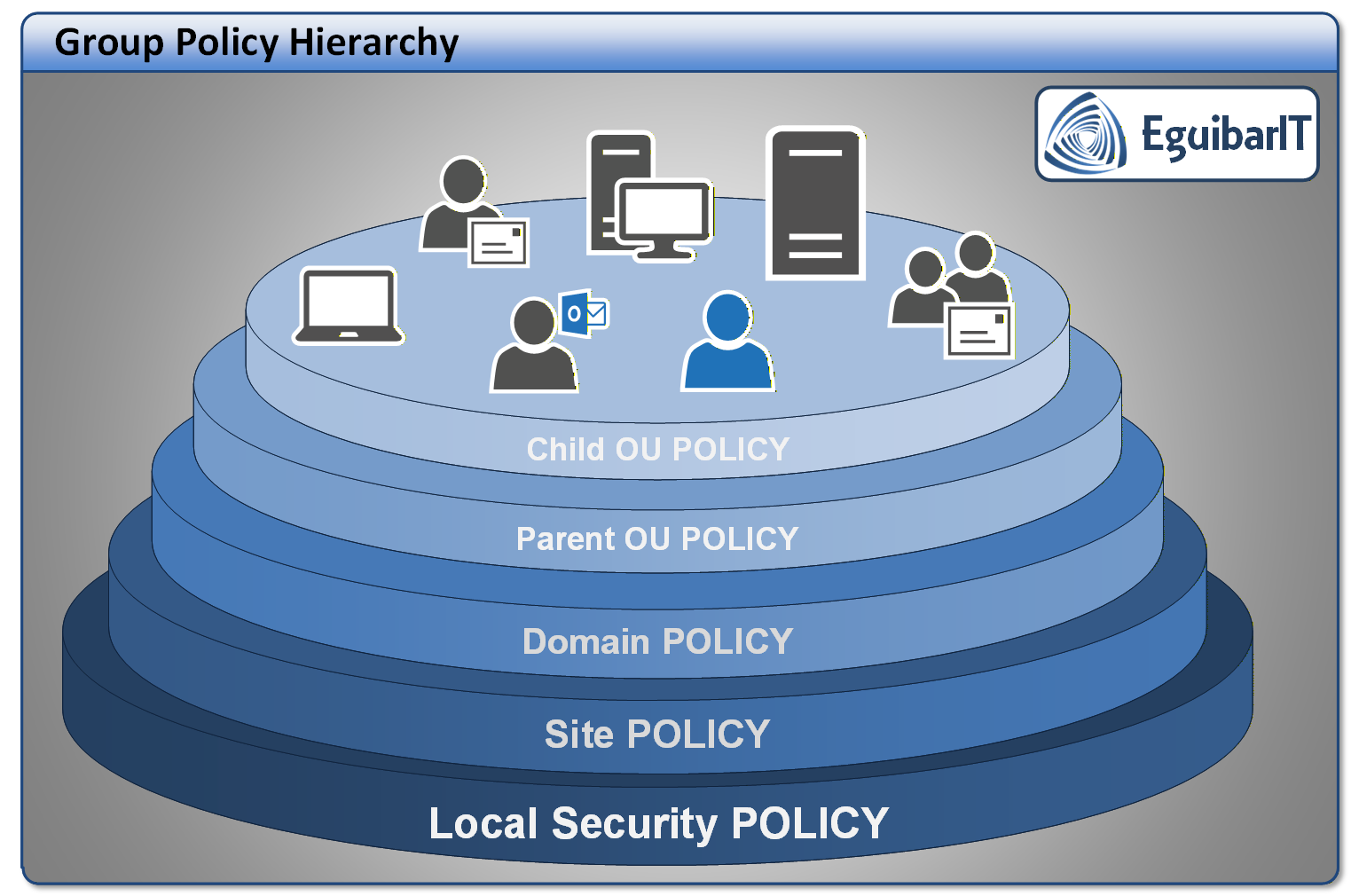
It obscures policy flow. Overriding just means lack of planning and configuration best practices. In over 35 years of experience, this approach has proven always problematic.
Preventing Cross-Tier Contamination
Critical principle: Tier0 credentials must never process Tier1/2 GPOs, and vice versa. Enforce this via:
- Security filtering: Grant Apply Group Policy only to
appropriate groups (e.g.,
SG_Tier1Serversfor Tier1 baselines). - OU structure: Separate Tier0/1/2 objects into distinct OU hierarchies. Never nest Tier0 admin OUs under Tier1/2.
- Delegation: Use
New-DelegateAdGpoto grant AGPM roles and GPO edit rights only within tier boundaries. - Audit: Monitor for Tier0 accounts logging into Tier1/2 systems (triggers lateral movement alerts).
Implementation Checklist
- Design OU structure per Tier model (separate Tier0, Tier1, Tier2 roots).
- Create baselines using naming convention (
C-Tier{N}-{Scope}). - Set GPO Status (disable unused half: User or Computer).
- Link baselines to appropriate Tier OU; test in lab first.
- Delegate AGPM roles per Tier (see delegation table above).
- Automate GPO creation and ACL assignment with
New-Tier0Gpo,New-DelegateAdGpocmdlets (see PowerShell section). - Document link order, exception criteria, and review schedule in AGPM archive comments.
- Schedule quarterly reviews: retire stale exceptions, merge permanent changes into baselines.
A monolithic GPO approach aligned with a tiered security model provides clarity, reduces complexity, and enhances security posture. Combined with AGPM workflows and PowerShell automation, it enables scalable, auditable Group Policy management for modern enterprises.
PowerShell Automation
Automating GPO creation, delegation, and maintenance ensures consistency and reduces manual errors. The examples below use the EguibarIT.DelegationPS module (available on PowerShell Gallery) for ACL assignments.
Create and Delegate a GPO
Use New-DelegateAdGpo to create a GPO with proper naming, status, and
Tier-aligned delegation in a single operation:
Creates GPO, sets status based on type (Computer/User/Both), and delegates Editor/Approver rights to shadow groups. Integrates with AGPM workflow.
Create Tier0 Baseline GPO
Use New-Tier0Gpo to scaffold a Tier0 computer baseline with
pre-configured
hardening:
SMBv1 disabled, Credential Guard, Device Guard, advanced audit, LAPS. Always test in lab OU before production deployment.
Delegation Examples
Grant AGPM Editor and Approver rights using Set-AdAcl* cmdlets:
Grant GPO Edit Rights
Grant GPO Admin Rights
Always delegate to shadow groups
(e.g., SL_InfraAdmins) rather than nested groups or individual users. This
maintains clear RBAC boundaries and simplifies auditing.
Backup and Restore Workflow
Maintain disaster recovery readiness with automated GPO backups:
Schedule this script weekly via Task Scheduler (using a gMSA). Store backups on Tier0-protected storage; retain 30+ days of history.
Validation Scripts
After creating or modifying baselines, validate configuration:
Module Installation
Install the EguibarIT.DelegationPS module on Tier0 admin workstations (PAW) only:
See the Delegation Module documentation for full cmdlet reference and advanced scenarios.
Maintenance Schedule & Health Monitoring
Establish a recurring maintenance cadence to keep monolithic GPO baselines secure, auditable, and aligned with evolving threats and compliance requirements.
Daily GPO Health Tasks
| # | Name | Description | Task | Impact Definition | Automated |
|---|---|---|---|---|---|
| 1 | Replication / SYSVOL Health | Verify AD & SYSVOL/DFSR replication; check key event IDs (4012, 4016, 1058, 1030) for emerging issues. | Run health script; review DC logs; confirm SYSVOL consistency. | Early detection prevents baseline drift and inconsistent policy enforcement. | Partial (Script + Log Review) |
| 2 | AGPM Pending Approvals | Identify changes awaiting approval to maintain controlled lifecycle. | List Pending in AGPM; escalate items >24h. | Prevents unreviewed changes lingering and risking silent drift. | Manual (AGPM UI) |
| 3 | Baseline Drift Quick Scan | Detect unsanctioned edits outside AGPM workflow. | Run AGPM Difference report vs production. | Minimizes silent security regression in Tier baselines. | Partial (AGPM Diff) |
| 4 | GPO Processing Errors | Review client/system GPO application errors (1058/1030) & replication related issues. | Parse SIEM / sample gpresult logs. | Ensures enforcement integrity and reduces configuration gap exposure. | Partial (SIEM Query) |
| 5 | Privileged Filtering Anomalies | Check for newly added privileged groups to baseline filtering. | Enumerate filters; diff against whitelist manifest. | Prevents privilege expansion & lateral movement. | Yes (Script) |
| 6 | Backup Job Success | Confirm last scheduled backup completed properly. | Review backup log & artifact count. | Assures recoverability & rollback readiness. | Yes (Script) |
Weekly GPO Health Tasks
| # | Name | Description | Task | Impact Definition | Automated |
|---|---|---|---|---|---|
| 1 | GPO Backup Execution | Run full Tier0/1/2 baseline & exception backup routine. | Execute backup script; verify log; rotate old archives. | Maintains point-in-time recovery integrity. | Yes (Script) |
| 2 | Disabled / Unlinked Report | List dormant GPOs for cleanup or re-link decision. | Generate report; tag candidates >30d unused. | Controls sprawl & audit complexity. | Yes (Script) |
| 3 | RSoP Validation Sample | Confirm baseline enforcement on representative endpoints. | Run gpresult; compare vs baseline manifest. | Assures effective policy delivery. | Partial (Script + Compare) |
| 4 | WMI Filter Performance | Check execution performance & relevance of filters. | Extract definitions; flag obsolete predicates. | Improves logon/boot performance. | Partial (Script) |
| 5 | AGPM Archive Hygiene | Prune superseded versions beyond retention policy. | Retain last N + milestone snapshots. | Reduces clutter while preserving rollback fidelity. | Manual (AGPM UI) |
Monthly GPO Health Tasks
| # | Name | Description | Task | Impact Definition | Automated |
|---|---|---|---|---|---|
| 1 | Exception Expiry Audit | Identify temporary exception GPOs past lifespan. | Compare exception list vs expiry; retire or renew. | Limits risk accumulation & drift. | Partial (Script + Approval) |
| 2 | Consolidation Review | Assess recurring exceptions for baseline inclusion. | Analyze frequency; propose merge if pattern stable. | Strengthens consistency; reduces overhead. | Manual (Analysis) |
| 3 | Baseline Compliance Diff | Diff baselines vs current MS / CIS updates. | Pull benchmark delta; draft update proposal. | Keeps parity with external standards. | Partial (Script + Review) |
| 4 | Delegation ACL Review | Verify only approved groups retain rights. | Enumerate ACLs; diff against manifest. | Prevents privilege creep. | Yes (Script) |
Quarterly GPO Health Tasks
| # | Name | Description | Task | Impact Definition | Automated |
|---|---|---|---|---|---|
| 1 | Benchmark Alignment | Deep review vs CIS, STIG & MS security baselines. | Map deltas; document remediate/accept decisions. | Mitigates divergence from industry posture. | Manual (Workshop) |
| 2 | Backup Restore Test | Restore sample baseline GPOs in lab. | Import from archive; validate checksum. | Proves recovery viability. | Partial (Script) |
| 3 | gMSA Rotation Verification | Confirm password rotations executed. | Review AD events & service usage. | Assures hardened service identity. | Manual / SIEM |
| 4 | OU / Tier Boundary Assessment | Validate separation still supports org changes. | Review new workloads; adjust OU design. | Prevents cross-tier leakage. | Manual (Architecture) |
| 5 | Filtering Hygiene | Confirm only minimal necessary groups filtered. | Enumerate filters; remove residual pilot groups. | Reduces unintended exposure. | Yes (Script) |
Semi-Annual GPO Health Tasks
| # | Name | Description | Task | Impact Definition | Automated |
|---|---|---|---|---|---|
| 1 | Naming Convention Audit | Ensure all GPOs follow prefix + Tier pattern. | List & flag deviations; schedule rename. | Preserves clarity & troubleshooting speed. | Yes (Script) |
| 2 | GPO Count KPI Review | Assess total & exception counts vs targets. | Generate metrics; propose reductions. | Prevents sprawl re-emergence. | Partial (Script + Analysis) |
| 3 | WMI Filter Relevance | Remove obsolete OS/hardware filters. | Enumerate; retire stale predicates. | Improves performance & reduces complexity. | Yes (Script) |
| 4 | Cross-Tier Contamination Review | Ensure Tier0 baselines not linked outside Tier0. | Enumerate links; remediate anomalies. | Maintains privileged boundary. | Yes (Script) |
| 5 | Legacy Preference Migration | Identify legacy Preferences to modernize. | Map to ADMX or MDM CSP replacements. | Reduces technical debt. | Manual (Planning) |
Annual GPO Health Tasks
| # | Name | Description | Task | Impact Definition | Automated |
|---|---|---|---|---|---|
| 1 | Baseline Rationalization Workshop | Stakeholder review of all baselines & exceptions. | Conduct workshop; record decisions. | Keeps architecture intentionally minimal. | Manual (Workshop) |
| 2 | AGPM Role Recertification | Validate Approver/Editor/Reviewer memberships. | Export roles; confirm justification. | Prevents privilege creep undermining control. | Partial (Script + Manual) |
| 3 | Full DR Simulation | Restore all Tier0 baselines in isolated lab. | Automate import; validate checksums. | Assures end-to-end recoverability. | Partial (Script) |
| 4 | Decision Matrix Refresh | Update exception criteria with new platforms. | Review emerging tech & security patterns. | Maintains governance clarity. | Manual (Review) |
| 5 | External Security Validation | Independent assessment of baseline effectiveness. | Engage audit; remediate findings. | Provides external assurance & compliance evidence. | Manual (External Audit) |
| # | Name | Description | Task | Impact Definition | Automated |
|---|---|---|---|---|---|
| 1 | Zero-Day Hardening Overlay | Rapid deployment of emergent mitigation settings. | Create exception GPO; set sunset date. | Reduces exposure window during exploitation. | Manual (Expedited) |
| 2 | Rollback Misapplied Policy | Undo accidental or harmful baseline change. | Restore last good via AGPM / backup. | Minimizes outage & instability. | Partial (AGPM + Script) |
| 3 | New OS Baseline Introduction | Onboard baseline for new Windows version. | Clone template; adapt ADMX; stage approval. | Ensures secure posture at adoption. | Manual (Initial Build) |
| 4 | Legacy Preference Modernization | Migrate legacy Preferences to ADMX / MDM CSP. | Inventory & map replacements. | Reduces technical debt. | Manual (Project) |
| 5 | Decommission Test / Pilot GPO | Remove obsolete pilot GPOs post rollout. | Confirm no links; archive & delete. | Prevents clutter & accidental reuse. | Partial (Script) |
Resources & Further Reading
Microsoft Official Documentation
- Group Policy Overview | Microsoft Learn
- Advanced Group Policy Management (AGPM) | Microsoft Learn
- Implementing Least-Privilege Administrative Models | Microsoft Learn
- Privileged Access Deployment | Microsoft Learn
- Windows Defender Application Control (WDAC) | Microsoft Learn
- Credential Guard | Microsoft Learn
Security Baselines & Benchmarks
- CIS Microsoft Windows Benchmarks | Center for Internet Security
- DISA STIG GPO Templates | Defense Information Systems Agency
- Microsoft Security Compliance Toolkit | Download Center
EguibarIT PowerShell Modules & Repositories
- EguibarIT Module | GitHub — Core delegation and housekeeping cmdlets
- EguibarIT.DelegationPS | GitHub — Advanced delegation (ACLs, GPOs, OUs, Tier0/1/2 automation)
- EguibarIT.HousekeepingPS | GitHub — Privileged account lifecycle, group hygiene, audit automation
- EguibarIT on PowerShell Gallery
- EguibarIT.DelegationPS on PowerShell Gallery
Related Articles on This Site
- Tier Model Architecture — Foundational Tier0/1/2 segmentation
- Delegation Model (RBAC) — Shadow groups and least-privilege access
- Privileged Access Workstations (PAW) — Secure admin endpoints
- Credential Theft Defenses — Hardening techniques
- Delegation Module Documentation —
Set-AdAcl*cmdlet reference - AD Housekeeping Tasks — Maintenance automation
Community Tools & Utilities
- Microsoft Policy Analyzer | GitHub — Compare GPO settings, identify drift
- Local Group Policy Object (LGPO) Utility | GitHub — Apply GPO settings locally for testing
- Group Policy Search (SDM Software) — Search GPO settings across estate