Kerberoasting is one of the most consistently effective Active Directory attack techniques because it exploits a design feature of the Kerberos protocol, not a vulnerability. It does not trigger lockouts. It does not require elevated privileges. It cannot be patched away. The only complete defences are architectural: strong encryption, automated password rotation, and minimum-privilege service accounts.
In This Guide
- Real-World Breach Scenario
- What is Kerberoasting?
- How the Attack Works
- Your Attack Surface
- Find Vulnerable Accounts
- Detection (Event ID 4769)
- Prevention: 5 Controls
- Enforcing AES-Only Kerberos
- Migrating to gMSA
- Incident Response Checklist
- Compliance Mapping
- Maintenance Schedule
- Resources & References
Breach Scenario: The Service Account Nobody Remembered
Composite scenario based on common real-world patterns
The attacker had been a standard domain user for eleven minutes.
They ran a single command: Invoke-Kerberoast -OutputFormat Hashcat. It
returned 23 service ticket hashes in under four seconds — no failed logon events,
no alerts, no network noise beyond the normal authentication traffic. They copied the
hashes to a laptop running Hashcat at 14 billion guesses per second against the
rockyou2024 wordlist.
The first hash cracked in 38 seconds: SQLSvc2019!. The service account
for a SQL Server registered in 2019. Password set at deployment. Never changed.
Member of Domain Admins because that was "easier than figuring out
the minimum permissions."
Forty-seven minutes after initial access, the attacker had a Golden Ticket.
What is Kerberoasting?
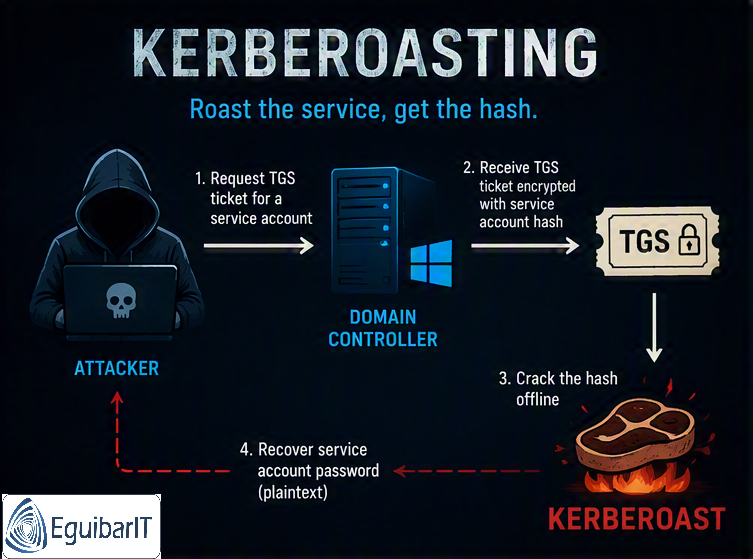
Kerberoasting is a credential theft technique catalogued as MITRE ATT&CK T1558.003. It exploits the Kerberos authentication flow: any authenticated domain user can request a Kerberos service ticket (TGS) for any account that has a Service Principal Name (SPN) registered in Active Directory. The ticket is encrypted with the service account's NTLM password hash. The attacker captures the encrypted ticket and cracks the password offline — no interaction with the target account, no lockouts, no failed logon events.
| Attribute | Value |
|---|---|
| MITRE ATT&CK | T1558.003 — Steal or Forge Kerberos Tickets: Kerberoasting |
| Prerequisite | Any valid Active Directory user account (no elevated privileges required) |
| Target | User accounts with Service Principal Names (SPNs) registered — SQL Server, IIS, Exchange, SharePoint, custom services |
| Detection difficulty | 🟢 Detectable — clear Event ID 4769 patterns when auditing is enabled |
| Common tools | Rubeus, Invoke-Kerberoast (PowerSploit), Impacket GetUserSPNs.py, Hashcat (-m 13100), John the Ripper |
| Five Eyes reference | NSA/CISA Advisory AA22-335A — Listed as one of the most exploited techniques against AD |
How the Attack Works
Kerberoasting follows four steps. Steps 1–3 take seconds inside the domain. Step 4 happens entirely offline on the attacker's hardware.
Step 1 — Enumerate All SPNs
The attacker queries Active Directory for all accounts with registered SPNs. This is a standard LDAP query any authenticated user can perform:
# Native PowerShell - no special modules required
Get-ADUser -Filter { ServicePrincipalName -ne '$null' } -Properties ServicePrincipalName |
    Select-Object SamAccountName, ServicePrincipalName

# Or using setspn (built-in Windows tool)
setspn -Q */*
Step 2 — Request TGS Tickets for All SPNs
For each SPN, the attacker requests a Kerberos service ticket from a Domain Controller. The KDC responds with a ticket encrypted using the service account's NTLM hash. The key insight: the KDC does not check whether the requester actually needs the service — it just issues the ticket.
# Using Rubeus (common attacker tool)
.\Rubeus.exe kerberoast /rc4opsec /outfile:hashes.txt

# Using PowerSploit (built-in PowerShell, no exe required)
Invoke-Kerberoast -OutputFormat Hashcat | Select-Object -ExpandProperty Hash
Step 3 — Extract the Encrypted Ticket Material
Each ticket contains a section encrypted with the service account's password hash. The attacker extracts these hashes — they are in Hashcat format 13100 (or equivalent John the Ripper format).
# View captured hashes (Hashcat format 13100)
Get-Content hashes.txt | Select-Object -First 3
# $krb5tgs$23$*SQLSvc2019$CORP.LOCAL$MSSQLSvc/SQLPROD01:1433*$a3f8...
# $krb5tgs$23$*IISSvc$CORP.LOCAL$HTTP/intranet.corp.local*$b7c2...
# Each line is one service account hash ready for offline cracking
Step 4 — Offline Password Cracking
The cracking happens entirely on the attacker's machine — no further connection to the domain required. RC4-encrypted tickets are cracked significantly faster than AES:
# Hashcat - RC4 ticket cracking (mode 13100)
hashcat -m 13100 hashes.txt rockyou2024.txt --rules best64.rule

# Against a GPU farm: 14 billion guesses/second
# "SQLSvc2019!" cracks in <1 minute from any common wordlist| Password Strength | RC4 Ticket (0x17) — Crack Time | AES256 Ticket (0x12) — Crack Time |
|---|---|---|
8 chars, common word + number (SQLSvc2019!) |
<1 minute (wordlist) | ~100× slower — still crackable with wordlist |
| 12 chars, mixed case + symbols | <48 hours (rule-based) | Days to weeks |
| 20 chars random alphanumeric | Months–years (brute force) | Effectively uncrackable |
| gMSA (240 chars, auto-rotated) | Computationally infeasible — even with AES, billions of years | |
Why RC4 Still Matters
By default, many older service accounts have msDS-SupportedEncryptionTypes
set to 0 or not set at all, which tells the KDC to use RC4. Attackers
can also explicitly downgrade the ticket request to RC4 even if the account
supports AES, unless your domain specifically blocks this via policy. Enforcing
AES-only at the domain and account level is the second most impactful control after
gMSA migration.
Your Attack Surface
Every user account with a registered SPN is a Kerberoasting target. The attack surface is larger than most organizations realize because SPNs accumulate silently over years:
- SQL Server service accounts (
MSSQLSvc/server:port) - IIS application pool accounts (
HTTP/intranet.corp.local) - Exchange service accounts
- SharePoint service accounts
- Custom application service accounts
- Orphaned SPNs — registered for decommissioned servers, never cleaned up
- Admin accounts with SPNs — the most dangerous category
| Account Type | Typical Password Age | Typical Privileges | Kerberoast Risk |
|---|---|---|---|
| Service account, RC4, weak password, Domain Admin member | 3–7 years | Domain Admin or higher | CRITICAL |
| Service account, RC4, short password, local admin on servers | 1–3 years | Local admin on target servers | HIGH |
| Service account, AES-only, strong 25+ char password | <1 year | Minimum required | MEDIUM (AES slows cracking) |
| gMSA with SPN | Auto-rotated every 30 days (240-char random) | Minimum required | LOW (practically uncrackable) |
| User account without SPN | Any | Any | NOT VULNERABLE |
Find Your Vulnerable Accounts Now
Run this audit before your next team meeting. It takes under two minutes against any domain size and generates a risk-scored CSV.
Quick One-Liner Audit
If you need a fast answer right now without downloading a script:
# Count Kerberoastable accounts and flag RC4-capable ones
Get-ADUser -Filter { ServicePrincipalName -ne '$null' } `
    -Properties ServicePrincipalName, 'msDS-SupportedEncryptionTypes', PasswordLastSet |
    Select-Object SamAccountName,
        @{N='SPNCount'; E={$_.ServicePrincipalName.Count}},
        @{N='RC4Capable'; E={
            $enc = $_.'msDS-SupportedEncryptionTypes'
            ($null -eq $enc) -or ($enc -eq 0) -or ($enc -band 4)
        }},
        @{N='PwdAgeDays'; E={
            if($_.PasswordLastSet){ [int](New-TimeSpan -Start $_.PasswordLastSet).TotalDays } else {9999}
        }} |
    Sort-Object RC4Capable -Descending | Format-Table -AutoSize
Detection: Event ID 4769
Kerberoasting is detectable if you have Kerberos Service Ticket auditing
enabled. The key signal is Event ID 4769 with encryption type
0x17 (RC4-HMAC).
Enable Kerberos Service Ticket Auditing
If not already enabled, configure auditing on all Domain Controllers via GPO:
- Path: Computer Configuration → Policies → Windows Settings → Security Settings → Advanced Audit Policy → Account Logon
- Setting: Audit Kerberos Service Ticket Operations — Enable Success
Detection Indicators in Event ID 4769
| Field | Suspicious Value | Explanation |
|---|---|---|
| Ticket Encryption Type | 0x17 (RC4-HMAC) |
Attackers request RC4 tickets deliberately — faster to crack offline.
Most modern environments should use 0x12 (AES256) or
0x11 (AES128).
|
| Request volume | 10+ different SPNs from one account in <10 minutes | Normal use requests 1–3 SPNs. Mass enumeration requests tens to hundreds. |
| Service Name | Many different SPNs — not krbtgt |
Kerberoasting enumerates all SPNs. Legitimate activity targets specific known services. |
| Source workstation | Standard workstation or non-admin host requesting admin SPNs | A developer workstation requesting SQL Server service tickets for 15 different servers is highly anomalous. |
| Account Name | Non-service, non-admin account requesting sensitive SPNs | Any standard user requesting a ticket for MSSQLSvc on a DC
should be flagged immediately. |
Automated Detection Script
The Kerberoasting Detection Script monitors Event ID 4769 continuously and generates alerts when thresholds are exceeded. It is designed to run as a scheduled task on a management workstation with Event Log Reader access to all Domain Controllers.
SIEM Detection Rule (KQL / Sentinel)
// Azure Sentinel / Log Analytics — Kerberoasting detection
SecurityEvent
| where EventID == 4769
| where TicketEncryptionType == "0x17"  // RC4-HMAC
| where ServiceName !endswith "$"        // Exclude machine accounts
| where ServiceName != "krbtgt"
| summarize
    RequestCount = count(),
    DistinctSPNs = dcount(ServiceName),
    SPNList = make_set(ServiceName, 20)
    by Account, IpAddress, bin(TimeGenerated, 10m)
| where RequestCount >= 5 or DistinctSPNs >= 3
| order by RequestCount desc
Prevention: 5 Controls Ranked by Effectiveness
| # | Control | Effectiveness | Implementation Effort | Risk After Implementation |
|---|---|---|---|---|
| 1 | Migrate service accounts to gMSA | 🟢 Maximum — 240-char auto-rotating password is computationally uncrackable | Medium — per-application testing required | LOW |
| 2 | Enforce AES-only Kerberos (disable RC4) | 🟡 High — eliminates fast RC4 cracking; AES cracks are 100× slower and wordlist-dependent | Medium — requires compatibility testing | MEDIUM |
| 3 | Set 100+ character random passwords for SPN accounts | 🟡 High — effectively eliminates brute-force risk for non-gMSA accounts | Low — one PowerShell command per account | MEDIUM (password still extractable, but uncrackable) |
| 4 | Remove Domain Admin from service accounts | 🟡 High — reduces blast radius from CRITICAL to HIGH/MEDIUM | High — requires application owners to define minimum permissions | MEDIUM |
| 5 | Audit and remove unnecessary SPNs | 🟢 Eliminates exposure for orphaned accounts entirely | Low — quarterly audit and cleanup | NONE for removed SPNs |
Set 100+ Character Random Passwords
For service accounts that cannot yet migrate to gMSA, a 100+ character random password makes offline cracking computationally infeasible regardless of encryption type. The password never needs to be typed — only the service logon uses it.
# Generate a 128-char cryptographically random password and apply it
$bytes = New-Object byte[] 96
[System.Security.Cryptography.RandomNumberGenerator]::Fill($bytes)
$pw = [Convert]::ToBase64String($bytes)  # 128 printable chars
Set-ADAccountPassword -Identity "SQLSvc_Prod" `
    -NewPassword (ConvertTo-SecureString $pw -AsPlainText -Force) `
    -Reset
# Store $pw in your PAM vault — it will never be used interactively
Remove Unnecessary SPNs
Orphaned SPNs for decommissioned servers are invisible in most monitoring dashboards but fully visible to Kerberoasting tools. Audit and clean them up:
# Find service accounts with SPNs that haven't logged in recently
Get-ADUser -Filter { ServicePrincipalName -ne '$null' } `
    -Properties ServicePrincipalName, LastLogonDate |
    Where-Object { $_.LastLogonDate -lt (Get-Date).AddDays(-180) -or $_.LastLogonDate -eq $null } |
    Select-Object SamAccountName, LastLogonDate, ServicePrincipalName

# Remove a specific SPN (after confirming with application owner)
Set-ADUser -Identity "SQLSvc_Legacy" -ServicePrincipalNames @{ Remove = "MSSQLSvc/SQLOLD01:1433" }
Enforcing AES-Only Kerberos Encryption
Before disabling RC4, audit what your environment currently uses. Disabling RC4 on accounts or domain-wide without testing first will break legacy applications that do not support AES.
Step 1 — Audit Current Encryption Types
The script below inventories all accounts and their supported encryption types. Run this first, before making any changes:
Step 2 — Enforce AES on Individual Service Accounts
Once compatibility is confirmed, set msDS-SupportedEncryptionTypes = 24
(AES128 + AES256 only, no RC4):
# Enforce AES128 + AES256 only (disable RC4/DES) for a specific account
# 8 = AES128, 16 = AES256, 24 = both AES types
Set-ADUser -Identity "SQLSvc_Prod" -Replace @{ 'msDS-SupportedEncryptionTypes' = 24 }

# Apply to all service accounts with SPNs (after compatibility testing)
Get-ADUser -Filter { ServicePrincipalName -ne '$null' } |
    ForEach-Object { Set-ADUser $_ -Replace @{ 'msDS-SupportedEncryptionTypes' = 24 } }
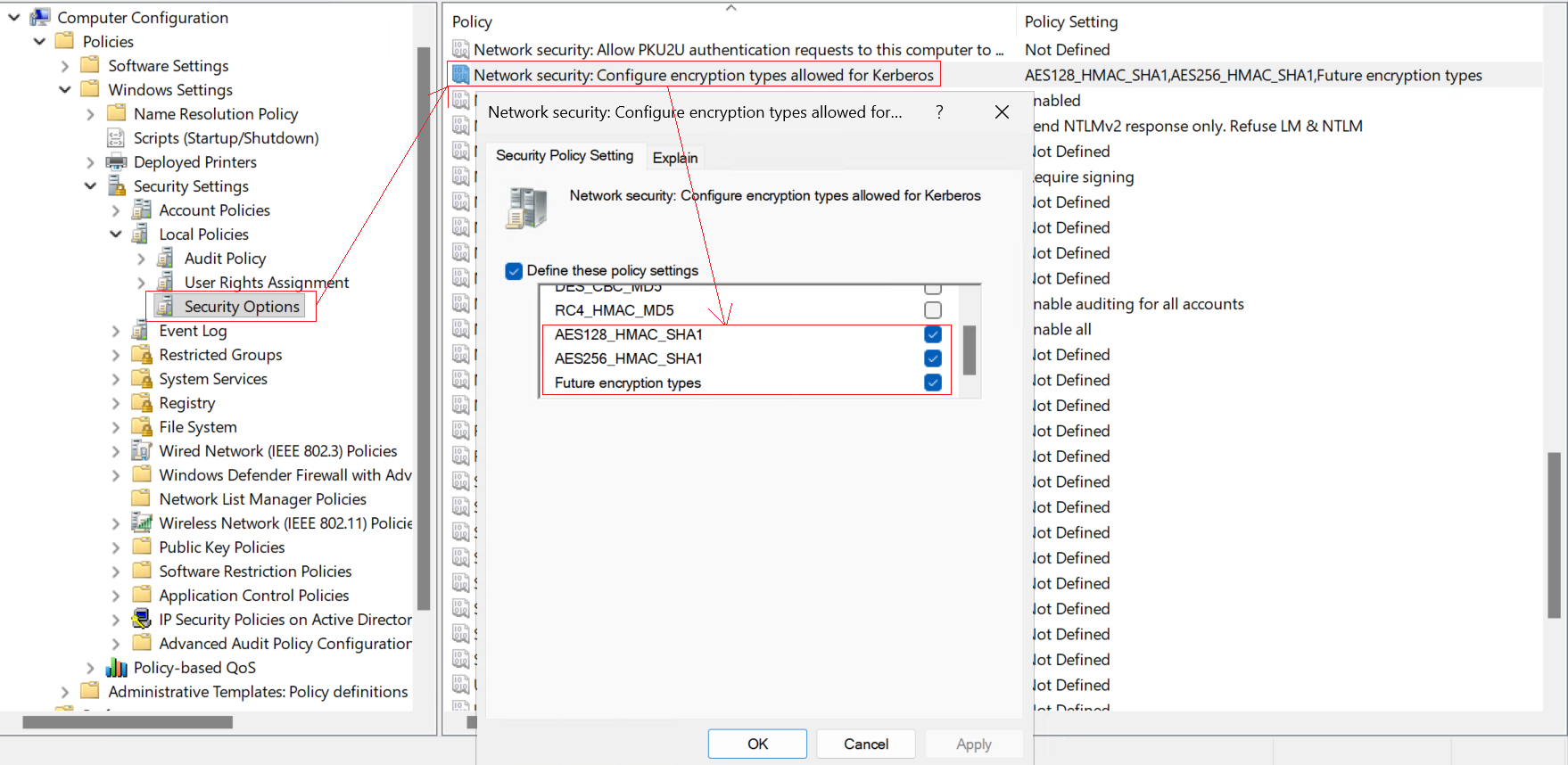
Step 3 — Domain-Wide RC4 Disablement via GPO
For a domain-wide policy, configure via Group Policy on the Default Domain Controllers Policy:
- Path: Computer Configuration → Policies → Windows Settings → Security Settings → Local Policies → Security Options
- Setting: Network security: Configure encryption types allowed for Kerberos
- Enable only: AES128_HMAC_SHA1 and AES256_HMAC_SHA1
- Disable: DES_CBC_CRC, DES_CBC_MD5, RC4_HMAC_MD5
Test Before Enforcing Domain-Wide
Disabling RC4 domain-wide breaks: older applications hard-coded to use RC4, Windows
XP/Server 2003 clients (if any remain), some NAS devices and network appliances,
and cross-forest trusts with older domains. Always audit first using the
Get-KerberosEncryptionTypes script, then enforce on pilot OUs before
applying to the entire domain.
The Best Defence: Migrate to Group Managed Service Accounts (gMSA)
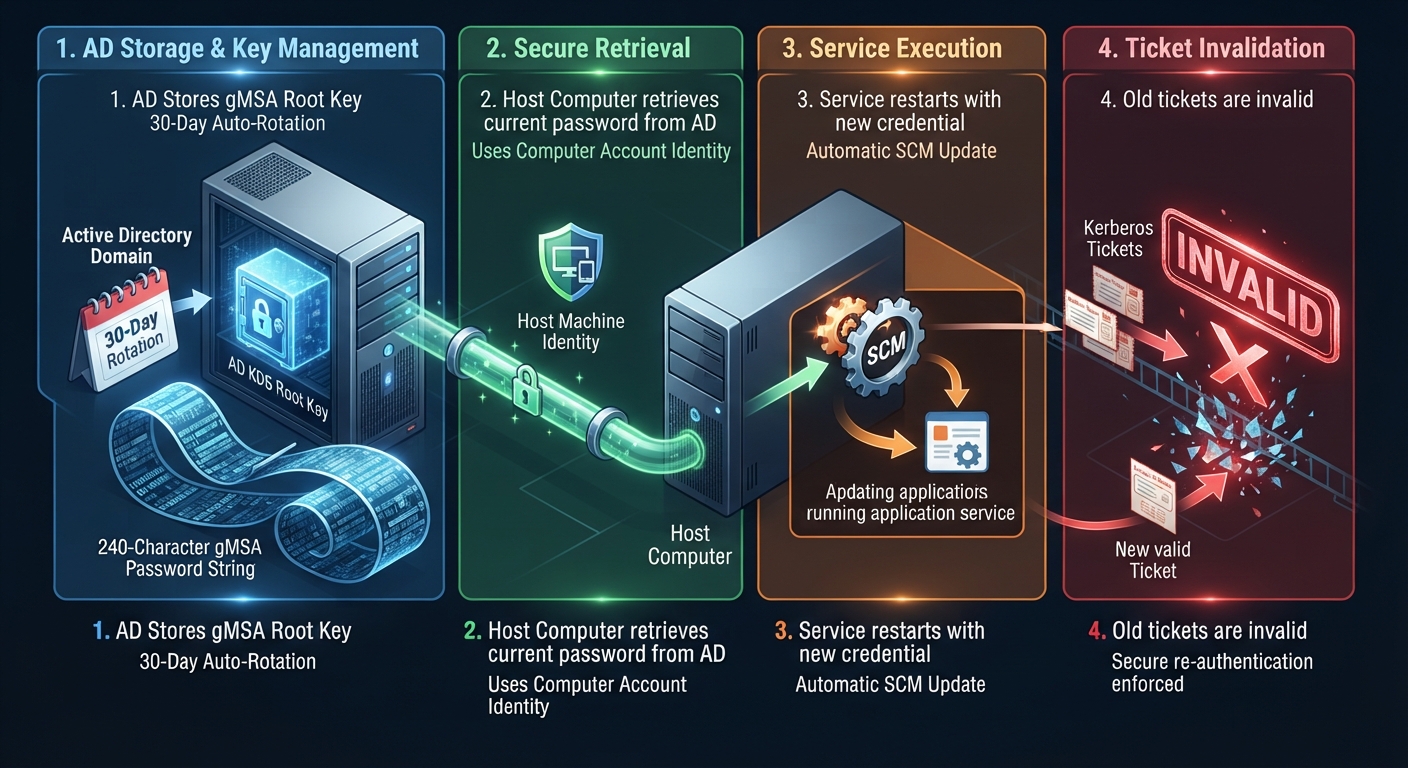
A gMSA uses a 240-character cryptographically random password that Active Directory automatically rotates every 30 days. The password is never visible to administrators, never stored in a human-accessible form, and never appears in a password manager. Even if an attacker extracts the TGS ticket, cracking a 240-character random password is computationally infeasible.
gMSA vs Regular Service Account
| Property | Regular Service Account | Group Managed Service Account (gMSA) |
|---|---|---|
| Password length | Typically 8–20 chars (human-set) | 240 characters, cryptographically random |
| Password rotation | Manual — often years between changes | Automatic — every 30 days by default |
| Password visibility | Known to admins who set it | Never visible to any administrator |
| Kerberoast crack feasibility | Minutes to months (depends on complexity) | Computationally infeasible (>10400 years) |
| Application compatibility | Universal | Windows Server 2012+ services, SQL Server, IIS, Task Scheduler |
For a complete gMSA deployment guide including prerequisites, creation, delegation, and migration steps, see: Service Account Management & gMSA.
Incident Response: Kerberoasting Detected
If your detection script or SIEM fires on Kerberoasting activity, assume the attacker already has hashes and is cracking offline. Time to remediation matters.
| Phase | Timeframe | Actions |
|---|---|---|
| Contain | 0–15 min |
|
| Assess | 15–60 min |
|
| Remediate | 1–4 hrs |
|
| Recover | 4–72 hrs |
|
When to Trigger Full Incident Response
Escalate immediately to a full domain compromise response if any of these are true after Kerberoasting detection:
- A targeted service account is a member of Domain Admins or Enterprise Admins
- New successful authentications appear from the source IP against sensitive systems (DCs, PKI, file servers) within the detection window
- Tools like Rubeus.exe or Mimikatz are found on the source workstation
- The krbtgt account was targeted (confirms Golden Ticket attempt)
Compliance Mapping
| Framework | Relevant Control | How This Guide Addresses It |
|---|---|---|
| MITRE ATT&CK | T1558.003 — Kerberoasting | Full detection, prevention, and response coverage |
| NSA/CISA Five Eyes (AA22-335A) | Kerberoasting listed as top technique against AD | Enumeration hardening, AES enforcement, gMSA migration |
| CIS Controls v8 (Control 5.6) | Centralise account management; rotate service account credentials | gMSA auto-rotation satisfies this fully |
| NIST SP 800-53 (IA-5) | Authenticator management — complexity and rotation requirements | gMSA + 100-char passwords exceed minimum requirements |
| ASD Essential Eight (Restrict Admin Privileges) | Service accounts must not have Domain Admin privileges | Privilege audit and removal (Prevention control #4) |
| ISO 27001:2022 (A.8.5) | Secure authentication management | gMSA + AES enforcement + audit logging |
Maintenance Schedule
The tasks below are integrated into the AD Housekeeping Tasks schedule. Use the anchor links to jump directly to each row.
| Frequency | # | Task | What to Check | Automated |
|---|---|---|---|---|
| Daily | 64 | Monitor Event ID 4769 for RC4-HMAC Ticket Requests | Alert on ≥5 RC4 (0x17) ticket requests or ≥3 distinct SPNs from one account within 10 minutes | Yes — SIEM/KQL rule or detection script |
| Weekly | 52 | Review RC4-Capable SPN Accounts | Query msDS-SupportedEncryptionTypes on all SPN accounts;
flag null, 0, or RC4-bit-set values; track
count week-over-week |
Partial — PowerShell scheduled report |
| Monthly | 54 | Audit Service Account SPN Inventory | Orphaned SPNs (90+ days no login), SPN accounts in privileged groups, non-gMSA accounts with password age >60 days | Partial — enumeration automated; removals require approval |
| Quarterly | 46 | Kerberoasting Full Risk Assessment | Risk-scored CSV audit, gMSA migration progress, AES-only enforcement verification, detection rule validation, privileged-group membership sweep | Partial — report automated; gMSA migration planning manual |
Resources & Related Articles
EguibarIT Guides
- Kerberoasting Detection Script — PowerShell script monitoring Event ID 4769 with threshold alerting and CSV export
- 17 Active Directory Attacks: Five Eyes Detection & Mitigation Guide — Kerberoasting in context with 16 other NSA/CISA-documented attack techniques
- Service Account Management & gMSA — Complete gMSA deployment and migration guide
- Credential Theft Defenses — AES enforcement, Credential Guard, LSASS protection, and Kerberos hardening baselines
- AD CS Enterprise PKI Hardening 2026 — Certificate-based attacks that often follow Kerberoasting when service accounts reach CAs
- Active Directory Hardening Checklist 2026 — 47-point checklist including Kerberos encryption enforcement and SPN hygiene
- AD Housekeeping Tasks — Kerberoasting tasks integrated as Daily #64, Weekly #52, Monthly #54, and Quarterly #46 in the maintenance schedule