Why logical perimeter security matters for AD
A traditional network perimeter is built with firewalls and DMZs. Active Directory needs a similar concept at the directory layer so you can protect the core identity fabric even when attackers move laterally inside the network. Logical perimetral security creates concentric rings inside AD where exposure decreases as you move inward.
Consider the reality: most breaches today assume the perimeter has already been breached. An attacker lands on a user workstation via phishing, compromises a service account, or exploits a web application. From that foothold, they move laterally, seeking to reach domain controllers and admin accounts. Without logical segmentation inside AD itself, a single compromised service account in the middle tier can pivot to domain admin credentials or forest-level access. A logical perimeter stops that escalation by placing structural and cryptographic barriers between rings so that compromise in one does not automatically grant entry to the next.
From physical to logical rings
The classic castle-and-moat design uses outer zones to absorb risk and inner zones to safeguard the crown jewels. Trebuchets and archers defended the outer palisades; only the castle keep held the royal treasury. We can apply the same idea to identity: move high-risk activity to outer rings, add buffer controls, and keep domain admins and tier-0 assets deep inside.
In AD, a logical ring is not a physical network segment. It is a collection of directory objects (users, computers, groups, GPOs, trust relationships) organized by sensitivity and trust level, then protected by policy boundaries. Logical rings overlay the directory structure so you gain separation even when systems share the same physical network. A user workstation in the cafeteria and a domain controller in the data center both speak to the same network, but their identities and the paths they can traverse belong to different rings.
The brilliance of logical rings is that they work even when the attacker is already inside your network. A compromised laptop on the corporate Wi-Fi cannot suddenly authenticate to a domain controller as a tier-0 admin if you have enforced logon restrictions, required MFA, and isolated administrative credentials. The logic is embedded in group membership, GPOs, Kerberos policies, and PAM systems—not in a single firewall rule.
AD logical perimeter model
The model starts by mapping directory objects and access paths into zones that reflect business risk. Keep everyday user workloads at the edge, isolate service dependencies in a middle ring, and reserve the innermost ring for domain-joining services, privileged identities, and forest-level controls. The rings are not rigid tiers but conceptual boundaries that inform policy decisions: which admins can edit which GPOs, which servers can query which group memberships, which accounts can log on to which machines.
This architecture reflects the principle of graduated trust. A user in the outer ring is assumed to be higher-risk: their device may be lost or stolen, they may click malicious links, their credentials may be reused across the web. A tier-0 admin in the inner ring, by contrast, must demonstrate fitness: clean device, strong authentication, no password reuse, regular re-certification. The model acknowledges that not all identities should have equal access, and uses directory structure to enforce those distinctions systematically.
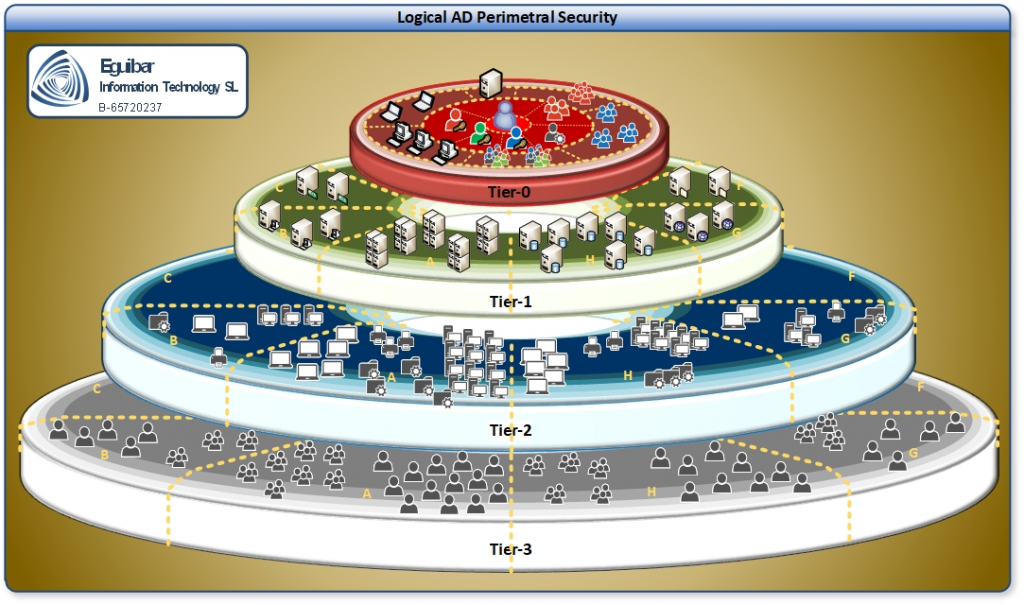
- Outer ring (Tier2): standard users, internet-facing workloads, and devices that regularly handle untrusted content. Includes any system that routinely interacts with the internet or processes user-generated data. Example: finance team workstations, web servers receiving customer traffic, shared printers in public areas.
- Middle ring (Tier1): application servers, service accounts, and delegated admin roles that support business apps. Includes systems that move data between outer-ring users and inner-ring infrastructure. Example: SQL Server running a business app, group managed service accounts for scheduled tasks, helpdesk admins who reset user passwords but do not touch domain controllers.
- Inner ring (Tier0): domain controllers, tier-0 identities, forest-level services, and break-glass accounts. The crown jewels: everything that controls the directory itself. Example: all DCs, domain admin accounts, forest root admins, Active Directory Certificate Services roots, DNS servers managing AD zones.
Design principles
Base the layout on Least Privileged Access and Segregation of Duties. Keep role boundaries crisp, avoid cross-ring administration, and require MFA with phishing-resistant methods for any access that crosses inward. Use dedicated 0 Admin model accounts for privileged work so credentials from outer rings cannot reach the inner ones.
A few key principles ensure the model stays coherent:
- No commingling of duties across rings. If a person or tool spans two rings, exploit the lower one to reach the higher. Split the role: one team resets user passwords (tier 2), another manages helpdesk computers (tier 1), and a third oversees domain controllers (tier 0).
- Credentials do not flow inward implicitly. A user in tier 2 should not possess or cache credentials that grant tier 1 or tier 0 access. If they need to perform privileged work, use a PAW and MFA to acquire temporary, short-lived credentials.
- Assume compromise at any ring. Design the ring such that if tier 2 is fully compromised, tier 1 remains protected. Do not rely on network secrets or trust alone.
Implementation approach
Building a logical perimeter is not a one-time project; it is a staged architectural evolution. Most organizations start by understanding what they have, then gradually enforce boundaries.
Phase 1: Map assets and trust paths. Inventory users, devices, servers, service accounts, management tools, and trust relationships. Document who can log on where, what tools push agents or scripts, and which identities manage AD itself. Create a spreadsheet or database: for each service account, list what machines it runs on, what permissions it holds, and what other accounts or systems depend on it. This is detective work and usually reveals surprises: an old backup account with domain admin that no one remembers, a third-party tool that stores credentials in a config file, a scheduled task running under an admin account on 50 machines. Do not try to fix everything at once; first, see.
Phase 2: Assign rings and enforce boundaries. Place non-privileged users and internet-facing systems in the outer ring; place application services and management tools in the middle; reserve the inner ring for DCs, PKI roots, tier-0 admins, and highly sensitive GPOs. Create OUs and groups per tier. Move computers and accounts into the right OUs. Block lateral movement across rings with firewall rules (RDP, WinRM, SMB), GPO-restricted groups (Administrators, Remote Desktop Users), and session isolation (restricted admin mode for RDP, constrained delegation for Kerberos). Example: tier 2 computers cannot reach tier 1 SQL servers except on port 1433; tier 1 admin tools cannot reach tier 0 DCs except from a hardened jump host.
Phase 3: Harden access workflows. Require jump hosts or PAWs for work that crosses into inner rings, and enforce Just Enough Administration and Just-In-Time elevation for privileged tasks. Use privileged access management (PAM) to provide short-lived credentials so that even if a tier 2 system is compromised and an admin's tier 0 password is extracted, it is valid for only 15 minutes. Rotate service account passwords frequently (every 30 days) and use GMSA where feasible so credentials are rotated automatically.
Phase 4: Validate with monitoring. Forward logs per ring, set detections for cross-ring authentication, and baseline normal administrative paths. Treat any unexpected middle-to-inner movement as an incident. Example: a user from tier 2 (non-admin OU) trying to log on to a tier 0 DC is anomalous and should trigger an alert immediately.
Controls by ring
Outer ring (Tier 2) controls: Disable legacy protocols (NTLMv1, basic auth) to prevent downgrade attacks. Enforce device compliance: BitLocker on laptops, Windows Defender enabled, firewall active, driver signature enforcement. Isolate browsers and email clients by restricting their outbound access and preventing them from caching credentials. Where feasible, prefer cloud identity and conditional access so you gain phishing-resistant MFA and device checks before a user ever touches the on-premises directory. For hybrid users, audit who holds domain admin and ensure no tier 2 user does.
Middle ring (Tier 1) controls: Pin service accounts to specific hosts: if a SQL service account can only run on SQL-01, lock it to that machine and fail authentication attempts from anywhere else. Deny interactive logon on service accounts to prevent someone from using stolen credentials to log in interactively. Use Group Managed Service Accounts (GMSA) for Windows services so credentials are rotated automatically and never exposed to admins. Limit management tools: a backup application should reach only its designated backup targets, not all servers; a monitoring agent should report only metrics, not receive commands. Never allow a middle-ring tool to reach a domain controller directly; always route through a privileged conduit.
Inner ring (Tier 0) controls: Restrict logon rights to tier-0 admin accounts only: edit the domain policy so only designated admin accounts can log on to DCs. Require MFA (Windows Hello, FIDO2, hardware key) for any tier 0 admin to prevent credential-only attacks. Mandate PAWs (Privileged Access Workstations) that are hardened, air-gapped from corporate Wi-Fi, and used only for admin work. Separate admin forests where the organization is large or high-risk so that a forest-level compromise does not immediately grant access to the entire directory. Keep GPO creation and editing limited to a small, audited change-control group: if every admin can edit a GPO, one mistake or one compromise becomes a global incident.
Operations and monitoring
A logical perimeter is not a static wall; it is a living boundary that must adapt as the organization grows, vendors change, and threats evolve. Operationalization is where many organizations stumble: they design the rings but then let it drift because adding a new server to tier 1 feels tedious or because a business unit is slow to migrate.
Quarterly reviews: Audit membership in tier 0 groups and service accounts. Confirm that objects in each OU belong there and that no new cross-ring dependencies have snuck in. Example: a new SaaS integration that requires the web server to contact a tier 0 resource exposes a gap.
Continuous monitoring: Set detections for outbound RDP or WinRM from domain controllers (should never happen), unexpected Kerberos service ticket requests crossing ring boundaries, and changes to tier-0 group memberships. Feed alerts into your SIEM. Example: if an admin account from tier 2 suddenly tries to access a tier 0 resource, the system should page on-call immediately.
Configuration management: Use GPOs and Azure Policy (for hybrid) to enforce ring controls automatically so that a misconfigured server drifts back into compliance on the next GPO refresh. Do not rely on manual configuration.
Incident response: Pre-define playbooks for ring violations. If a tier 1 account is compromised, immediately revoke its credentials, force logoff from all sessions, and audit what it accessed. If tier 0 is compromised, escalate to incident response leadership and begin forensics on all DCs immediately.
Benefits and challenges
Strategic benefits:
- Defined blast radius. If a tier 2 system is compromised, the attacker cannot immediately reach tier 1 databases or tier 0 admins. You have time to detect, isolate, and remediate before the damage spreads. Contrast with a flat network where a single foothold can pivot to full compromise in minutes.
- Governance and auditability. Auditors can see exactly which admins can do what, which service accounts run where, and how access is restricted. Regulatory frameworks (SOC 2, PCI-DSS, HIPAA) often mandate segregation; a logical perimeter demonstrates compliance and reduces audit friction.
- Incident response clarity. When you detect suspicious activity, you know which ring it occurred in and can instantly determine the scope. A compromised tier 1 service account is a contained incident; compromised tier 0 is an emergency.
- Workforce training. Admins understand why they cannot log in to production DCs from their regular workstation. The model creates mental models that reduce mistakes.
Operational challenges:
- Legacy tool dependencies. A 20-year-old backup system that was written to expect domain admin may not support GMSA or restricted logon. You must either replace the tool, maintain a legacy exception (and monitor it closely), or refactor the workflow. This takes time and budget.
- Cross-ring admins. Some organizations have small teams where one person manages users, servers, and domain controllers. Splitting duties requires hiring or restructuring. In the interim, enforce compensating controls: MFA, separate accounts for each tier, and PAM.
- Business velocity vs. control. Developers want to deploy quickly; architects want to audit every change. Establish a change-control process that is fast enough to not block velocity but thorough enough to catch risks.
- Device hygiene. If tier 1 and tier 0 admins use laptops, those laptops must be kept clean. A compromised admin workstation is a foothold into the inner ring. Invest in endpoint detection, regular patching, and behavior monitoring.
Address challenges with executive sponsorship, phased rollout, and exception processes. If a business unit needs cross-ring access, document it, require MFA and auditing, and set a timeline to eliminate it. Do not let exceptions become permanent without review.
Related guidance
Logical perimetral security is one pillar of a defense-in-depth strategy. For depth and detail on complementary practices, review:
- Tiered administration provides the formal model for tier 0, tier 1, and tier 2 roles, credentials, and workstations. Use it to define which admins and accounts belong in which ring.
- Least Privileged Access helps you size admin roles so admins hold only the permissions they actually need. Pair it with logical rings to enforce those permissions structurally.
- Segregation of Duties ensures that no single person or system can make critical changes alone. Logical rings support this by preventing one person from spanning multiple rings.
- 0 Admin model extends logical perimeters by ensuring that everyday admins do not hold standing admin rights; they elevate temporarily and leave a full audit trail.
Together, these practices form a defense-in-depth strategy where logical perimeters, tiered roles, least privilege, segregation of duties, and 0-admin principles reinforce each other to stop attackers at multiple layers.