Introduction: Why AD Sites & Services Breaks More Environments Than Any Other Component
Active Directory Sites and Services is the invisible infrastructure that makes multisite AD environments work—or fail spectacularly. When properly designed, AD replication is automatic, efficient, and reliable. When misconfigured, you get authentication storms, group policy failures, replication backlogs that span days, users authenticating across WAN links, application timeouts, and domain controllers that can't find each other.
The business impact of AD Sites misconfigurations is insidious. Unlike a complete outage that triggers an immediate response, site topology problems cause slow degradation: users complain about "intermittent" logon issues, applications randomly fail authentication, sysvol doesn't replicate properly so GPOs are inconsistent, DFS namespace referrals send users to the wrong site, and troubleshooting becomes a nightmare because the symptoms are unpredictable.
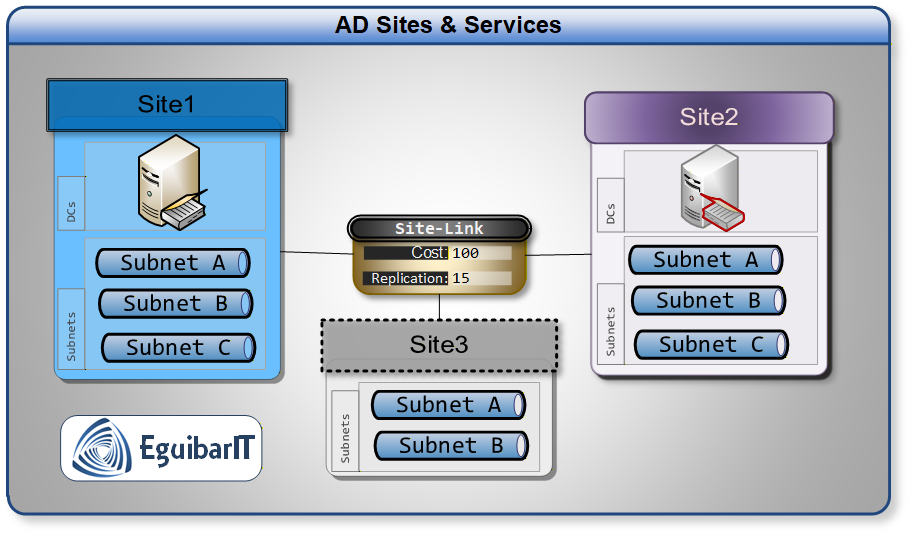
Here's the uncomfortable truth: most organizations have site topology problems they don't know about. Subnets not mapped to any site. Sites with no domain controllers. Incorrect site link costs that route replication through expensive WAN circuits. Default replication schedules that saturate branch office connections during business hours. Manual bridgehead designations that create single points of failure. These aren't theoretical—these are the configurations I see in nearly every AD assessment.
This guide provides the architectural decisions, design patterns, and operational procedures to build and maintain reliable AD Sites infrastructure. We'll cover the critical planning phase that most organizations skip, the implementation procedures with PowerShell automation, the monitoring and alerting required to catch problems early, and the disaster recovery procedures you need when things go wrong.
War Story: The Hub Site That Wasn't
The Situation: A global enterprise with 150+ sites configured their AD topology with New York as the "hub" for all replication. Every site had a site link back to New York. Seemed logical—central location, good connectivity, redundant domain controllers.
The Problem: When the New York data center lost power for 6 hours during a storm, replication between ALL other sites stopped. Branch offices in Asia, Europe, and South America couldn't replicate with each other—they could only replicate through New York. The replication backlog took three days to clear after power was restored.
The Root Cause: No site link transitivity strategy. No regional mesh. No alternate paths. The topology assumed New York would never fail.
The Fix: Redesigned to regional hub-and-spoke with mesh connections between regional hubs (New York, London, Singapore, São Paulo). Added site link bridges. Tuned costs so replication could route around failures. Result: when New York went down again 8 months later, replication continued through alternate paths with zero user impact.
The Lesson: AD replication topology must assume your "hub" will fail. Design for failure, not for the happy path.
Planning & Design Considerations
AD Sites and Services architecture requires upfront planning that maps your physical network topology to AD's logical replication topology. Skip this planning and you'll spend years fighting fires. Do it properly and AD replication becomes invisible infrastructure that just works.
Understanding AD Sites Fundamentals
An AD Site represents a location with good network connectivity—typically a physical location like a data center or office building. Sites serve three critical purposes:
- Client-server affinity: Clients authenticate against domain controllers in their own site, avoiding expensive WAN authentication
- Replication topology: Domain controllers within a site replicate immediately; replication between sites is scheduled and compressed
- Service location: Applications like DFS, Exchange, and Certificate Services use site membership to direct clients to local services
Architecture Blueprint (from Internal Standard)
About this section
This blueprint captures the organization-specific guidance from the AD Sites Architecture standard. It consolidates naming, costing, scheduling, placement, and operations policy into one consumable reference. Replace or extend the bullets with your canonical text as needed.
Design Principles
- Design for failure: every hub has at least one alternate replication path
- Map every IP subnet to exactly one site; zero unmapped subnets in steady state
- Prefer automatic bridgehead selection; if manual, designate 2-3 per critical site
- Keep site link costs proportional to effective bandwidth and reliability
- Throttle low-bandwidth links with schedules; keep hub-to-hub replication 24/7
- Document and review topology quarterly; enforce change control for site objects
Naming & Taxonomy
- Sites:
Site-(e.g.,- [ -DC] Site-EMEA-LON,Site-NA-NYC-DC) - Subnets:
<Prefix>/<Mask> (Site-Name)in Description - Site Links:
SL-A-to-B(e.g.,SL-NYC-to-LON) - Schedules:
SCHED-(e.g.,- SCHED-AFTERHOURS-20-06)
Domain Controller Placement
- Datacenters: minimum 2 writable DCs per domain, both GC; stagger FSMO roles
- Regional hubs: 2+ writable DCs, at least one GC; preferred bridgeheads optional
- Branches < 300 users: no DC (unless WAN/facilities constraints demand otherwise)
- Branches 300–1500 users: potentially 1 DC; decide based on WAN reliability and onsite facilities (see table below)
- Branches > 1500 users: 1 DC recommended
- Time sync: DCs sync to domain hierarchy; hubs sync to reliable external source
DC Placement by Site Size
| Site | Users/Devices | Local DC |
|---|---|---|
| Micro | Less than 20 | NO. This is considered as a home-office. A broadband connection using VPN will have the same effect. |
| Small | From 20 to 300 | NO, unless any other related factor demonstrates the opposite. |
| Medium | From 300 to 700 | Potentially YES. Although the number of users will benefit from a local DC, the cost and effort for the adequate facilities might not compensate. Might be smarter to work on WAN expansion to accommodate needs. |
| Big | From 700 to 1500 | Potentially YES. In such sites, normally, a proper telecommunications room exist. Making arrangements for this room to host servers might not be an issue. Although comm room might be available and usable, all WAN links are big and reliable, so using those is recommended. |
| Enormous | Over 1500 | YES. In such case proper server room already exists, beside the reliable communications. In such case could be a bandwidth saving to maintain AD related traffic within the site. |
Site Link Costing Model
| Bandwidth/Link Type | Suggested Cost | Notes |
|---|---|---|
| >= 1 Gbps (DC-to-DC) | 10 | Backbone between datacenters and regional hubs |
| 100–1000 Mbps | 50 | Primary regional links |
| 10–100 Mbps | 100–200 | Standard WAN for offices |
| < 10 Mbps or high latency | 300–500 | Throttle via schedule |
| Backup/DR path | 700–1000 | Only used during failure or maintenance |
Replication Interval & Schedule Policy
- Backbone/hub-to-hub: 15 minutes, 24/7
- Standard WAN (10–100 Mbps): 60 minutes, 24/7
- Low bandwidth (<10 Mbps): 180 minutes, after-hours (20:00–06:00 local)
- Satellite/high latency: 360 minutes, after-hours with business-hours blackout
- Emergency change: temporarily reduce interval for critical propagation; restore after
Bridgehead Strategy
- Default to automatic; monitor actual chosen bridgeheads
- If manual at hubs: designate 2–3 DCs; health-check before/after designation
- Document designated objects (NTDS Settings DN) and review monthly
Change Management Workflow
- Propose change with impact analysis (sites, subnets, links, schedules, costs)
- Peer review and CAB approval for production
- Stage in lab or a pilot region; capture baseline metrics
- Implement during maintenance window; monitor replication convergence
- Rollback plan documented for each change
- Update diagrams, inventories, and the topology export
KPIs and SLAs
- Replication failures: 0 sustained; alert on any failure > 60 minutes
- Max convergence between hubs: ≤ 30 minutes; branches: ≤ interval + 15 minutes
- Clients in correct site: ≥ 99%
- Unmapped subnets: 0
- Preferred bridgehead outages (if used): 0 simultaneous
Common Anti-Patterns
- Single hub without alternate paths
- Manual bridgehead with only one designated DC
- All sites on one link with aggressive 15-minute intervals
- Unmapped or overlapping subnets
- Schedules that block replication for entire business days
Subnets are the key to site membership. Every IP subnet in your environment should be mapped to an AD site. When a client boots, it queries DNS for domain controllers, then determines which site it belongs to based on its IP address. If a client's subnet isn't mapped to any site, it picks a domain controller at random—often across the WAN.
Site Links define the WAN connections between sites. Each site link has a cost (lower = preferred), replication interval, and replication schedule. AD uses these to build the replication topology automatically.
Operational Roles of Sites
- Active Directory replication: Updates to the Configuration, Schema, and Domain partitions replicate within and between sites.
- SYSVOL replication: Group Policy and logon scripts replicate domain-wide via DFS-R, and site topology informs DC-to-DC paths.
- Client logon: Site/subnet mapping drives the DC Locator so clients authenticate locally when possible; automatic site coverage handles nearest-site fallback.
- Service location: Site-aware discovery for DFS, printing, file services, and other workloads.
Replication Fundamentals: Intra-site vs Inter-site and the KCC
Active Directory needs an accurate model of the underlying network to make two decisions: which domain controllers should replicate with each other and which domain controllers are optimal for client authentication. This model is expressed with Sites, Site Links, and Subnets. As a rule of thumb, the AD logical topology should mirror your OSI Layer 3 WAN topology.
- Intra-site replication minimizes latency using fast, change-triggered updates. Compression is not used in-site because LAN speeds make CPU overhead counterproductive.
- Inter-site replication conserves bandwidth by compressing replication payloads larger than ~50 Kb to roughly 10–15% of original size and by following a schedule so replication frequency over WAN links can be controlled.
- The Knowledge Consistency Checker (KCC) builds separate topologies for intra-site and inter-site replication. Intra-site connection objects are created automatically; inter-site replication requires explicit Site Links.
Replication Scope by Partition
- Schema: Object/attribute definitions for the forest. Every DC holds a read-only copy; changes are performed on the single Schema Master and are subject to infrastructure change control (see Delegation Model).
- Configuration: Forest-wide configuration (sites, services, topology). Every DC holds a read-only copy protected by ACLs; modifications follow change control.
- Application: App-specific data (e.g., AD-integrated DNS zones) that may replicate to a subset of DCs as designed by the application.
- Domain: Domain objects (users, groups, computers, etc.) replicate to all DCs in the domain; a subset is present in the Global Catalog for forest-wide queries.
Architecture Decision Matrix: Site Design Strategy
| Scenario | Site Strategy | When to Use | Pros | Cons |
|---|---|---|---|---|
| Single Data Center | One site ("Default-First-Site-Name" or renamed) | All infrastructure and users in one location; no WAN | Simple; no replication delays; no site link tuning needed | No client-site affinity; all replication is immediate (can cause storms) |
| Hub and Spoke | One central hub site; branch sites with site links back to hub | 50+ branch offices; centralized IT; limited branch IT staff; hub has redundant DCs | Simple to manage; predictable replication flow; central monitoring | Hub is single point of failure; branches can't replicate to each other; no alternate paths |
| Regional Hub-and-Spoke | Regional hubs (Americas, EMEA, APAC) with mesh between hubs; branches connect to nearest hub | Global enterprise; regional data centers; hundreds of branch offices | Scales well; regional autonomy; survives hub failures; regional replication optimization | More complex to design; requires careful cost tuning; regional hub dependencies |
| Full Mesh | Site links between every site pair | 5-10 major sites with high-bandwidth interconnects; equal importance | Fastest convergence; no single point of failure; survives multiple failures | Doesn't scale (N*(N-1)/2 links); complex to troubleshoot; hard to predict replication paths |
| Hybrid (Recommended for Most) | Regional mesh for major sites; hub-and-spoke for branches; site link bridges for transitivity | Most enterprise environments: mix of data centers, regional offices, branches | Balances complexity and resilience; scales to hundreds of sites; provides alternate paths | Requires careful planning; cost tuning critical; must document topology |
Decision Matrix: Replication Intervals and Schedules
| Scenario | Replication Interval | Schedule | Rationale |
|---|---|---|---|
| High-Speed WAN (>100 Mbps) | 15 minutes | Always available (24/7) | Fast convergence; bandwidth not a concern; near real-time replication |
| Standard WAN (10-100 Mbps) | 60 minutes | Always available (24/7) | Balances convergence speed with bandwidth; default for most environments |
| Low-Bandwidth Branch (<10 Mbps) | 180 minutes | After-hours only (e.g., 8 PM - 6 AM) | Prevents replication from impacting business traffic |
| Satellite/High-Latency Link | 360 minutes (6 hours) | After-hours with blackout during peak | Accommodates high latency and packet loss |
| Critical Path (e.g., between regional hubs) | 15 minutes | Always available (24/7) | Ensures rapid propagation of critical changes across regions |
Decision Matrix: Bridgehead Server Strategy
| Strategy | When to Use | Pros | Cons | Recommendation |
|---|---|---|---|---|
| Automatic (Default) | Sites with 2-4 domain controllers; standard topology; no special requirements | Zero admin overhead; AD picks best DC; auto-fails over; adapts to changes | Less predictable; can't guarantee specific DC for replication | Recommended for 95% of sites |
| Manual Preferred Bridgehead | Sites with 5+ DCs; specific DCs designated for WAN replication; performance tuning | Predictable; can choose DCs with better hardware/network; separates intrasite from intersite replication | Single point of failure (if bridgehead fails, replication stops); requires manual failover; admin overhead | Only for large sites with clear performance needs |
| Multiple Manual Bridgeheads | Critical sites (e.g., hub sites in regional topology); need redundancy | Redundancy (AD picks among designated bridgeheads); predictable; load distribution | More complex; must monitor all bridgeheads; requires 3+ designated DCs | Only for hub sites in hub-and-spoke topology |
Critical: Preferred Bridgehead Failures
If you designate a preferred bridgehead server and it fails, AD replication to/from that site stops completely. AD will NOT automatically fail over to another domain controller in the site. You must manually remove the failed bridgehead designation or designate a replacement.
This is why automatic bridgehead selection is recommended for most environments. Only use preferred bridgeheads when you have a specific performance or architectural reason, and always designate multiple bridgeheads for redundancy.
Site Design Checklist
Phase 1: Discovery and Documentation
- Document all physical locations (data centers, regional offices, branch offices)
- Map all IP subnets to physical locations
- Document WAN topology: circuits, bandwidth, latency, costs
- Identify domain controller placement at each location
- Note any existing site definitions and verify accuracy
- Check for unmapped subnets (clients in "no site" state)
Phase 2: Site and Subnet Design
- Create sites for each physical location with domain controllers
- Use clear, consistent naming (e.g., "Site-NYC-DC01", "Site-London-Office")
- Map all IP subnets to appropriate sites (including future subnets if known)
- Validate: every subnet should map to exactly one site
- Consider: create sites for locations without DCs if they have significant user populations (for DFS, future DC placement)
Phase 3: Site Link Design
- Identify WAN connections between sites
- Assign site link costs based on bandwidth and reliability (higher bandwidth = lower cost)
- Set replication intervals based on WAN capacity and change frequency
- Configure replication schedules (after-hours for low-bandwidth links)
- Design for redundancy: ensure alternate replication paths exist
- Document site link transitivity (enabled by default; disable only with specific reason)
Phase 4: Bridgehead Strategy
- Default: use automatic bridgehead selection (no manual configuration)
- If manual: designate at least 2 preferred bridgeheads per site for redundancy
- Choose DCs with best hardware, network connectivity, and reliability
- Document bridgehead selections and rationale
- Establish monitoring for bridgehead health
Phase 5: Validation and Monitoring
- Verify replication topology with
repadmin /showreplandGet-ADReplicationPartnerMetadata - Check for replication failures:
repadmin /replsummary - Verify clients are locating correct site:
nltest /dsgetsite - Test failover: disable bridgehead, verify alternate path activates
- Establish ongoing monitoring and alerting for replication health
Prerequisites & Requirements
Before implementing AD Sites and Services changes, ensure you have the necessary permissions, documentation, and validation procedures in place. Site topology changes can disrupt authentication and replication if not done correctly.
Required Permissions
- Enterprise Admins or Domain Admins group membership (required for creating sites, site links, and subnets)
- Alternative: Delegated permissions to the Sites container in AD Sites and Services (for least-privilege approach)
- PowerShell remoting access to domain controllers for validation and monitoring
- Read access to network documentation and IP address management systems
Required Documentation
- Current network topology diagram with all sites and WAN links
- Complete IP subnet inventory mapped to physical locations
- Domain controller inventory: which DCs are at which locations
- WAN circuit details: bandwidth, latency, provider, costs
- Business continuity requirements: RTO/RPO for each location
- Current AD site topology (export with PowerShell for baseline)
Software & Tools
- Active Directory module for PowerShell (included in RSAT for Windows 10/11 and Server 2016+)
- AD Sites and Services MMC (for visual validation; not required for PowerShell automation)
- Repadmin and DCDiag (included with AD DS role)
- Network monitoring tools to measure WAN utilization before/after replication changes
- Documentation tool for topology diagrams (Visio, Draw.io, or similar)
Pre-Implementation Validation
Critical Pre-Checks
Before making any site topology changes:
- Verify all domain controllers are replicating successfully (zero replication errors)
- Confirm no existing replication backlogs (check with
repadmin /showrepl) - Validate DNS health on all domain controllers
- Check that all DCs can reach each other on required ports (RPC, LDAP, Kerberos, SMB)
- Document current replication topology as baseline
- Schedule changes during maintenance window (site topology changes can trigger replication topology recalculation)
Physical Security for Domain Controllers
Active Directory is a core business service and requires strong physical controls. Data center access must be enforced. A basic server room rarely provides adequate protections for access, continuity, recovery, environmental control, or supporting facilities. In many cases, it is more effective to avoid placing a DC on-site and instead remediate site issues than to upgrade the room into a data-center-like facility.
If a domain controller must be placed on-site, ensure at minimum:
- Restricted access controls to the enclosure and room
- Adequate temperature and environmental monitoring
- Redundant power supply and UPS
- Redundant communications links
- Adequate fire suppression systems
- Segregation of facilities (network, power, servers, backups, operator consoles)
- Offline backup and tested recovery procedures
- Documented site operational procedures
Step-by-Step Implementation
This implementation guide uses PowerShell for all site topology configuration. While AD Sites and Services MMC is useful for visualization, PowerShell provides automation, documentation (scripts are self-documenting), and consistency across environments.
Phase 1: Create Sites
Sites represent physical locations. Create a site for each location that has (or will have) domain controllers. Sites can also be created for user-only locations to enable site-aware services like DFS.
Step 1.1: Create New AD Site
Step 1.2: Rename Default-First-Site-Name (Optional but Recommended)
The default site created during AD installation is called "Default-First-Site-Name". Rename it to match your actual site naming convention:
Phase 2: Map Subnets to Sites
Every IP subnet in your environment should be mapped to an AD site. This is how clients determine which site they belong to and find local domain controllers.
Step 2.1: Create Subnet and Map to Site
Step 2.2: Bulk Import Subnets from CSV
For large environments with many subnets, use a CSV file to automate subnet creation:
Phase 3: Configure Site Links
Site links define the WAN connections between sites. Configure costs, replication intervals, and schedules to optimize replication traffic.
Step 3.1: Create Site Link
Step 3.2: Configure Site Link Schedule (Restrict Replication to After-Hours)
For low-bandwidth links, restrict replication to after-hours to avoid impacting business traffic:
Step 3.3: Modify Site Link Cost and Interval
Phase 4: Configure Bridgehead Servers (Optional)
Recommendation: Use automatic bridgehead selection unless you have a specific reason to designate preferred bridgeheads. If you do designate bridgeheads, always designate at least two per site for redundancy.
Step 4.1: Designate Preferred Bridgehead Server
Phase 5: Validation and Health Checks
Step 5.1: Verify Replication Topology
Step 5.2: Check for Replication Failures
PowerShell Automation Summary
The implementation section above provides 10 production-ready PowerShell scripts that automate AD Sites and Services configuration:
- Site Creation: Create new sites and rename default site
- Subnet Mapping: Map individual subnets or bulk-import from CSV
- Site Link Configuration: Create site links, set costs, intervals, schedules
- Bridgehead Management: Designate preferred bridgeheads (optional)
- Validation: Verify topology, check replication health, generate reports
All scripts follow the architecture pattern: externalized PowerShell code with descriptive
filenames ending in -powershell.txt, loaded via
codeHighlighter.loadCode() for syntax highlighting and copy functionality.
Monitoring & Health Checks
AD Sites and Services requires continuous monitoring to detect replication failures, topology issues, and performance problems before they impact users.
Daily Tasks
| Check | Method | Threshold | Action on Failure |
|---|---|---|---|
| Replication Failures | Get-ADReplicationFailure -Scope Forest |
Zero failures | Investigate immediately; check network connectivity, DNS, time sync |
| Replication Lag | Get-ADReplicationPartnerMetadata (check LastReplicationSuccess)
|
<15 minutes intrasite; <interval+15 minutes intersite | Check for backlogs; verify site link schedules not blocking replication |
| Bridgehead Health | Get-ADDomainController -Filter {IsGlobalCatalog -eq $true} + DC
diag
|
All bridgeheads online and replicating | If preferred bridgehead down, remove designation or designate replacement |
| Unmapped Subnets | Check event logs for "client has no site" warnings (Event ID 5805, 5807) | Zero unmapped subnets | Map subnet to appropriate site |
Weekly Tasks
| Check | Method | Purpose |
|---|---|---|
| Replication Topology Review | Get-ADReplicationSiteLink and
Get-ADReplicationSite
|
Verify site links and costs still match network topology |
| Site Coverage Validation | Compare AD sites to physical locations; check for missing sites | Ensure new locations are properly configured |
| Replication Performance | Measure replication time for test change across all sites | Establish baseline; detect degradation trends |
| WAN Utilization | Check network monitoring for replication traffic patterns | Verify replication not saturating WAN links during business hours |
Monthly Tasks
| Task | Description | Impact | Automated |
|---|---|---|---|
| Generate replication health report | Produce and review a report of replication status, failures, and lag for all sites. | Ensures management visibility and early detection of problems. | Yes |
| Review/update site topology documentation | Verify diagrams and inventories match current AD configuration. | Prevents drift and supports troubleshooting. | No |
| Validate disaster recovery procedures | Test manual bridgehead failover and site link redundancy. | Ensures DR readiness and operational resilience. | No |
| Check for orphaned site links | Identify and remove site links referencing deleted sites. | Reduces replication errors and topology confusion. | No |
| Audit preferred bridgehead designations | Review and remove unnecessary manual bridgehead assignments. | Prevents single points of failure. | No |
Annual Tasks
| Task | Description | Impact | Automated |
|---|---|---|---|
| Full topology review | Comprehensive audit of all sites, subnets, links, and bridgeheads. | Ensures long-term reliability and supports strategic changes. | No |
| Disaster recovery simulation | Simulate hub site or bridgehead failure and validate recovery steps. | Tests organizational readiness for major incidents. | No |
As Needed Tasks
| Task | Description | Impact | Automated |
|---|---|---|---|
| Topology change validation | Run validation after any major site, subnet, or link change. | Prevents unexpected replication or authentication issues. | No |
| Incident response | Investigate and resolve replication or authentication failures as they arise. | Minimizes downtime and user impact. | No |
Automation Tip
Create a scheduled task that runs the replication health check script daily and emails results to the AD team. Include:
- Replication failure count (should be zero)
- Oldest unreplicated change (max age in minutes)
- List of sites with replication lag >threshold
- List of unmapped subnets detected
This proactive monitoring catches problems before users notice.
Troubleshooting Common Issues
Issue: Clients Authenticating Across WAN (Slow Logons)
Symptoms: Users complain of slow logons; network traces show authentication traffic crossing WAN links; domain controller in local site exists but isn't being used.
Root Causes:
- Client's subnet not mapped to any site (client picks random DC)
- Client's subnet mapped to wrong site
- Local DC not advertising itself properly (DNS SRV records missing)
- Local DC not operational (services stopped, replication failing)
Diagnosis:
Resolution:
- Map missing subnet to correct site
- Move subnet to correct site if mapped incorrectly
- Restart Netlogon service on DC if SRV records missing; force re-registration with
nltest /dsregdns - Fix DC replication/operational issues
Issue: Replication Not Occurring Between Sites
Symptoms: Changes made in one site not appearing in other sites; replication
lag increasing; repadmin /replsummary shows errors.
Root Causes:
- No site link between sites (sites isolated)
- Site link schedule blocking replication (outside replication window)
- Preferred bridgehead server down (and no alternate designated)
- Network connectivity problem between sites
- Firewall blocking required ports (RPC 135, dynamic RPC, SMB 445, etc.)
Diagnosis:
Resolution:
- Create site link if missing
- Adjust site link schedule to allow replication during current time
- Remove preferred bridgehead designation or designate alternate
- Fix network/firewall issues blocking DC-to-DC communication
Issue: Replication Storms (Excessive Replication Traffic)
Symptoms: WAN links saturated with replication traffic; complaints about slow network; Event ID 1311 (insufficient space for replication queue).
Root Causes:
- All sites in single site link with high frequency (e.g., 15 minutes)
- Large change made (e.g., GPO change affecting entire domain) triggering immediate replication
- Site link schedule too aggressive for available bandwidth
- No replication compression configured
Diagnosis:
Resolution:
- Increase replication interval for low-bandwidth site links (e.g., 60-180 minutes)
- Implement site link schedules to restrict replication to after-hours
- Verify compression is enabled on site links (default, but can be disabled)
Disaster Recovery Procedures
Scenario: Hub Site Failure (Regional Datacenter Down)
Impact: If you use hub-and-spoke topology and the hub site fails, replication between branch sites stops (branches can only replicate through hub).
Immediate Actions:
- Verify replication status:
repadmin /replsummary - Check if alternate paths exist (site link transitivity)
- If no alternate paths: temporarily create direct site links between branch sites
- Monitor replication convergence
Long-Term Fix:
- Redesign topology to regional hub-and-spoke with mesh between hubs
- Add site link bridges to enable alternate replication paths
- Test failover scenarios regularly
Scenario: All Preferred Bridgeheads Down in Site
Impact: Replication to/from site stops completely (AD does not auto-failover to non-preferred DCs).
Immediate Actions:
Prevention:
- Always designate at least 2 preferred bridgeheads per site (3+ for critical sites)
- Monitor bridgehead health daily
- Consider using automatic bridgehead selection for most sites
Resources & References
Related EguibarIT Articles
- Tier 0 Architecture & Security — AD Sites as Tier 0 infrastructure
- Enterprise Network Architecture — WAN design and connectivity
- IP Addressing & Subnetting — Subnet design for AD Sites
- DNS Configuration & Best Practices — DNS SRV records and site awareness
- Windows Server Monitoring — Replication health monitoring
PowerShell Modules & Scripts
- EguibarIT PowerShell Modules — Enterprise AD management automation
- ActiveDirectory Module Reference — Microsoft official AD cmdlets
Microsoft Documentation
- Understanding AD Site Topology (Design Guidance)
- Site Link & Site Design Guidance
- AD Replication Concepts
- Replication Error Troubleshooting
Community Resources
Conclusion
AD Sites and Services is the foundation of reliable multisite Active Directory infrastructure. Proper site topology design ensures users authenticate locally, replication is efficient and predictable, and applications can locate site-local services. Get it wrong and you'll fight authentication problems, replication storms, and user complaints for years.
The key principles: map every subnet, design for failure not the happy path, use automatic bridgehead selection unless you have a specific reason not to, monitor replication health daily, and document your topology thoroughly. Site topology is one of those AD components that you configure once and forget—which is exactly why it needs to be right from the start.
Start with discovery: document your physical network, map all subnets, and understand your WAN topology. Then design sites, site links, and costs to match reality. Test failover scenarios before production. Monitor continuously. The time invested in proper site design pays off in years of reliable AD infrastructure.
You're Ready
After implementing this guide, your AD Sites and Services infrastructure will provide:
- Optimized client authentication (users always authenticate locally)
- Efficient replication topology with alternate paths for resilience
- Site-aware service location (DFS, Exchange, Certificate Services)
- Predictable WAN utilization (replication scheduled appropriately)
- Rapid convergence for critical changes while respecting bandwidth constraints
- Disaster recovery procedures tested and documented
If you have questions or want to share your site topology design, reach out. AD Sites and Services is one of those topics where peer review catches problems early.