Introduction: Why This Matters
Flexible Single Master Operations (FSMO) roles are specialized responsibilities assigned to specific domain controllers in Active Directory. They ensure that critical directory operations are performed reliably and without conflict, maintaining the integrity and stability of your AD environment. There are specific tasks that must be performed by only one domain controller (DC). The DCs that are assigned to perform these unique operations are known as FSMO role holders.
Why does this matter? Without proper FSMO role assignment and management, your organization risks data inconsistency, replication errors, and even domain-wide outages. Correct configuration is essential for business continuity, security, and compliance.
Business impact: Misconfigured FSMO roles can lead to failed user provisioning, broken trust relationships, and inability to create or remove domains. These issues can disrupt operations and increase support costs.
Technical challenges: Engineers must understand the scope and placement of each FSMO role, especially in multi-domain or multi-site environments. Role transfer and seizure require careful planning to avoid conflicts.
Security considerations: FSMO role holders are high-value targets. Compromising these domain controllers can allow attackers to manipulate AD schema, domain structure, or security principals. Harden and monitor FSMO holders accordingly.
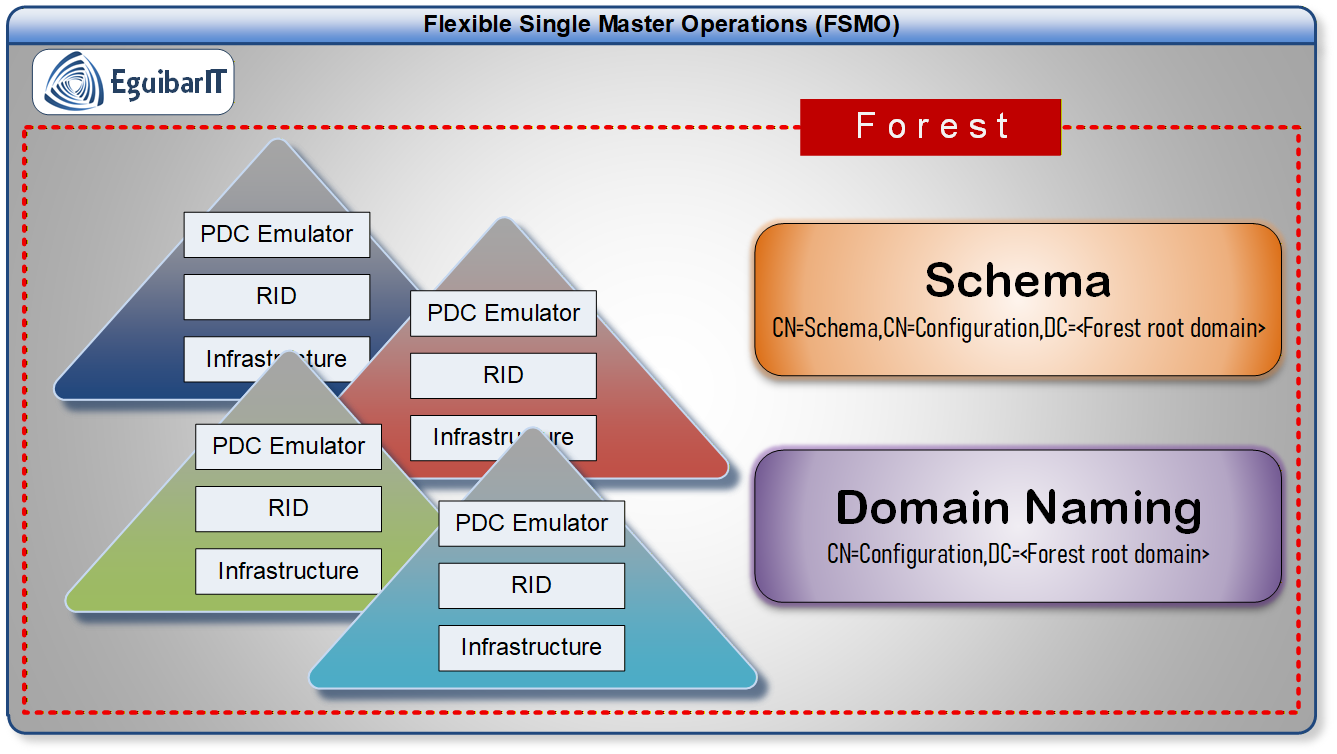
| Role | Scope | Responsibilities |
|---|---|---|
| Schema Master | Forest | Controls all updates and modifications to the AD schema. |
| Domain Naming Master | Forest | Manages addition/removal of domains in the forest. |
| RID Master | Domain | Allocates pools of unique RIDs to DCs for object creation. |
| PDC Emulator | Domain | Processes password changes, account lockouts, time sync, and legacy compatibility. |
| Infrastructure Master | Domain | Updates cross-domain object references and group memberships. |
War Story: FSMO Outage — a Timeline & Root Cause Analysis
Context: A medium-sized organization experienced a multi-hour outage affecting user provisioning, password resets, and application authentication after the primary DC holding the RID Master and PDC Emulator went offline during maintenance.
Incident Timeline
- T-1 day: Planned hardware firmware update scheduled for primary DC.
- T0: Technician powered off the server to apply firmware. Automated restart failed — server hung at firmware stage.
- T+30m: Monitoring alerts for DC reachability were missed due to an outdated alerting rule threshold and an exhausted paging rotation.
- T+1h: Helpdesk reported incoming flood of user account creation and password change tickets; engineers confirmed RID allocation failures on other DCs.
- T+2.5h: Engineers executed an emergency FSMO seize to a healthy DC after failed restart attempts and inability to recover the original server quickly.
- T+5h: Services gradually recovered; post-incident review initiated.
Root Cause Analysis
- Single point of failure: Critical domain roles (PDC + RID) were effectively single-hosted without an up-to-date runbook for rapid transfer/seize.
- Monitoring gap: Alert thresholds and escalation were not tuned for role-holder detection and paging exhaustion prevented rapid on-call response.
- Process gap: No regularly tested playbook for role transfer/seize in production; engineers had to validate commands during the outage.
- Documentation gap: FSMO ownership and last-known health checks were not readily discoverable from centralized inventory.
Corrective & Preventive Actions
- Create and publish an FSMO runbook with step-by-step transfer and seizure commands (tested in lab) and keep it under version control.
- Co-locate PDC Emulator and RID Master where appropriate and ensure those DCs are highly available, monitored, and backed up.
- Tune monitoring to detect unreachable FSMO holders and add automated escalation (SMS/call) for critical alerts.
- Document and automate periodic health checks for FSMO holders (replication, disk, event logs) using scheduled scripts and centralized telemetry.
- Practice role transfers and seizures during maintenance windows in a staging environment and update runbooks after each test.
Key takeaway: Treat FSMO role holders as Tier‑0 assets: document them, monitor them with aggressive thresholds, and practice transfer/seize procedures so you can recover within your RTO without improvising during an outage.
Planning & Design Considerations
Proper planning and design of FSMO role placement is critical for a resilient and scalable Active Directory environment. Consider business requirements, site topology, and security posture before assigning or moving FSMO roles.
Key Design Considerations
- Place forest-wide roles (Schema Master, Domain Naming Master) on highly available, secured domain controllers.
- Co-locate RID Master and PDC Emulator for performance and reliability.
- Infrastructure Master should not be on a Global Catalog unless all DCs are GCs.
- Document FSMO role holders and monitor their health.
- Plan for role transfer and seizure in disaster recovery scenarios.
Decision Matrix
| Scenario | Recommended Placement & Controls | Operational Actions | Why |
|---|---|---|---|
| Single-site, small domain | Consolidate FSMO roles on a well-provisioned, monitored DC. Ensure regular backups and secondary DC ready for transfer. | Document owners, schedule weekly health checks, test role transfer quarterly. | Low complexity; simple ops reduce administrative burden while meeting SLAs. |
| Multi-site, large domain | Place forest-wide roles (Schema, Domain Naming) in central site; distribute domain roles (RID/PDC/Infrastructure) near primary consumers. Use multiple DCs per site. | Implement replication monitoring, site-aware failover playbooks, and automated alerts for role-holder downtime. | Balances resilience and performance while limiting cross-site replication impact. |
| High-security / Compliance | Host FSMO roles on dedicated, hardened DCs in secured site (air-gapped where required). Enforce strict RBAC and audit logging. | Apply tight change control, MFA for admins, frequent integrity checks, and offline backups. | Reduces attack surface and supports forensic and compliance requirements. |
| Cloud / Hybrid AD | Keep FSMO roles on on-prem DCs; use cloud for backup/replication telemetry but not as primary role holders unless fully supported. | Validate connectivity SLA, maintain fallbacks, and test role transfer across hybrid boundaries in lab first. | Preserves control and ensures predictable role behavior; avoids cloud-specific limitations. |
| Branch/Remote Sites | Do not place FSMO roles on low-trust/unstable branch DCs. Use RODCs for local auth; keep roles in central or regional DCs. | Use read-only DCs at edge, monitor replication, and ensure central failover playbooks are available. | Prevents replication conflicts and reduces risk from unreliable network links. |
Design Checklist
- Are FSMO roles distributed according to business and technical needs?
- Is documentation of role holders current?
- Are monitoring and alerting in place?
- Is there a tested disaster recovery plan for FSMO roles?
- Are FSMO DCs hardened and regularly patched?
Troubleshooting FSMO Role Issues
| Symptom | Possible Cause | Resolution |
|---|---|---|
| Cannot create new users/groups | RID Master unavailable | Check DC health, transfer/seize RID role if needed |
| Domain trust creation fails | Domain Naming Master offline | Restore or transfer Domain Naming Master |
| Password changes not replicating | PDC Emulator issues | Verify replication, check PDC Emulator status |
| Group membership not updating | Infrastructure Master misconfigured | Review GC configuration, move role if needed |
| Schema updates fail | Schema Master unreachable | Restore or transfer Schema Master |
Design Checklist
- Document FSMO role assignments and update after any change.
- Verify FSMO DCs are healthy, patched, and monitored.
- Ensure role placement aligns with business and technical requirements.
- Test role transfer and seizure procedures in a lab environment.
- Restrict administrative access to FSMO role holders.
- Review disaster recovery plans for FSMO roles annually.
Prerequisites & Requirements
Infrastructure Requirements
- Operating System: Windows Server 2016 or later (recommended for latest AD features)
- Hardware: Enterprise-grade server hardware, redundant power/network, sufficient RAM/CPU for DC workload
- Network: Reliable, low-latency connectivity between DCs; secure site links for multi-site environments
- Active Directory: Functional level at least 2016; all DCs must be healthy and replicating
- Permissions: Domain Admin or Enterprise Admin rights required for FSMO operations
Software & Tools
- PowerShell: Version 5.1 or later, with Active Directory module
- RSAT Tools: Active Directory Users & Computers, Domains & Trusts, Schema MMC
- EguibarIT Modules: (Optional) Custom scripts for FSMO monitoring and reporting
Step-by-Step Implementation
The first promoted Domain Controller in a forest contains all FSMO roles by default. This includes the Schema Master, Domain Naming Master, PDC Emulator, RID Master, and Infrastructure Master roles. In the old days where compute power was limited, these roles were often placed on separate servers to balance the load. Nowadays, it's common to see all roles on a single server. It is worth to analyze the impact of this consolidation on performance and management.
The PDC emulator and RID master roles should be on the same machine because the PDC Emulator is a large consumer of RIDs. This co-location helps to optimize performance and reduce latency in RID allocation.
The infrastructure Master should not be placed on a Global Catalog. However and in order to make the infrastructure master more efficient make sure that it has a GC in the same site as a direct replication partner. The infrastructure Master is allowed to run on a Global Catalog server in a domain if every DC in the domain/forest is GC server.
For simpler management, the Schema Master and domain naming master can be on the same machine, which should also be a GC.
Important Note: Infrastructure Master Role
Infrastructure Master role isn't needed anymore if the following conditions are true
- All domain controllers in the domain are Global Catalogs (GCs). In this case, the GCs get updates that remove cross-domain references.
- The AD Recycle Bin is enabled in the forest. In this case, each DC is responsible for updating its references.
There is not much to do to implement FSMO roles as they are created automatically when the first domain controller is promoted in a new forest. However, it is important to monitor and maintain them properly. Planning to distribute such roles across multiple domain controllers can help improve performance and reliability.
The exception would be the PDC Emulator role, which may require additional configuration to ensure proper time synchronization across the domain. The PDC Emulator should be configured to synchronize its time with a reliable external time source, and all other domain controllers and member servers should be configured to synchronize their time with the PDC Emulator. This can be achieved by implementing a PDCe GPO, using a WMI Filter and having specific configuration to whichever DC is the PDC Emulator transferred or seized.
Create and Configure PDCe GPO
To create and configure a PDCe GPO, follow these steps:
- Open the Group Policy Management Console (GPMC).
- Navigate to WMI filters and create a new filter with the following query:
SELECT * FROM Win32_ComputerSystem WHERE DomainRole = 5
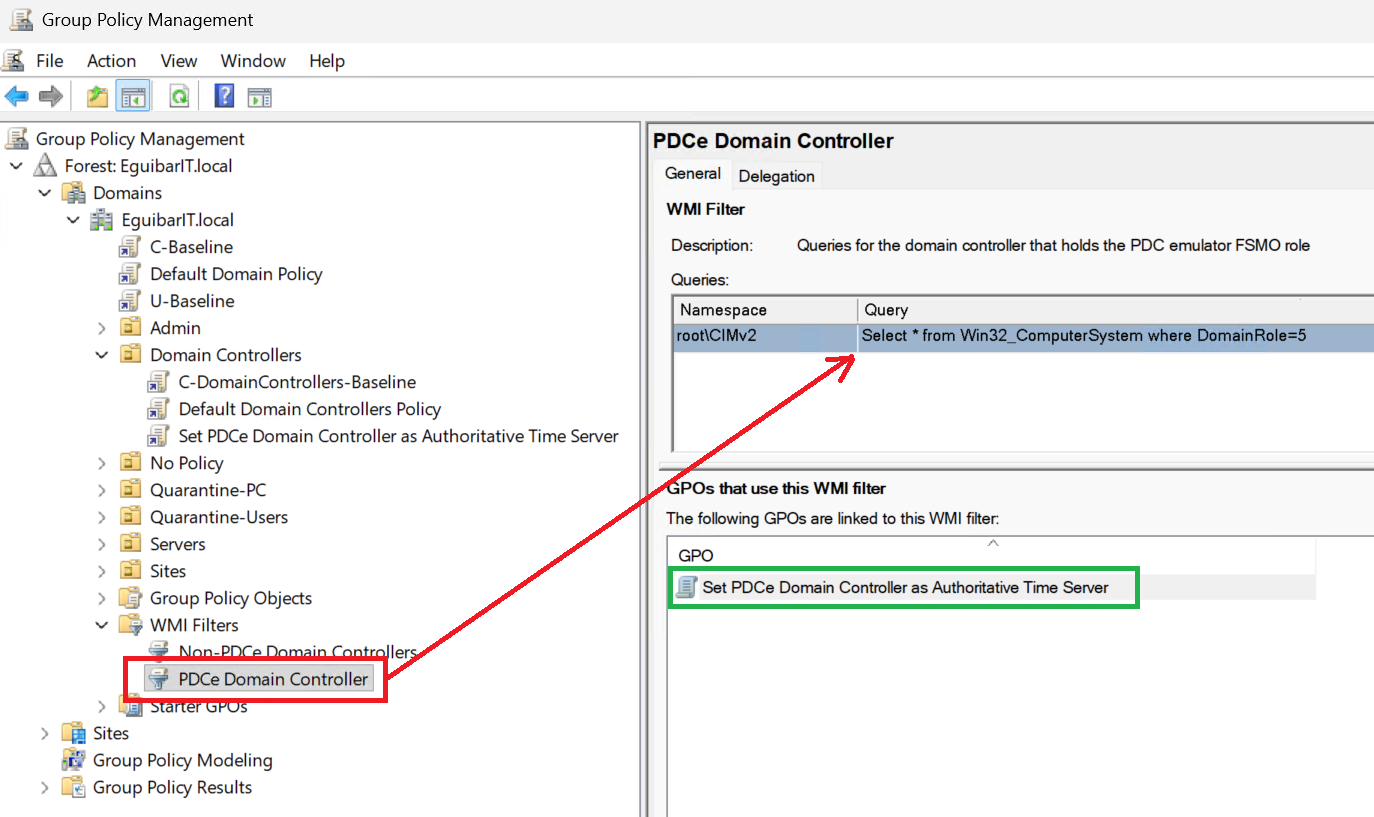 💡 FSMO WMI Filter
 - Create a new GPO and link it to the Domain Controllers OU.
- Link the previously created WMI filter to the GPO.
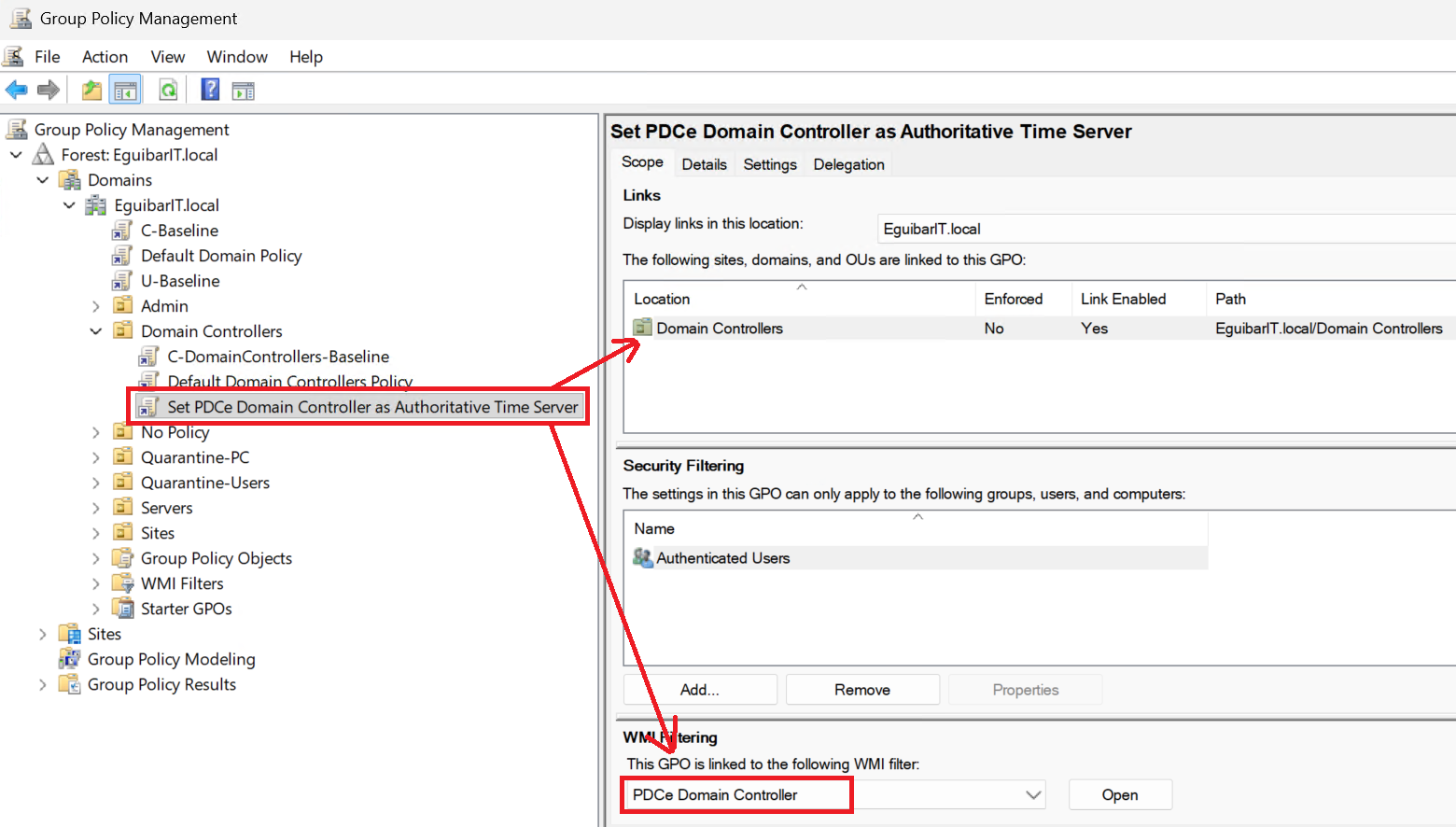 💡 FSMO New GPO
 - Configure the necessary settings for time synchronization, including NTP server settings.
Routine Checks & Maintenance Tasks
Below are recommended routine checks for FSMO role holders. Tailor frequencies to your organization's SLAs, operational capacity, and risk profile. Each task lists whether it can be automated and the expected impact if skipped.
Daily Tasks
| # | Name | Description | Task | Impact Definition | Automated |
|---|---|---|---|---|---|
| 1 | Backup FSMO DCs | Verify that scheduled system-state backups completed successfully for all FSMO DCs. | Check backup job status and retention; remediate failures. | High — ensures recoverability of AD and FSMO state. | Yes (backup solution) |
| 2 | Replication health | Confirm no replication failures or large replication queues between DCs. | Run automated repadmin/PowerShell checks and surface errors to SIEM/alerts. | High — replication issues can block role-dependent operations. | Yes (scripted) |
| 3 | Service & reachability | Verify DCs are reachable and AD services (NTDS, Kerberos, DNS) are running. | Run health probe and remediate unreachable hosts. | High — DC unreachability affects authentication and FSMO availability. | Yes (monitoring) |
| 4 | Event log alerting | Surface critical errors from System/Directory Services logs to operations. | Ensure SIEM/alerting rules processed events; investigate new critical alerts. | Medium — early detection of issues that can lead to role impact. | Partial (SIEM) |
| 5 | Time sync check | Confirm PDC Emulator time sync to authoritative NTP and that other DCs are synchronized. | Run w32tm/status checks; remediate drift >5s for domain operations. | High — time skew breaks Kerberos and replication. | Yes (scripted) |
Weekly Tasks
| # | Name | Description | Task | Impact Definition | Automated |
|---|---|---|---|---|---|
| 1 | Event log review | Perform a focused review of Directory Services and System logs for warnings/errors not auto-resolved. | Triaged by on-call team; escalate persistent issues. | Medium — prevents escalation of latent issues. | Partial (alerts) |
| 2 | Verify FSMO holders | Confirm current FSMO assignments and reconcile with documentation. | Run Get-ADForest/Get-ADDomain and update inventory. | Medium — keeps documentation accurate for fast response. | Yes (PowerShell) |
| 3 | Backup verification | Validate recent backups by checking job logs and performing periodic integrity checks. | Verify job success and retention policies; schedule restore test if needed. | High — undetected backup failures increase recovery time and risk. | Yes (backup reports) |
| 4 | Patch status check | Review recent patch deployments and identify pending reboots affecting DCs. | Coordinate maintenance windows for pending reboots. | Medium — delayed reboots can leave systems in inconsistent states. | Partial (patch management) |
Monthly Tasks
| # | Name | Description | Task | Impact Definition | Automated |
|---|---|---|---|---|---|
| 1 | Replication & topology review | Analyze replication latency, queue sizes, and inter-site links for issues. | Run repadmin reports; adjust schedules or troubleshoot broken links. | High — replication problems affect directory integrity. | Yes (reports) |
| 2 | Monitoring rules & thresholds | Review and tune monitoring alerts to reduce noise and ensure coverage. | Adjust SIEM/monitoring thresholds and update runbooks accordingly. | Medium — reduces alert fatigue and ensures critical events are noticed. | Partial |
| 3 | Inventory & documentation | Ensure FSMO owner records, contact info, and runbook versions are current. | Update CMDB/inventory and commit runbook changes to version control. | Medium — accurate docs speed incident response. | Partial (automation for reports) |
| 4 | Security & audit review | Review privileged access to FSMO DCs and recent administrative activity. | Audit privileged groups, review access logs, and rotate credentials if needed. | High — prevents unauthorized role manipulation. | Partial (audit tooling) |
Annual Tasks
| # | Name | Description | Task | Impact Definition | Automated |
|---|---|---|---|---|---|
| 1 | Role transfer & seizure drills | Perform a full test of transfer and seizure procedures in a lab/staging environment. | Execute scripted transfers/seizures and update runbooks based on findings. | High — validates DR readiness and operator skills. | No (manual/test) |
| 2 | Full DR exercise | Schedule and run an organization-level disaster recovery exercise covering AD and FSMO recovery. | Coordinate across teams and document lessons learned. | High — validates cross-team procedures and timelines. | No |
| 3 | Architecture review | Review DC placement, capacity planning, and hardware lifecycle for FSMO holders. | Plan upgrades or replacements and budget for lifecycle refresh. | Medium — prevents capacity-related failures. | Partial |
As‑Needed / Event‑Driven Tasks
These tasks are performed in response to specific events (failures, decommission, schema changes, emergency patches).
| # | Name | Description | Task | Impact Definition | Automated |
|---|---|---|---|---|---|
| 1 | Seize FSMO role | Seize a role when the original owner will not be recovered. | Follow emergency runbook: verify backups, seize via NTDSUTIL/PowerShell, document actions. | Critical — restores functionality when role owner is permanently lost. | No (manual) |
| 2 | Transfer during decommission | Move FSMO roles off a DC that is being retired or replaced. | Perform graceful transfer and validate replication; update inventory. | High — prevents accidental outages during planned changes. | Partial (scripted transfer) |
| 3 | Schema change coordination | Planned schema updates require availability of the Schema Master owner. | Schedule maintenance with Schema Master owner, take backups, perform change, validate. | High — schema changes are forest‑wide and potentially irreversible. | No (manual/planned) |
| 4 | Emergency patching | Apply urgent security patches to FSMO DCs outside normal windows. | Follow emergency change control; ensure backups and rollbacks are available. | High — patching can cause reboots or service interruptions. | Partial |
| 5 | Respond to split‑brain or replication corruption | Investigate and remediate AD inconsistencies after catastrophic events. | Invoke advanced recovery procedures per runbook and coordinate across teams. | Critical — prevents data loss and inconsistent authentication behavior. | No |
PowerShell management of FSMO roles
This section covers the use of PowerShell for managing FSMO roles in Active Directory.
Get FSMO Role holder
To retrieve the current FSMO role holders in your Active Directory environment (Domain and Forest), you can use the following PowerShell command:
Transfer FSMO Role
The transfer of an FSMO role is the suggested form of moving a FSMO role between domain controllers and can be initiated by the administrator or by demoting a domain controller, but is not initiated automatically by the operating system. This includes a server in a shut-down state. FSMO roles aren't automatically relocated during the shutdown process—this must be considered when shutting down a domain controller that has an FSMO role for maintenance, for example.
In a graceful transfer of an FSMO role between two domain controllers, a synchronization of the data that is maintained by the FSMO role owner to the server receiving the FSMO role is performed prior to transferring the role to ensure that any changes have been recorded before the role change.
Operational attributes are attributes that translate into an action on the server. This type of attribute isn't defined in the schema, but is instead maintained by the server and intercepted when a client attempts to read or write to it. When the attribute is read, generally the result is a calculated result from the server. When the attribute is written, a pre-defined action occurs on the domain controller. For example, when the PDC emulator FSMO role owner receives a password change, it updates the operational attribute msDS-Password-Last-Set. This attribute isn't replicated to other domain controllers, but is maintained by the PDC emulator FSMO role owner to track when the last password change occurred.
Ensure you have the necessary permissions to transfer FSMO roles, that both source and target are healthy and reachable. To transfer FSMO roles to another Domain Controller, you can use the following PowerShell command:
Size FSMO Role
If a FSMO role holder is offline or unreachable, and it will NOT come back online, and you need to seize the role to another Domain Controller, you can use the following PowerShell command:
Administrators should use extreme caution in seizing FSMO roles. This operation, in most cases, should be performed only if the original FSMO role owner will not be brought back into the environment.
Integration with EguibarIT Modules
The EguibarIT.DelegationPS module contains functions used to delegate permissions to manage FSMO roles. Install it from the PowerShell Gallery (see the module page for details).
Automated Health Checks
Small, automatable checks help you detect FSMO-impacting issues early. The snippets below are intended to run from a management host with AD and backup tooling available.
Replication Check
Time Synchronization Check
Backup Verification
Composite Health Check
Security & Hardening
Securing FSMO role holders is critical to prevent unauthorized changes, privilege escalation, and domain-wide compromise.
Security Best Practices
- Restrict administrative access to FSMO DCs using dedicated admin groups.
- Monitor FSMO DCs for unauthorized changes, failed logons, and suspicious activity.
- Apply latest security patches, enable auditing, and review logs regularly.
- Use tiered administration and Privileged Access Workstations (PAW) for FSMO management.
- Document and regularly review FSMO assignments and access permissions.
- Implement backup and recovery procedures for FSMO DCs.
- Limit network exposure of FSMO DCs; avoid internet-facing roles.
Security Warning
Critical: Compromise of a FSMO role holder can allow attackers to manipulate AD schema, domain structure, or security principals. Always monitor, restrict, and audit access to these DCs.
Mitigate risks by enforcing least privilege, using secure admin workstations, and maintaining up-to-date documentation and backups.
Hardening Checklist
| Security Control | Implementation | Impact Definition | Automated |
|---|---|---|---|
| Admin Access Restriction | Dedicated admin groups, PAW | Prevents unauthorized changes | Yes (Group Policy, RBAC) |
| Monitoring & Auditing | SIEM, event log review | Detects suspicious activity | Yes (SIEM integration) |
| Patching & Updates | Regular patching schedule | Reduces vulnerability risk | Yes (WSUS, SCCM) |
| Backup & Recovery | Automated backups, DR plan | Ensures recoverability | Yes (Backup software) |
| Network Segmentation | Firewall rules, VLANs | Limits attack surface | Partial (Network tools) |
Monitoring & Alerting
Effective monitoring and alerting are critical to maintaining FSMO role health and preventing outages. Implement the following best practices:
- FSMO Role Availability: Monitor the health and online status of all FSMO role holders. Alert if any role holder becomes unreachable or fails health checks.
- Event Log Monitoring: Track Active Directory, Directory Services, and
System event logs for errors or warnings related to FSMO operations, replication, or
authentication.
- Directory Services Event ID 1558, 1559, 1560: FSMO role transfer or seizure events.
- Directory Services Event ID 1864, 2042: Replication failures or tombstone lifetime exceeded.
- Directory Services Event ID 1925, 1988, 1989: Replication errors, lingering objects, or USN rollback.
- Security Event ID 4728, 4732, 4756: Privileged group membership changes (Domain Admins, Enterprise Admins, etc.).
- System Event ID 1000, 1014: Service failures or DNS issues affecting DCs.
- Replication Status: Alert on replication failures, latency, or tombstone lifetime issues between domain controllers.
- Role Transfer/Seizure Events: Notify administrators of any FSMO role
transfer or seizure actions, including source, target, and reason.
- Directory Services Event ID 1558: FSMO role transferred.
- Directory Services Event ID 1559: FSMO role seized.
- Directory Services Event ID 1560: FSMO role transfer/seizure completed.
Meaning: Indicates which FSMO role was moved, the source and target DCs, and whether the action was a transfer (planned) or seizure (emergency).
- Security Alerts: Monitor for unauthorized changes, privilege
escalations, or suspicious activity targeting FSMO DCs.
- Security Event ID 4672: Special privileges assigned to new logon (potential privilege escalation).
- Security Event ID 4720, 4726: User account creation or deletion (watch for admin accounts).
- Security Event ID 4738: User account changes (especially for FSMO DCs).
- Security Event ID 4740: Account lockout (could indicate brute-force attempts).
- Security Event ID 4769, 4776: Kerberos or authentication failures.
- Security Event ID 5136: Directory object modification (track changes to FSMO role assignments or DC objects).
Meaning: These events signal unauthorized changes, suspicious activity, or privilege escalation attempts targeting FSMO DCs.
- Backup Verification: Ensure regular backups of FSMO DCs are completed and tested. Alert on backup failures or missed schedules.
Resources & References
Microsoft Documentation
- Microsoft: AD Functional Levels
- Microsoft: Forest Functional Levels
- Microsoft: Domain Functional Levels
- Microsoft: Understanding FSMO Roles
- PowerShell: Move-ADDirectoryServerOperationMasterRole
The size of FSMO roles is generally small, as they primarily consist of metadata and configuration information. However, the impact of these roles on Active Directory operations can be significant, especially in large or complex environments.
Related EguibarIT Articles
- DNS Configuration for Domain Controllers
- DHCP Configuration and AD Integration
- Windows Server: Best Practices & Overview
Conclusion
Key Takeaways: Proper FSMO role assignment and management are essential for Active Directory health, security, and business continuity. Document role holders, monitor their status, and plan for disaster recovery. Co-locate roles where appropriate, and ensure all FSMO DCs are hardened and regularly maintained.
Operational Guidance: Regularly review FSMO assignments, automate health checks, and test role transfer/seizure procedures. Use PowerShell and custom scripts to streamline management. Stay informed on best practices and update your processes as your environment evolves.
Next Steps: Implement the recommendations in this guide, validate your FSMO configuration, and provide feedback or questions to help improve future documentation.
Questions or Feedback?
Have questions about this implementation? Found an issue or have a suggestion?
- Email: info@eguibarit.com
- GitHub: Open an issue