Introduction to Hyper-V
Describes the technique that allows to run different Operative Systems on the same hardware, sharing resources and providing reliability and stability to all machines. This technique creates an abstraction layer between the VMs and any infrastructure that exists below these, eliminating physical and geographical restrictions. There are several products, like Microsoft Hyper-V.
What is Virtualization?
The concept of virtualization is not really new, as a matter of fact is somehow an inheritance of the mainframe world (for those of you who don't know what is a mainframe, here is a short explanation: A mainframe is a huge computer which can have from several dozen up to hundreds of processors, tons of ram and enormous storage space. Think of it as the super computers that international banks are using, or car manufacturers or even Aero Space entities). These monster computers have a "core" operative system (OS), which helps making a logical partitioning of the resources to assign it to a smaller OS. In other words, the full hardware power is somehow divided into smaller chunks which have a specific purpose.
The virtualization concept, even if a bit bizarre, is to work as a normal application to the host OS, asking for cpu, memory, disk, network, etc., but within this application is creating hardware, virtualized hardware of course, that can be used to install a brand new OS. On the next figure you can see a physical server, including cpu, ram, disk, network, etc. This server needs an OS on top, and from there you can install and execute programs as internet browsers, databases, spreadsheets and of course a virtualization software. This virtualization software behaves the same way as any other application, it request to the OS a file stored on a disk, access to a web page, more cpu time, so for the host OS is a standard application that demands resources. But within the virtualization application, some virtual hardware is created, in other words, some fake hardware is presented to the top end of the program. At this point we can start the OS setup on this virtual hardware, and the OS can recognize the hardware and use it as if it were real.
The shared infrastructure in this case, provides many benefits, such as physical hardware reduction, lower power consumption, lower heat dissipation (less cold air required), increased efficiency, high availability, etc. Due to the strong influence of technology and current economic trends, is a good strategy to virtualize the existing infrastructure. Eguibar IT provides professional services in the various techniques of virtualization.

Benefits of Virtualization
Computer makers are constantly pressured by the imminent need to reduce costs and improve efficiency in the service provided, both locally and within the entire corporation. A well planned and designed virtualization can benefit almost immediately:
- Reduced costs due to lower power consumption, less cooling and less use of physical space.
- Provisioning servers in minutes.
- Provision of testing and QA environments quick and easily.
- Decreased breakdown of services due to hardware failure.
- Easily “Replicate” productive environments for testing and development.
- Added optimization of Hardware resources.
- Increased reliability of all services and applications
- Reduction in the management of servers and applications
- Solid platform for the implementation of DRP (Disaster Recovery Plan)
- Increased information security
Types of Virtualization
Virtualization is a software, called Hypervisor, that creates the virtual environment by creating, sharing and controlling the physical resources and make them available as “virtual Hardware” to the clients. The first type of software is the one that behaves as any other application installed on the server also known as workstation or software based virtualization. The second one is part of the kernel on the host OS, and is enabled as a service. This type of software is also called as hardware virtualization. The main difference is the performance you can have when using either type. On the software/workstation virtualization the request for hardware resources has to go from up application down to OS into the kernel in order to get the resource.
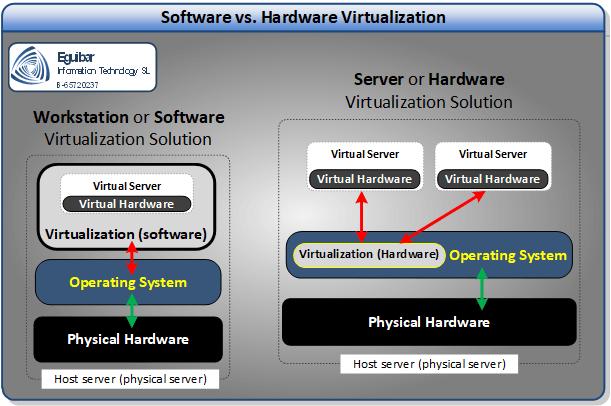
On the other hand, the hardware virtualization has a more direct access to the resources, as the hypervisor is part of the kernel, so the request goes from up application down to OS and then directly to the kernel. This is why hardware virtualization is more efficient and faster than software/workstation virtualization.
There are two types of hypervisors, Type 1 and Type 2. Type 1 hypervisors run directly on the host’s hardware to control the hardware and to manage guest operating systems. Type 2 hypervisors run on top of an existing operating system and rely on the host OS for resource management.
What can we do for you?
EguibarIT can design a strategy tailored to its new virtualization infrastructure based on Microsoft’s Hypervisor Hyper-V. We can run the project to implement and migrate the existing infrastructure. We can deploy and change the various management processes in order to maximize the advantage of reducing the service management time.